

It used to be easy to write down a web address. We knew the beginning of the address, sometimes called a URL, was always “h-t-t-p, colon, forwardslash, forwardslash, w-w-w.” But that slowly started to change. Not only did we sometimes lose the “www” in the URL, but we also started to sometimes see “https” instead of “http.”
What is the difference between HTTP and HTTPS, and how do we know which one we should be typing in when we’re going to an address, if all we know is the part after “www?” If we navigate to a site and the HTTP changes to HTTPS all on its own, what does this mean?
The differences between HTTP and HTTPS
Let’s first examine what HTTP is. It’s an acronym for “Hyper Text Transfer Protocol” and is basically the protocol used to communicate with websites. As you type in the URL into your web browser, it then “talks” to the server utilized by the website and allows you access. Many times, you can just put the site name with the “.com,” “.org,” etc., and your web browser will autofill the rest of the address for you with the rest of the URL.
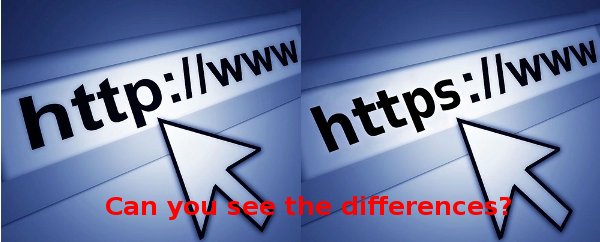
The problem with HTTP is that the communication isn’t necessarily completely private or secure. Information you provide to a website, such as contact or financial information, could be intercepted by a third party. If you are on amazon.com or paypal.com, you want to be sure that the information you share won’t be picked up by anyone else. What you need is a site that is more secure.
This is exactly what the S stands for in HTTPS, or “secure HTTP.” The S stands for “secure.” It’s not a completely different protocol. Instead it’s a layering effect. The HTTP is layered on top of the SSL/TLS (Secured Socket Layer/Transport Layer Security) to create a larger security for you. It will authenticate the site so that you know you are dealing with a site that is who they say the they are and will also encrypt the data.
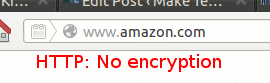
Let’s go back to Amazon.com. When I enter “amazon.com” into my web browser, it automatically fills in the rest, including recognizing me and my account and signing me in. When I’m just browsing around the store, I don’t need any more protocol other than HTTP. I’m not providing any information about myself.
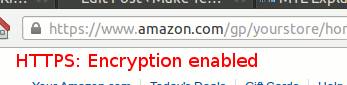
However, if I am going to get into my actual account to either edit information or purchase an item, it includes not only my address, but my credit card information, so I want it to be more secure. Once I click on my account, it automatically switches on its own to an HTTPS where I know it will be more secure. I know my information is safe here, or should I say safer?
How secure is HTTPS
The HTTPS protocol is supposedly secured, but it doesn’t necessarily mean you are completely safe. In some occasion, the site owners might not have implemented HTTPS correctly, or that the signing certificate is expired/invalid. In addition, being on HTTPS doesn’t mean it is a legitimate site. It could be a phishing or hacking site that looks exactly like amazon.com or paypal.com. In these cases, you have to use your own judgement whether the site can be trusted or not.
How to check if a site has implemented HTTPS correctly?
If you are using a recent build of the web browser, regardless if it is Firefox, Chrome, IE or Safari, you should be able to view the HTTPS status of the site from the URL bar.
In Firefox, when you access a HTTPS site, you will see a padlock beside the URL. Click on it and you will see the status of the signing certificate.
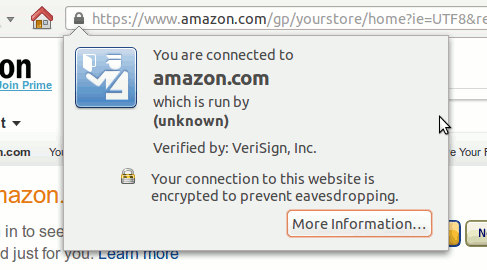
From here, you can see who provides the signing certificate (in this case, Verisign) and whether it is implemented correctly to prevent eavesdropping.
In Chrome, you can see even more detail about the connection and how secure it is.
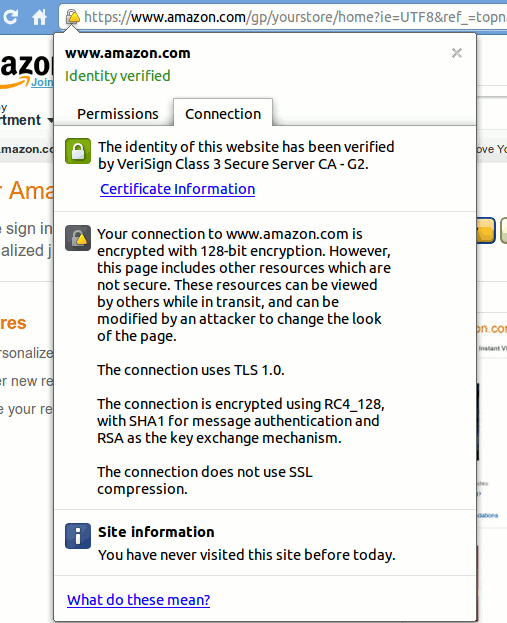
If there is an error with the certificate, or that the provider source is not verified, this is what you will see on screen:
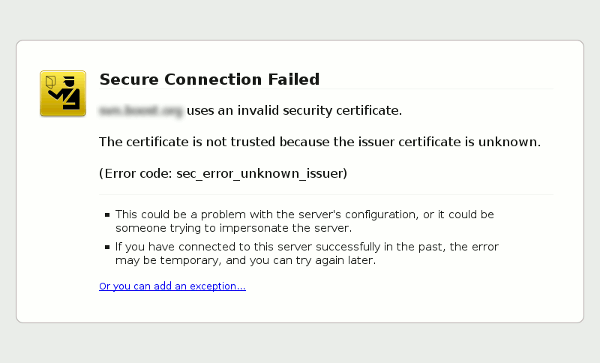
You can then decide if you want to “Add Exception” and continue, or to leave the site.
Conclusion
During this holiday where you purchase all your gifts and presents online, it pays to be more attentive to the security of the site and whether the credit card you are sending over is encrypted or not. Hopefully this article has helped you understand better the differences between HTTP and HTTPS and the things you need to look out on a supposedly secure site, and is indeed who they say they are.