

A lot of webmasters are adamant about their website’s color quality and arrangement. However, finding the right colors for your website is not always easy; it is a cumbersome process of trial and error. In some cases, the main colors of your website may not match certain objects and elements. What if you could somehow harmonize the colors of all the different features on your website? This is where Accupix comes in.
Accupix is a simple extension for Google Chrome that lets you detect and copy the color code of any object on your page.
Key Features of Accupix:
- Picks Color from Any Webpage
- Easy-to-use Shortcuts
- Improves Color Schemes
- Facilitates Web Editing
Are Color Arrangements Really That Important?
It doesn’t take a lot of research to realize that colors play a crucial role in just about every aspect of life. In the commercial sector, companies often denote the quality of their products with colors. A good example of this is the editions of Microsoft Windows 7 (see the image below).

Notice that the most expensive edition has the most vibrant color – black. Colors are especially important for webmasters that generate revenue from contextual advertisements.To generate optimal revenue, it is generally best for the ads to match the color themes of the website. Harmonizing those colors may be time-consuming if you are not really familiar with HTML and CSS. Fortunately, accupix may be an ideal for solution for webmasters that are dealing this problem.
Using Accupix:
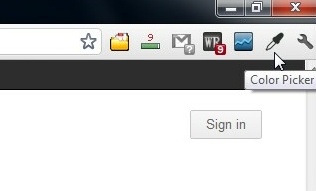
Accupix is a convenient app to use. You will literally know how to use it the moment you install it. There are two ways to access accupix. The first method is by moving the cursor to the top-right corner of the window and clicking the “Color Picker” icon.
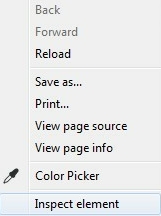
Alternatively, you can do this by right-clicking anywhere within the Chrome window and selecting the “Color Picker” option from the context menu.
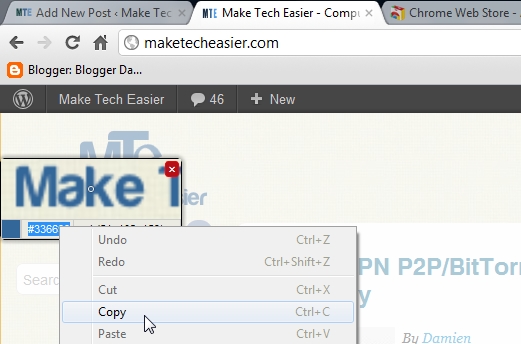
After accessing Accupix, drag the cursor along to select the color of any object in the page. Accupix displays a small dialog box detailing the color code of the image of which the cursor is hovering on.
Click the spot with the color you want to pick. You will then notice that the color code has been highlighted. Copy the code by pressing “Ctrl+C” or by right-clicking and selecting “copy”. To cancel your selection, simply click the “X” (red) button.
Useful Shortcuts:
- Use Control Mouse (Scroll) Up to Zoom in toward the webpage.
- Use Control Mouse (Scroll) Down to Zoom out away from the webpage.
- Use the Arrows in the Keyboard to match the pixels with precision.
- Press Enter to Pick the Pixels.
- Press Escape (Esc) to exit the picker.
Final Thoughts:
As its names implies, Accupix allows you to accurately copy the color of any object on a webpage. The app works quite well. You will likely have success tweaking the colors of your website by using it. It is an ideal alternative of Eye Dropper—which is another extension that offers similar features. Albeit it is not as popular as Eye Dropper, it does seem to be slightly easier to use.