


When you see that your Dropbox account is almost out of space, your first impulse might be to start erasing files you don’t need. But, why do something yourself when a web app can do it for you. Wouldn’t it be better if your files would erase themselves?
Thanks to a web app called Finesse, you can have your Dropbox files delete themselves at a scheduled time. Finesse is a paid web app, but it gives you a fourteen-day free trial to try it out. If you’re happy with the app and want to buy it, you can either use a credit card or use your PayPal account.
Also read: How to Run Multiple Dropbox Accounts on One Computer
How to Make Dropbox Files Erase Themselves
When you first access the app, you’ll see that it has a straightforward design. To the left you’ll see the Schedule option with its drop-down menu to the left. When you click on it, you should see options such as Scheduled, Schedule, and History.
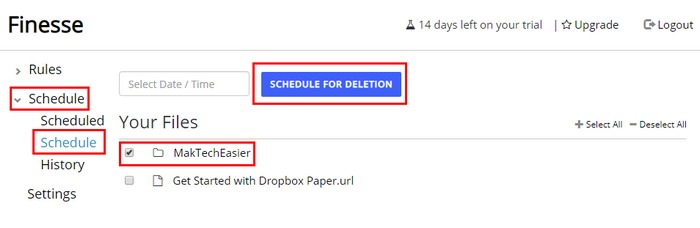
Finesse gives you the option to either erase specific files or an entire folder. To delete a whole folder, click on the box to the left of the folder you want to wipe. To erase particular files inside a folder, click on the folder and click on the files you wish for the web app to delete at a scheduled time.
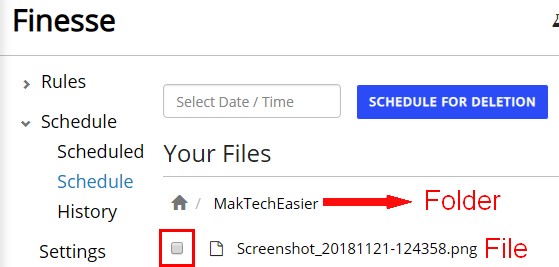
Once you’ve chosen the files you want to erase, click on the blue “Schedule for Deletion” button at the top. Select a date from the calendar that will appear automatically.
After selecting the date, you’ll need to choose what time you want the files to be deleted. To select a time, click on the clock at the bottom and then on the arrow keys to choose the time.
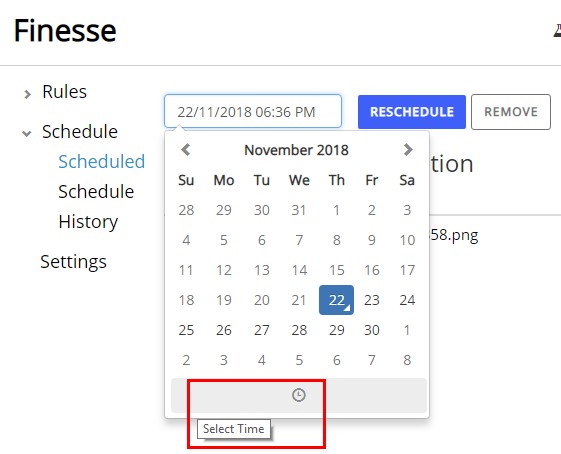
To make the deletion final, once again click on the blue “Schedule for Deletion” button. You should now see what you’ve scheduled for deletion in a list.
Also read: Simple Tips You Can Use to Better Organize Files in Dropbox
If you ever change your mind and want to change either the time or date of elimination, first select the file and then click on the blue “Reschedule” button. Choose your new time or date, and once again click on the Reschedule button. Finesse should show you a brief message letting you know if the changes were done correctly.
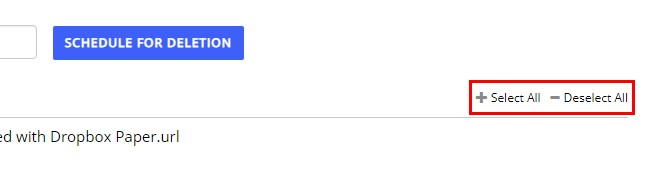
If there are various files you want to select, click on the plus sign that will select all the files on your list. To deselect all the files, click on the minus icon. You also have the option of choosing the files manually, but that’ll take some time. From there you can choose to either reschedule or remove them from the list.
Conclusion
You already have enough things to do then to try and remember what files you need to remember. Thanks to Finesse you can have one less thing to worry about if you decide to stick with it after the fourteen-day free trial.