
Save and Restore Groups of Tabs in Chrome with This Quick Trick

Having too many tabs open in ones web browser is a problem that many internet users face on a daily basis. What’s even worse is that having all those tabs open can also slow down your browser tremendously. For this reason it’s a better idea to keep only a few tabs open at a time and save the rest for later.

So what do you do if want to save those tabs for later?

Well, there are plenty of Chrome extensions available to help you better manage your tabs, but this quick trick from OMG! Chrome! doesn’t require an extension at all. Here’s how you can quickly save and restore groups of tabs in Chrome without installing an extension.

Saving Groups of Tabs

1. Add a new bookmarks folder to your bookmarks bar by right clicking on it and selecting “Add Folder…” If you prefer, you can add a new folder in the bookmarks menu instead; it’s simply a matter of preference.

2. Name the folder anything you’d like, such as “Saved Tabs” or “Bookmarked Tabs.”

3. The next time you’re ready to save all your open tabs for later, right-click on any tab in your browser and select “Bookmark All Tabs…”
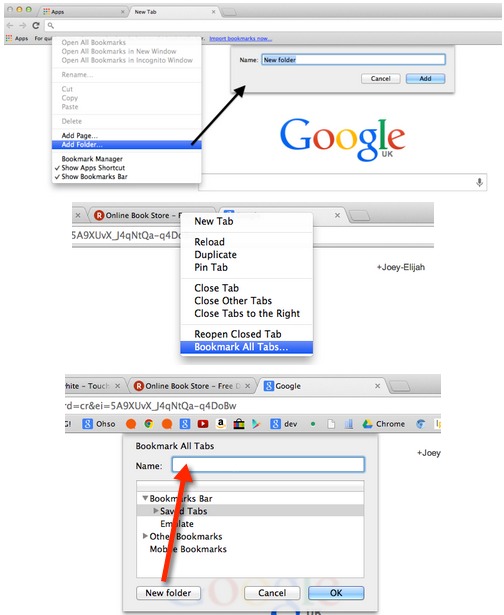
Create a new bookmarks folder and right-click any tab to bookmark them all to save for later.

4. Choose the folder you created above as the location, and add a descriptive name to your tab group; this will create a new folder within your “Saved Tabs” folder.

5. Click OK and your tabs will be saved for later use.

Restoring Groups of Tabs

To restore your tabs, simply right-click on the group (folder) that you want to restore and click on “Open All Bookmarks.” Now, all of those pages will be opened as new tabs in your browser.

One of the great things about this trick is that if you’re using and extension like Xmarks or Chrome’s own bookmark sync feature, you’ll be able to restore these tabs on any computer.

Image Credit: T a k

Subscribe to our newsletter!

Our latest tutorials delivered straight to your inbox

Charnita Fance Avatar

Read next

Suzanne Simard sealed paper birch and Douglas fir seedlings inside plastic bags, fed them carbon-14 and carbon-13 dioxide, and nine days later found carbon had crossed between species through fungal threads in the British Columbia soil beneath her boots
A species of jellyfish called Turritopsis dohrnii can revert its adult cells back to a juvenile polyp stage when injured or starving, effectively restarting its life cycle, and biologists have so far failed to identify any natural limit to how many times it can do this.
A Japanese man named Jiroemon Kimura, who lived to 116, was born in 1897 when Queen Victoria still ruled and died in 2013, meaning a single human life personally overlapped with the invention of the airplane, the atomic bomb, the internet, and Instagram
The Hollywood sign originally read HOLLYWOODLAND when it was built in 1923 as a real estate advertisement for a housing development, and it was only meant to stand for 18 months, but nobody ever got around to taking it down and the city eventually adopted it as a landmark
Almost all of the world’s internet traffic does not travel by satellite but through fibre-optic cables lying on the ocean floor, a hidden web of wires crossing the deepest parts of the sea to connect the continents.
People who flip their phone face down on every table aren’t being secretive. They figured out that staying interruptible meant handing their time to whoever rang first
Twitch vs. Facebook Gaming vs. YouTube Gaming: What’s the Best Live Game Streaming Platform?
Chrome Extensions Ownership Transfer is a Direct Threat to You: How to Stay Safe