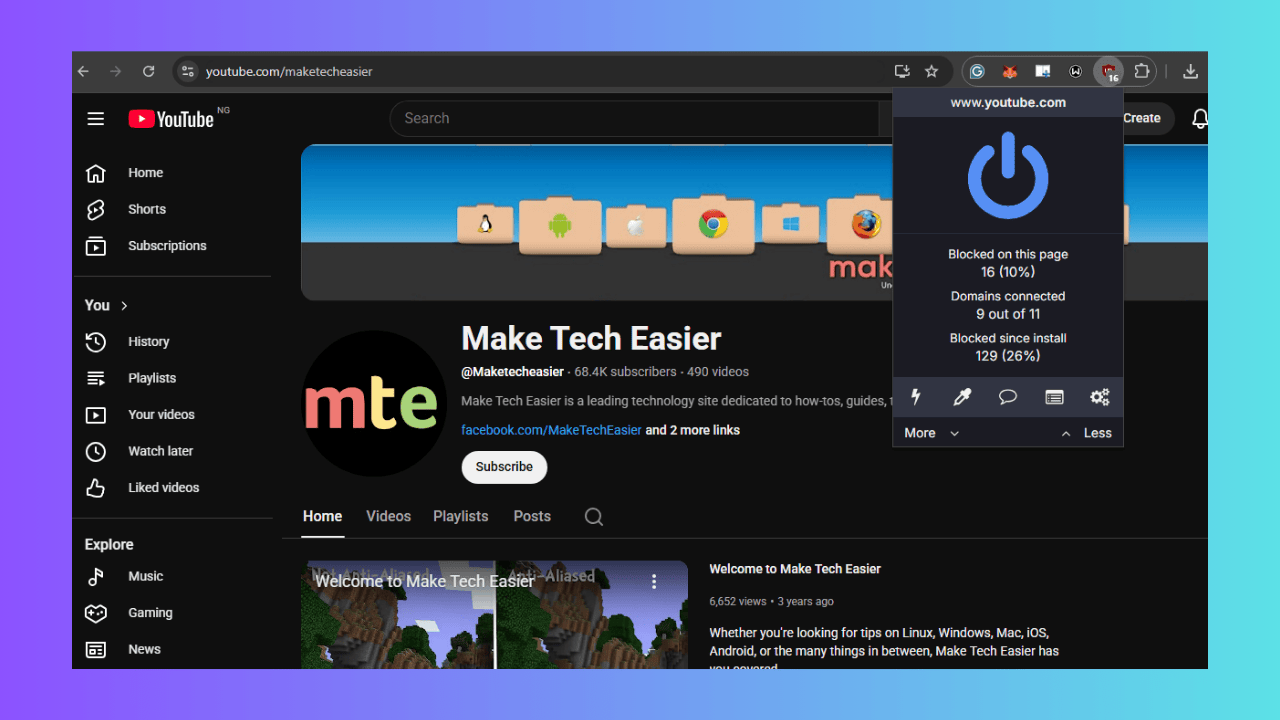
You’ve probably been as annoyed as I was since Google introduced Manifest V3 on Chrome to mess with our favorite ad-blockers. One minute, you’re enjoying an ad-free experience with uBlock Origin, and the next, ads are popping up everywhere. I’ve been using uBlock Origin forever, and this change hit me hard. However, don’t worry, I’ve got a workaround to help you restore full uBlock Origin functionality on Chrome.
Why Google’s Manifest V3 Restricts uBlock Origin and Ad-Blockers
So, Google’s move from Manifest V2 to Manifest V3, Chrome’s new extension framework, feels like a plot twist nobody asked for.
It limits how extensions like uBlock Origin and other ad-blockers work, making them less effective at stopping ads and trackers.
Google says it’s for security; fewer permissions mean fewer risks. But come on, I’m not buying it. As someone who’s dodged creepy targeted ads for years, I smell a rat.
Google’s ad empire thrives on data, so messing up ad-blockers feels like a power move to keep those ads flowing. This isn’t just about uBlock Origin; it affects the most effective ad-blockers, pushing us towards weaker options.
While there are still alternative tricks to block ads in Google Chrome, they’re getting harder to pull off.
Restoring uBlock Origin
To restore uBlock Origin on your Google Chrome, we need to enable/disable a couple of flags first.
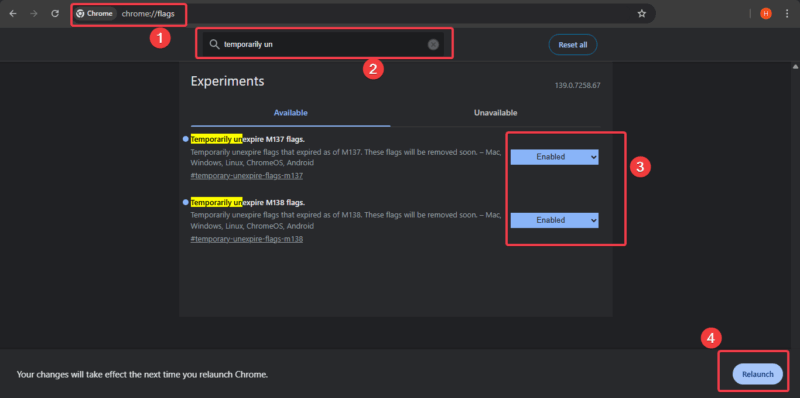
Open Chrome, type chrome://flags in the address bar, and hit Enter to access Chrome’s experimental features page.
Search for Temporarily unexpired M137 and M138 flags, set both to Enabled, and Relaunch Chrome. Enabling these two, depending on your version, allows you to access older Chrome settings that Google has started to phase out.
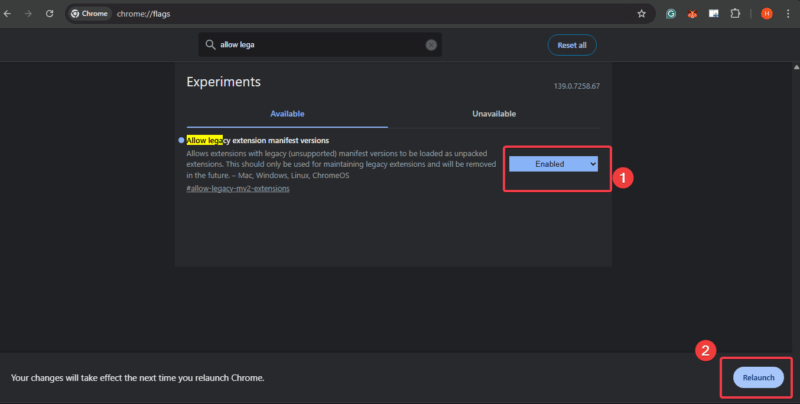
Still on the Chrome flags, search for Allow legacy extension manifest versions, set it to Enabled, and click the Relaunch button. This flag forces Chrome to keep the old system running and accept extensions built with the Manifest V2 framework, like uBlock Origin.
Return to the Chrome flags and search for MV2 to locate all Manifest V2 settings.
You need to set these three flags to Disabled: Extension Manifest V2 Deprecation Warning Stage, Extension Manifest V2 Deprecation Disabled Stage, and Extension Manifest V2 Deprecation Unsupported Stage.
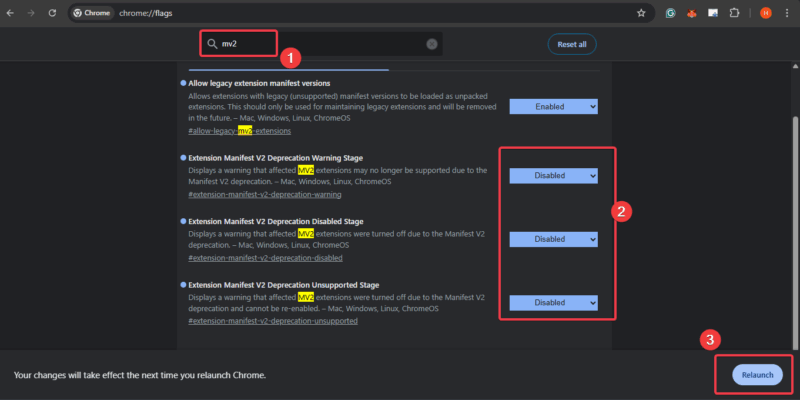
These flags are blocking older extensions like uBlock Origin, which operate strictly using the Manifest V2, from working properly in newer Chrome versions.
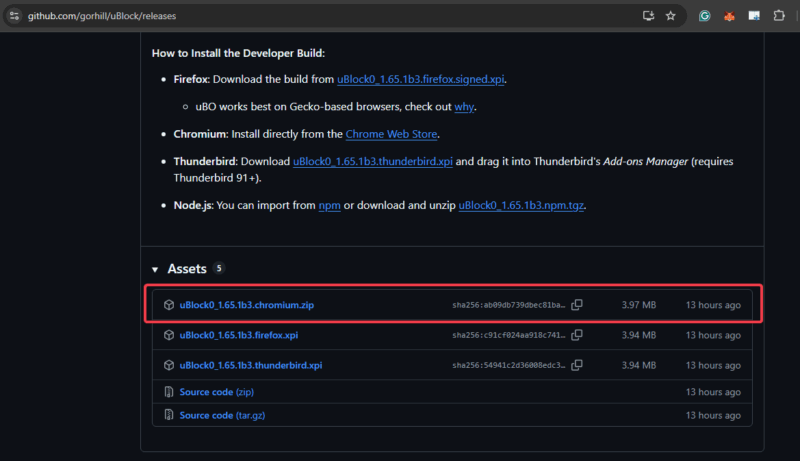
If you need to reinstall, go to uBlock Origin’s GitHub page, download the chromium.zip file under Assets, and unzip it.
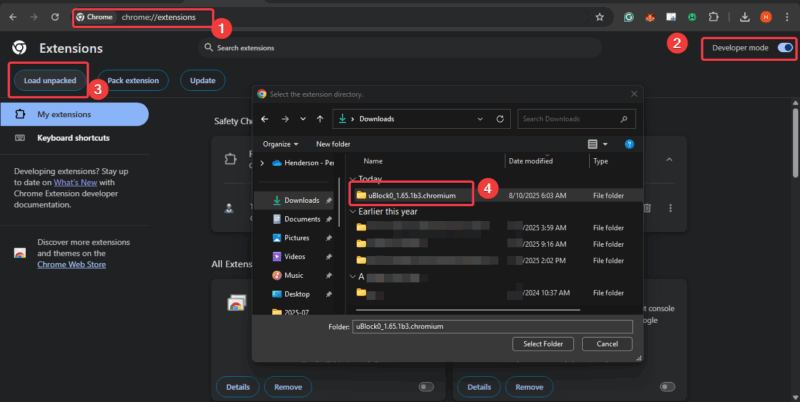
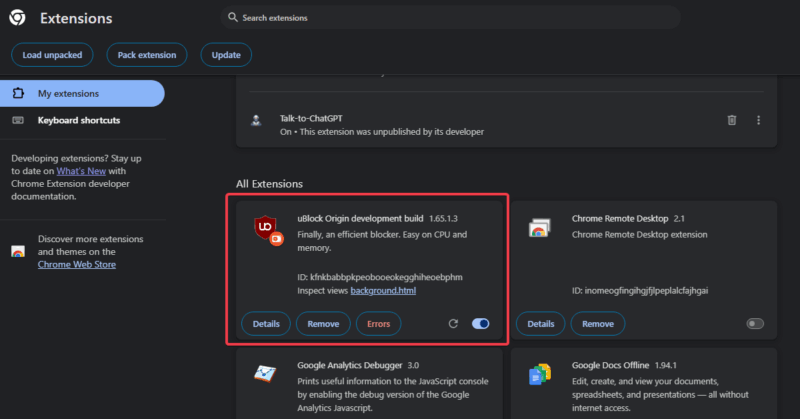
Then head to chrome://extensions, flip on Developer mode, click Load unpacked, and select the unzipped folder. Boom! Now you’ve restored uBlock Origin in Chrome and your ad-blocker’s back in action.
FYI: Google’s end game is to phase out all these flags eventually, so this workaround is like a band-aid on a leaky pipe. So, just enjoy it while it lasts!
I’ve relied on uBlock Origin to keep my browsing secure and clean for years, and knowing it’s on shaky ground bums me out.
What This Means for Your Privacy and Browsing
Without uBlock Origin’s full power, your privacy takes a hit. It’s not just about skipping annoying ads; this tool blocks trackers that follow your every click, building profiles for advertisers.
Manifest V3-compliant blockers like uBlock Origin Lite are a big step down; less customization, less effective.
I tried Lite for two weeks, and let’s just say I missed the real deal. For a deeper dive into why this matters, see how to protect your privacy online.
The Bigger Picture
Google’s turning into a walled garden where you have less control and they call all the shots.
So if you’re fed up, try Firefox, where uBlock Origin still works like a charm. I’ve been trying other browsers lately, and it’s honestly refreshing to browse without Google’s restrictions.
Explore why we think Opera browser might be a better pick than Chrome or Edge here. If you’re sticking with Chrome, try to check these privacy-focused extensions to beef up your defenses.
You can restore uBlock Origin for now and score this quick win. However, Google’s Manifest V3 push shows they’re tightening their grip on your browsing.
Think long-term and explore other options to keep your browsing experience safe and ad-free. So, what’s your plan? Hit me up in the comments!








