


Slack is an all-inclusive communication tool for teams. It’s like HipChat but way better. If you work with a team of more than a handful people, or if your team works remotely, you need to check out Slack. It’s going to solve your email headache and is sure to boost your productivity.
If you’re already using Slack, good for you. They have 500,000 active users already, and the number’s only going up. If you’ve started using Slack a lot, you must have realized that a lot of what you do is share links and messages from the web to a Slack channel or private chat. It’s certainly the case with me. So below, you’ll find a couple of fastest ways for doing just that in Chrome, iOS and Android.
Slack’s iOS Extension
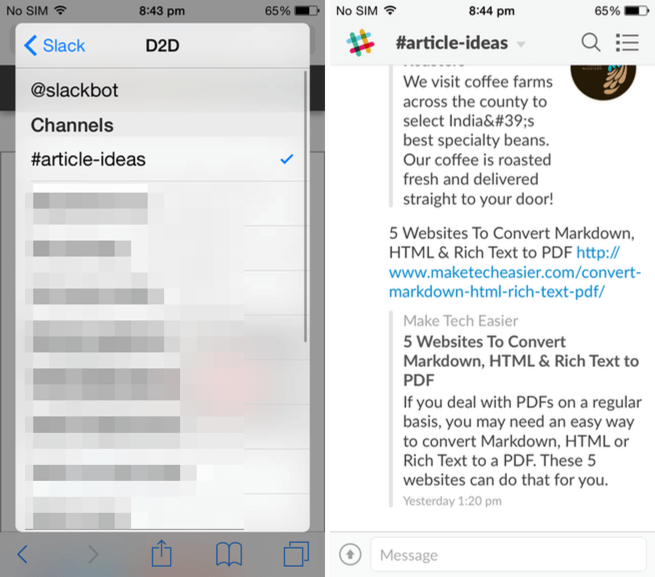
Slack has one of the best extensions to come out for iOS 8. It’s powerful, yet easy to use. After installing the Slack app, go to Safari (or any other app that supports extensions), tap the “Share” button, and from the top row swipe all the way to the right and tap “More.” From here, enable “Slack.”

I like Slack’s extension because it works at all the places you’re going to be reading text or viewing images: In Safari, Chrome, RSS readers and more. Just tapping the “Slack” button will show a popup with the page’s title and link already in the field that you can edit. Below will be options to select the Slack team and the channel. I’m in four Slack teams right now, so having the option to switch the team from right here is very helpful. It’s the same with picking a channel or deciding to send someone a direct message.
Slack’s Android Integration
Slack’s Android app isn’t as good as the iOS app, and it’s the same story with the native share sheet integration. Anywhere you see the “Share” button in Android, the Slack option will show up. But the problem is that the popup won’t let you switch between the multiple Slack teams you’re logged into in the Android app.
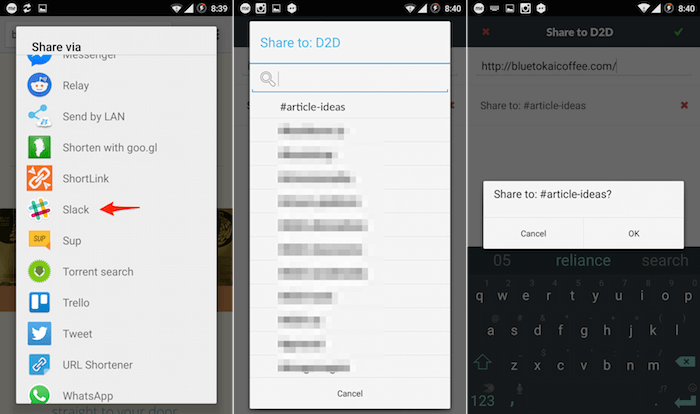
Here, the team that’s currently active in the app will show up. You can select between channels and direct chat though. If you’re only signed into one Slack account, this won’t be a problem for you. But I know a lot of people for whom it can be a major annoyance, including myself. I hope Slack gets feature parity between the iOS and Android apps in Slack soon.
#Clicky for Slack Extension

#Clicky for Slack is the Chrome extension made exactly for this use case – to quickly share a link and a message to any channel, group or private chat in Slack without actually switching the app. Normally it would require you to select and copy the URL, switch to Slack, find the right channel and then paste the URL and add the message. #Clicky essentially reduces this to two steps: click the #Clicky extension, type the message if you want, and select the channel or private chat from the list. That’s it.
Again, #Clicky’s problem is the same as Android’s. You can’t log in to multiple Slack teams at once.
Do Note by IFTTT Recipe for iOS and Android
IFTTT is a great web automation tool, and they have amazing Slack recipes that you should spend some time with. But right now, I want to focus on Do Note app by IFTTT (available for both iOS and Android) that takes the “IF” part of the automation and makes it user-initiated. Using the Do Note to Slack recipe, you can launch the app and type in whatever you want, or paste in a link, press one button and the text is now sent to the specific channel of the Slack team that you selected when activating the recipe.
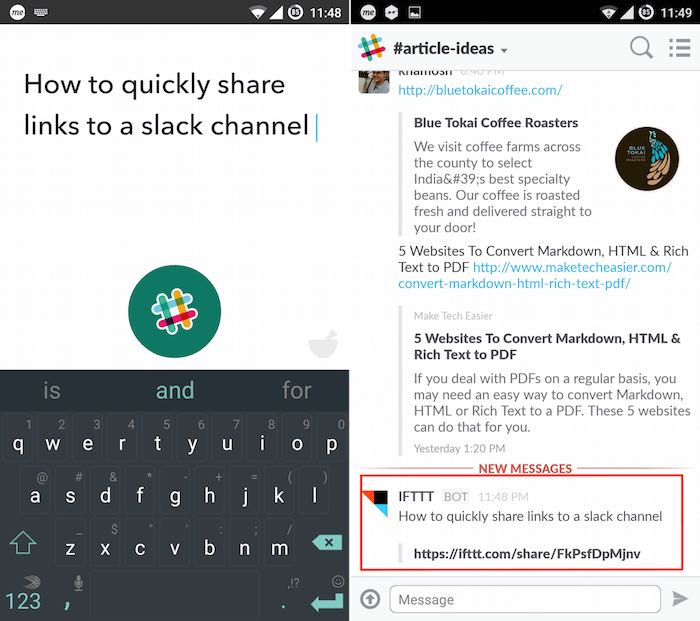
I have a Slack room that’s just for me, and I use it to stay on top of RSS feeds, get notifications and more. I also have a channel where I quickly type in article ideas. I have the Do Note set up with my article ideas channel, so the next time I come up with the amazing life hack of the century, the chances of me forgetting it in forty seconds are less likely.
The limitation here is that you can only have this setup for one channel in one Slack team. But if you’re okay with that, or you have some specific use case where such a setup can be incredibly valuable, set this up.
Do you have any Slack hot tips? Share with us in the comments below.