

Anyone can create pro-level AI images these days, which sometimes blurs the boundaries between fact and fiction. This can work against you as you may get mistakenly accused of using AI to create fake images. I have been unwillingly pulled into this “real image or AI” debate more than once. To counter it, I use a simple method: Live displaying an image’s EXIF metadata that proves it was indeed taken with a camera.
Real Image or AI? Who Can Even Tell Anymore
Whether you use Stable Diffusion, DALL-E, or other imaging models, all of them have been trained on massive datasets of high-quality backgrounds. Tools like Gemini’s Nano Banana excel at subject uniformity and smooth gradients. I recently tested it to generate a mock selfie with a Hollywood celebrity, and it felt so realistic that I cannot publish it without risking a lawsuit.
On the other hand, your actual images taken with a camera or smartphone are at risk of being lumped together with AI-generated output. I spent some time in Paris many years ago and captured a selfie right in front of the iconic Eiffel Tower. Some people have accused me of faking this one with AI. Because it was very windy in Paris that evening, my hair contour appears a bit uneven, which might appear AI-ish to some.

While there are many obvious signs of AI images, you might still end up explaining yourself more than necessary. Instead, let us pull the actual technical specs that come integrated with your camera. Once you use the following method, it leaves no shred of doubt that your photos were taken with a camera.
EXIF Metadata: The Best Way to Prove an Image’s Authenticity
When you capture photos with an actual camera or smartphone, EXIF metadata remains in the backend. Your camera’s hardware and firmware write this EXIF data which is then embedded at the time of photo capture. No human or external software is involved yet. AI images cannot embed realistic, camera-specific EXIF because they don’t use any physical sensors.
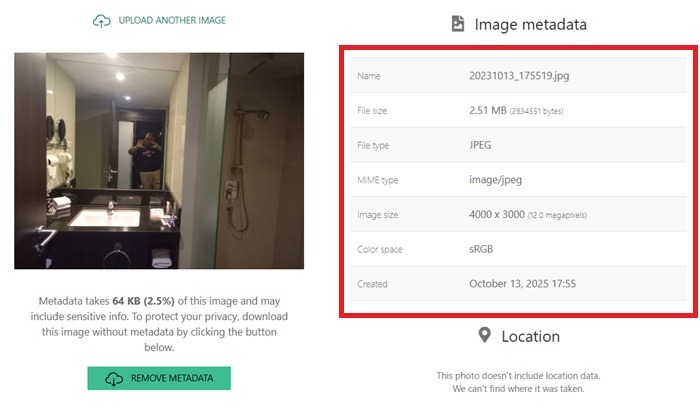
The camera’s EXIF information includes a mention of the camera model, lens, date/time taken, GPS (if enabled), shutter speed, focal length, and any exposure settings.
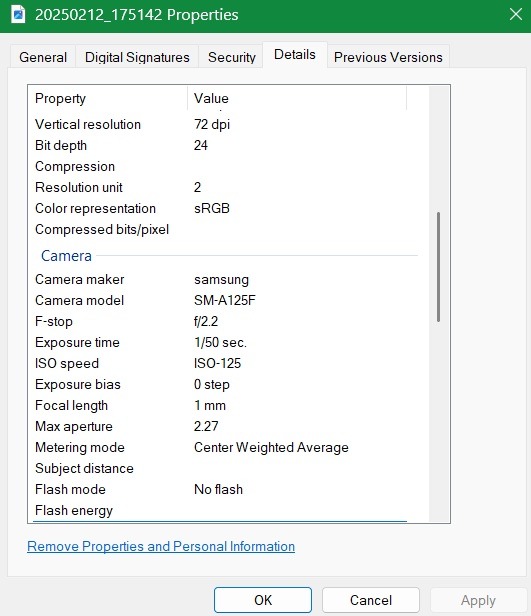
On Windows, you can view some of this EXIF by right-clicking an image and viewing its Properties → Details. Mac users can go to the image in Preview followed by Tools → Show Inspector, and click the Exif tab which looks like a small “i”. There are several options for Linux users too.
However, the thing is, you may not be carrying a laptop with you everywhere. But most of us do carry a phone with us. Thus having a quick EXIF metadata viewer app on Android or iOS lets you instantly show the metadata Live, proving it’s from a real camera capture, not AI-generated.
Check EXIF Metadata On the Fly
As long as you have Internet, you can find your EXIF metadata quickly using one of these methods: on a mobile browser, or with Android/iOS apps.
Mobile/Web Browser
Jimpl is my go-to web application for quickly retrieving image metadata. You don’t need to create an account. Simply upload one image after another, and you get the full metadata for your target images.
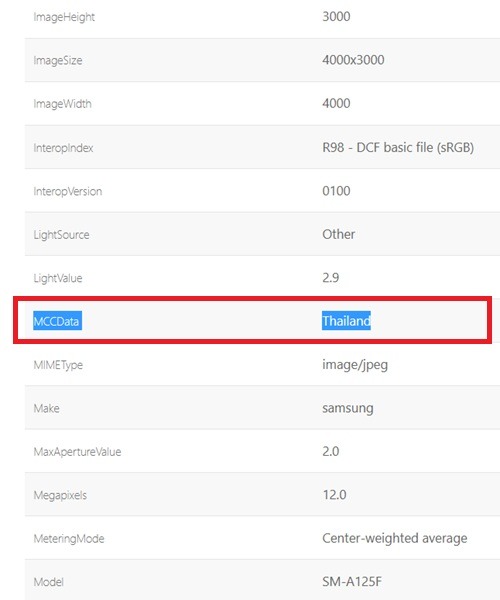
What I like most about Jimpl is that even if you disable location/GPS in your camera settings, it still captures the geographical location through cellular metadata, called MCCData, which stands for Mobile Country Code.
Apart from Jimpl, Metadata2Go is another useful site that not only views the metadata in images but also in videos. The free plan supports videos of a few minutes in length. Again, you don’t need to create an account, but it is useful if you do.
Android/iOS
If you rather prefer apps, here are a few Android/iOS examples that do a good job at identifying EXIF metadata. The good thing about these apps is that the metadata processing is local to your device, which is helpful for privacy.
- Photo Exif Editor Metadata: a versatile Android app that does a great job at viewing and editing EXIF metadata.
- Exif Metadata: a highly-rated iOS app that works with the iPhone Photos app.
As a summary, no matter which EXIF metadata tool you use, look for one of these essential information bits.
| Parameter | AI vs. Real Image |
|---|---|
| Camera make and model | Clearly indicated in real images; usually missing in AI |
| exposure_time | Real images have values such as 1/25 |
| f_number | Indicates the size of a camera lens, so f/2 represents a wider aperture |
| ISO | An image sensor’s exposure to light indicated by a value ranging from 100-1600. |
| Flash or No Flash | Obviously, it takes a real camera to document this detail. |
| White Balance | A real camera will have a value such as “Auto” |
| FOV | Field of View represents the captured area of camera lens. AI cannot replicate this one. |
| Longitude and Latitude | If GPS is enabled, the longitude and latitude give the exact location. This data cannot be faked by AI. |
| MCCData | Mobile Country Code gives cellular location for smartphone cameras. |
| Offset_Time and Offset_Time_Original | Gives time zone in GMT +/- format. Another way to establish the location of a photo. |
| Shutter_speed_value | Shutter times shown with values such as 1. |
Can Image EXIF Metadata be Stripped or Faked?
The answer is yes. Some aspects of an AI image can be faked to mimic real information, but not all of it. For example, someone may generate an AI image and then carefully add fake camera-specific information using tools that mimic Android/iPhone EXIF data.
There are online tools available to insert fake EXIF information, but fakes usually get caught. There are many giveaways, such as mismatched accuracy tags (GPSDOP), inconsistencies with other metadata (e.g., timestamp vs. other dates evident). Most importantly, Live spoofing of freshly created AI images requires too much work.
However, to end all debates, try to use C2PA credentials. A website called c2paviewer helps you verify the authenticity of your image files. But it only works if you have enabled it with your photos. Once you’ve figured out whether you’re dealing with a real image or AI, check out our guide on the must have AI detector tools in your arsenal.