
In one of the largest leaks ever, 16 billion new passwords have been leaked. Researchers say it’s mainly the work of malware, with infostealers being the main culprit. Resetting your passwords is an obvious move here, but how do you keep infostealers at bay going forward? This guide covers every step you can take to stay protected.
What are Infostealers
Most types of malware are created to harm users’ devices or control them, like Ransomware or RAT. However, infostealers work specifically to steal sensitive information like login credentials, cookies, login tokens, cryptocurrency wallets, and any other information that criminals could use.
They usually work stealthily to steal as much information as possible, and some even delete themselves after stealing information to leave no traces of theft. This makes them extremely dangerous as they intend to exploit highly sensitive information while being very hard to detect.
Prevent Entry of Infostealers
Your first line of defense is to prevent the entry of infostealers into your device. Once they get onto your device, it is very hard to catch them due to their stealthy nature. They need to be executed as an app or script to work, so you need to be careful about what you execute on your device. Below are some ways to prevent the entry of infostealers.
Only Install Reputable Programs
When looking for apps, go for the ones that come from well-known vendors and show signs of trust. This includes having a digital signature (Windows can detect this), receiving regular updates (preferably with version history), and being distributed through reliable channels like the Microsoft Store or official vendor websites.
Stay away from cracked or pirated software, as there is no way to confirm their authenticity other than trying. Opting for open-source apps is also a good way to stay safe.
Avoid Malicious Links and Websites
A large proportion of infostealers are distributed using malicious links delivered through email or malicious advertisements. Avoid clicking on any links without knowing their destination. You can hover the mouse over the link to know where it leads. A good rule of thumb is to avoid downloading any file or program that is offered to you.
Secure Your Browser
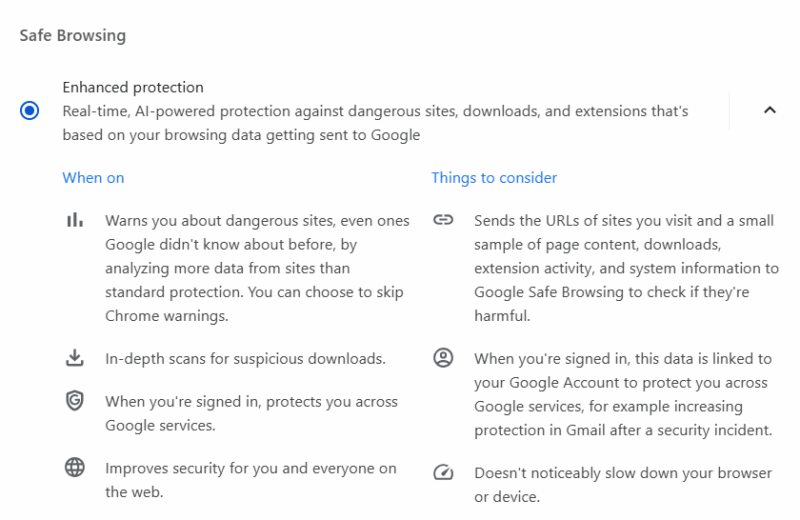
Your browser is the main entry point for malware; make sure it’s configured for utmost security. If you’re on Chrome, make sure Enhanced Protection is enabled. You can check our guide on protecting against EDDIESTEALER (a type of infostealer) to learn more ways to secure your browser. For even more protection, try some security extensions.
Strengthen Device Security
While difficult to detect, there are still a bunch of security measures you can take to protect against infostealers. The goal is to prevent execution of infostealers on the device or identify and stop them as soon as possible to prevent further damage.
Configure Microsoft Defender For Better Security
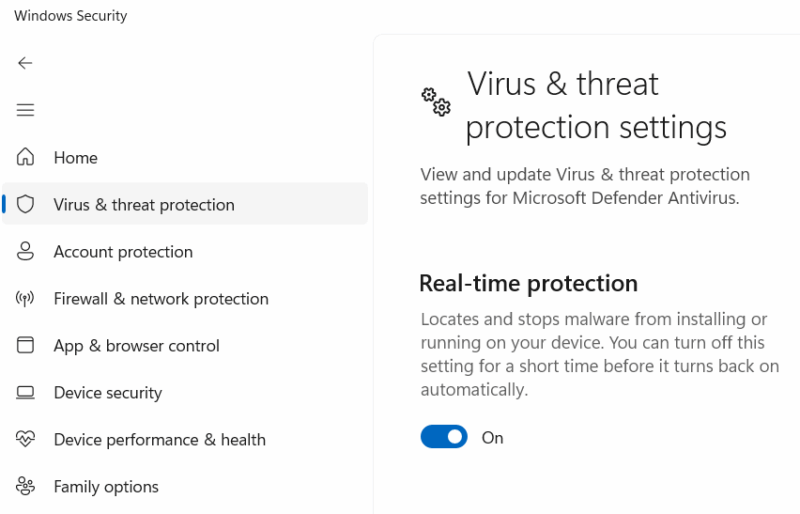
Many of the advanced Microsoft Defender features help prevent the entry of infostealers directly or indirectly. Search for “windows security” in Windows search to open the Windows Security app and make sure the following features are enabled:
- Real-time protection
- Cloud-delivered protection
- Tamper Protection
- Smart App Control (may need Windows 11 clean install)
- All Reputation-based protection features
Monitor Network Traffic
Infostealers need to send back the data they collect to the C2 server, which involves contacting the server and uploading data. If your device has an infostealer, it must be creating outbound connections to send the data. Using a program like GlassWire, you can see if there are any shady outbound connections and which programs are making them. It can also detect suspicious hosts and alert you.
Run a Full Security Scan Regularly
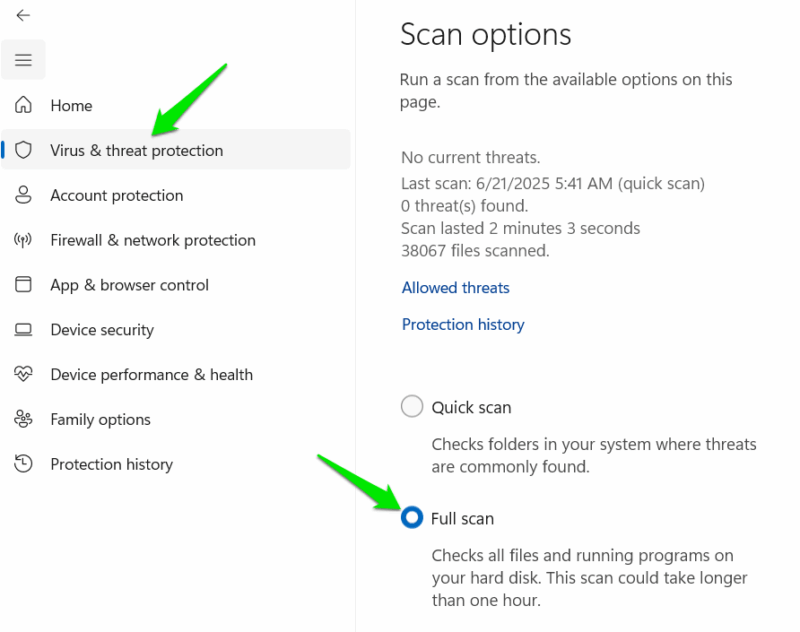
Microsoft Defender and most other antivirus programs have a full system scan function, but it needs to be run manually. It consumes a lot of resources and takes hours to finish, but it can often find hidden malware like infostealers. Try to run a full system scan once a month or when in doubt to possibly catch hidden malware.
In Windows Security, go to Virus & threat protection → Scan options and choose Full scan.
Use the Standard Account For Daily Use
The default account on most operating systems is administrator, but it has too much access to the system that isn’t needed in regular use. A standard account is restricted to necessary things like using apps, browsing, and configuring personal settings. An infostealer won’t be able to freely steal information in a standard account, like accessing browser data. Check out our guide on why you should use a standard account and how to set it up.
Secure Your Online Accounts
The main target of infostealers is the login credentials of your online accounts, like usernames and passwords. You need to make sure your online accounts are secure beyond just passwords and use them in a secure environment. In case your device does get infected, your accounts will still be secure. The method of securing your online accounts include:
- Using multi-factor authentication
- Use sensitive accounts in Incognito mode
- Use a dedicated password manager instead of the browser’s built in password manager.
- Enable alerts for credential leaks
When combined, all of these security methods will offer the utmost protection against infostealers. However, if you think your device has been infected, it’s best to fully reset your PC, as infostealers are often difficult to completely remove. Better yet, clean install Windows to avoid taking any chances.








