
You trust your AI to follow your prompts, but what if someone else secretly alters them? A new attack lets malicious actors hijack your instructions, causing the LLM to return misleading or harmful responses that steal data or deceive users. Let’s explore how this man-in-the-prompt attack works and how you can defend against it.
What is a Man-in-the-Prompt Attack?
Similar to a man-in-the-middle attack, a man-in-the-prompt attack intercepts your interaction with a large language model (LLM) tool like AI chatbots to return an unexpected answer. They can inject a visible or even an invisible prompt along with your prompt to instruct the LLM to reveal secret information or provide a malicious answer.
So far, browser extensions are the main attack vector for this attack. This is mainly because the LLM prompt input and output are part of the page’s Document Object Model (DOM) that browser extensions can access using basic permissions. However, this attack can also be executed using other methods, like using a prompt generator tool to inject malicious instructions.
Private LLMs, like in an enterprise environment, are most vulnerable to this attack as they have access to private company data, like API keys or legal documents. Personalized commercial chatbots are also vulnerable, as they can hold sensitive information. Not to mention, LLM can be tricked into telling the user to click on a malicious link or execute malicious code, like a FileFix or Eddiestealer attack.
If you want to make sure your AI chatbot doesn’t get used against you, below are some ways to protect yourself.
Policing Browser Extensions
While browser extensions are the main culprit, it’s difficult to detect a man-in-the-prompt attack as the extension doesn’t require special permissions to execute. Your best bet is to avoid installing such extensions. Or if you must, only install extensions from reputable publishers that you trust.
You can also track the extension’s background activity to get clues. When using an LLM, press Shift + Esc keys to open the browser’s Task Manager. See if any extensions start running their processes even when they’re not supposed to work there. This could suggest it’s altering the prompt, especially if it only happens when you write in the chatbot’s text field.
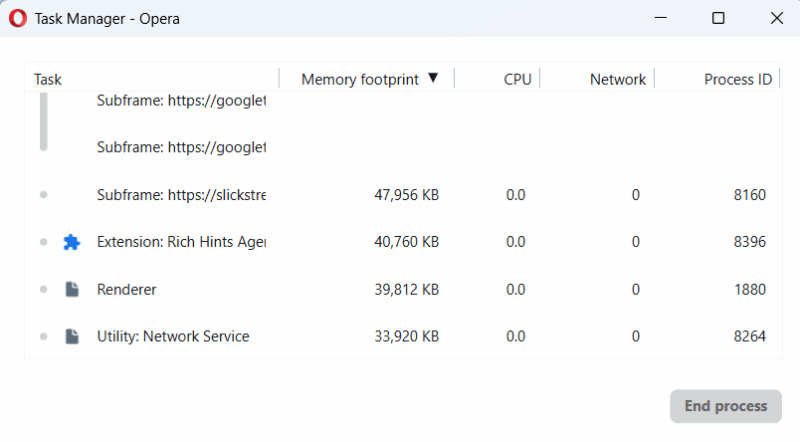
Furthermore, avoid using extensions that directly interact with your LLM tools or modify prompts. They might work fine at the start, but may start doing malicious edits later.
Manually Enter Prompts and Inspect Before Sending
Many online prompt tools can edit your prompts for better results or provide prompt templates. While useful, these tools can also inject malicious instructions into your prompts and don’t need direct access to your browser/device.
Try to manually write prompts in the AI chatbot window and always check before pressing Enter. If you must copy from another source, first paste it into a plain text editor like the Notepad app in Windows, and then paste it into the chatbot. This will ensure any hidden instructions are revealed. If there are any blank spaces, make sure you use the Backspace key to remove them.
If you need to use prompt templates, create your own and keep them safe in a note app instead of depending on third-party sources. These sources can introduce malicious instructions later when you start trusting them.
Start New Chat Sessions Whenever Possible
Man-in-the-Prompt attacks can also steal information from a current session. If you have shared sensitive information with the LLM, it’s better to start a new chat session when the topic changes. This will ensure the LLM doesn’t reveal sensitive information even if a man-in-the-prompt attack happens.
Furthermore, if such an attack does happen, a new chat can prevent it from further influencing the session.
Inspect the Model’s Replies
While using AI chatbot, don’t believe everything it replied. You need to be very skeptical with the LLM’s response, especially when you find any anomalies. If the chatbot suddenly gives you sensitive information without you asking, you should immediately close the chat or at least open a new session. Most man-in-the-prompt instructions will either fully disregard the original prompt or ask the additional information in a separate section at the end.
Furthermore, they can also ask the LLM to reply in an unusual way to confuse the user, like put the information in a code editor block or a table. If you see any such anomalies, you must immediately assume it is a man-in-the-prompt attack.
Entry of Man-in-the-Prompt attacks is very easy in enterprise environments, as most companies don’t vet the browser extensions of employees. For utmost security, you can also try using LLMs in incognito mode with extensions disabled. While you are at it, make sure you protect from slopsquatting attacks that take advantage of AI hallucination.








