When you leave your laptop unattended, have you ever worried that it might be tampered and someone have installed a malware to steal your data? Even if you didn’t leave it where it could be stolen, tampering is still a real risk. This guide lists practical steps you can take to minimize the chances of others tampering your laptop when it’s left unattended.
Enable BIOS/UEFI Password
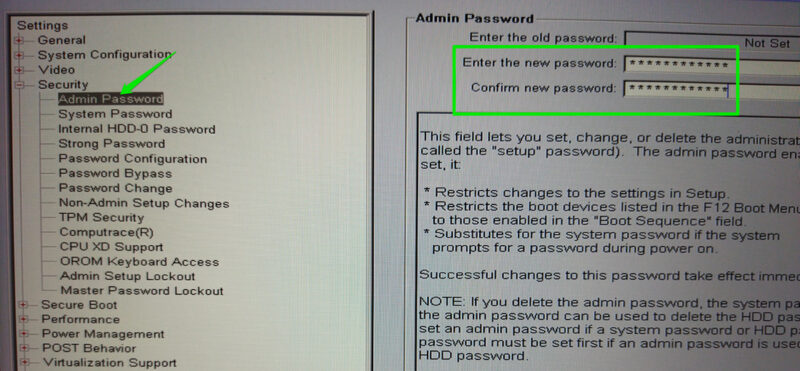
Many of the post-boot protection options are listed inside the laptop BIOS/UEFI. A malicious actor can exploit them to execute attacks, such as disabling secure boot to install rootkits. You can password-protect the BIOS so others are unable to access it to change your system settings.
To do so, access the BIOS and look for the Admin/Setup password option under the Security or Authentication section. Here, you can add a password to lock the BIOS and prevent unauthorized access. Keep in mind that while it’s a deterrent to most malicious actors, a dedicated attacker can easily reset the BIOS by resetting CMOS on some laptops.
Disable External Boot Support
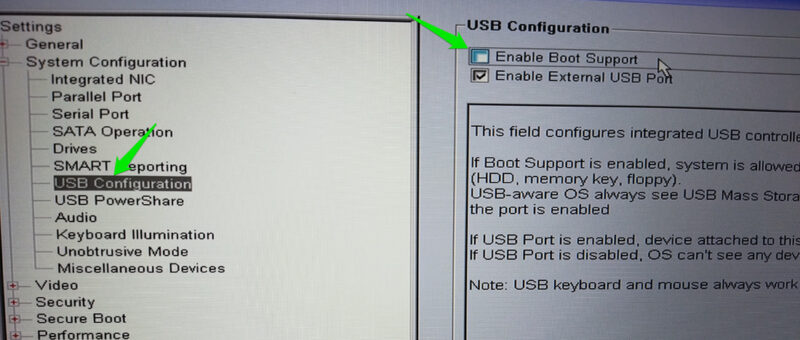
You should also turn off the ability to boot your PC through a bootable drive. A malicious actor can use that to possibly gain access to your data or install backdoors. You can turn off the ability to boot from an external drive in the BIOS to prevent this from happening.
Access BIOS again and look for the USB configuration menu. It should have a Boot support option to prevent booting from external devices. Disable it, and it will prevent booting from a different drive. Make sure you undo these changes if you need to boot from an external drive.
Use Tamper-Detection Stickers
There are many types of tamper-detection stickers available that can detect most types of tampering with your laptop. They usually come as paper or plastic labels that leave visible evidence of tampering when removed or tampered with, such as a void pattern.

You can apply these stickers anywhere you think your laptop is at risk of tampering, like screws, the bottom chassis, or even unused ports. They are usually cheap, so it’s easy to replace them when you need to remove them yourself. You can get TamperSafe tape to create custom-sized tamper-detection stickers.
Get USB Port Protectors
Since USB ports are the key entry point for tampering, you can use a more robust solution to prevent any exploitation. You can buy dedicated USB port protectors that will prevent others from inserting any USB device in the ports. They come in USB-C and USB-A sizes and fit like any other USB device to prevent the entry of another device.
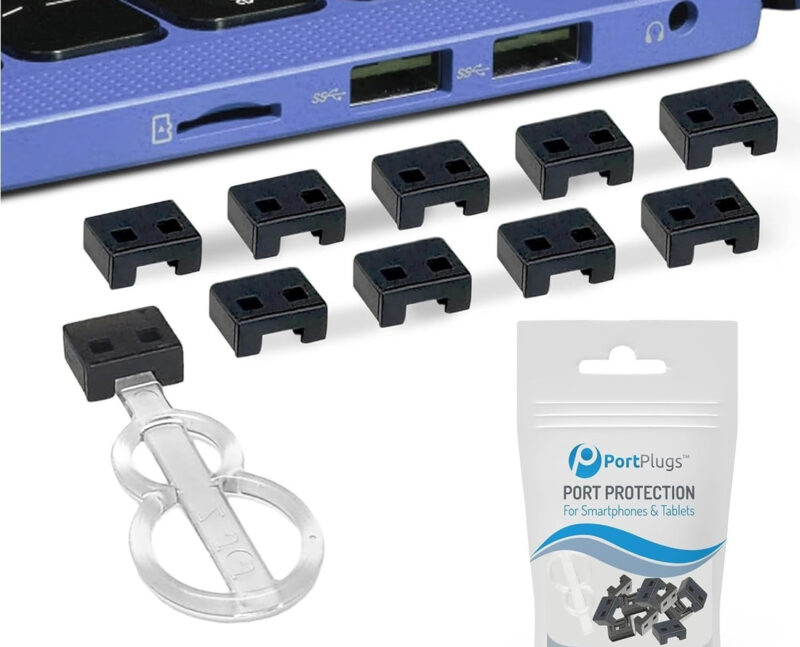
Most come with a dedicated key that you must insert into the USB port protector to unlock and remove it. Without the dedicated key, a malicious actor won’t be able to pull out the protector without breaking it. PortPlugs has some nice USB protectors for USB-A and USB-C ports.
Encrypt Data with BitLocker
You can also encrypt your system drive with BitLocker in Windows. It has a pre-boot authentication feature that prevents loading of the OS without the encryption key. You can lock down the OS and encrypt data, so your system becomes inaccessible. If someone gains access to your PC, they still can’t steal data from it or try to access the OS, as it prevents access even before the OS loads.
Apart from these protection measures, you should be careful about obvious signs of tampering, like a moved laptop or something attached to the laptop. If you find any tampering signs, it’s best to back up your important data and perform a clean install of Windows.