


Gone are the days when you could surf a website without fear of an ad popping up suddenly and blaring a sales pitch at you on full volume. Nowadays every page on the Internet has several video and audio media links embedded in them, just waiting to automatically start playing the moment you start scrolling down the page.
Fortunately, Google Chrome provides a way for you to mute an entire website in one go so that any media that starts playing does so silently. Here are two methods you can use to perform this function.
Also read: How to Delete Your Google Chrome Web Activity Data Automatically
via Site Tab
1. Go to a website that features auto-playing videos.

2. Go to the top of the browser and to the tab of the window that you have currently opened. Right-click the tab.
A list of options will appear in a pop-up menu. Look through the options until you find the “Mute Site” option and select it.
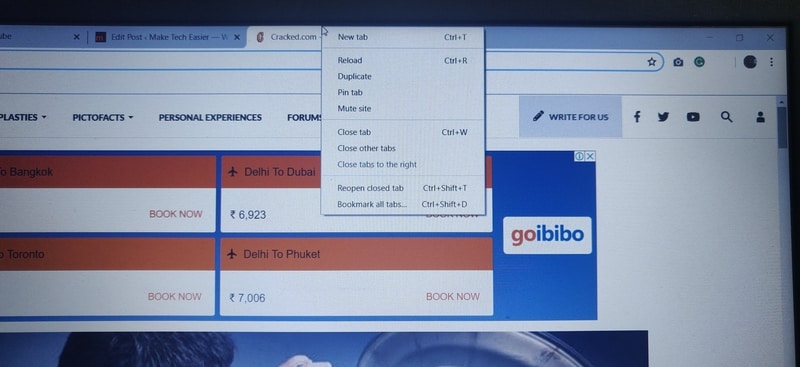
You might not notice any immediate change, but your new setting has been saved by Chrome. From now on, any page you open that belongs to that website will be muted by default. You can do this for as many sites as you want.
3. If you want to turn audio back on for the site, repeat the steps mentioned above until you reach the pop-up menu.
This time you will see the option “Unmute Site” in place of the previous option you selected. Choose this option, and the audio for the site will be restored.
Via the URL Address Bar
1. Once again, start by going to a site that features audio files that you wish to mute.
2. Next to the address of the site in the address bar at the top of the browser is a padlock icon. Click on the padlock to access a new list of options related to navigating the site.
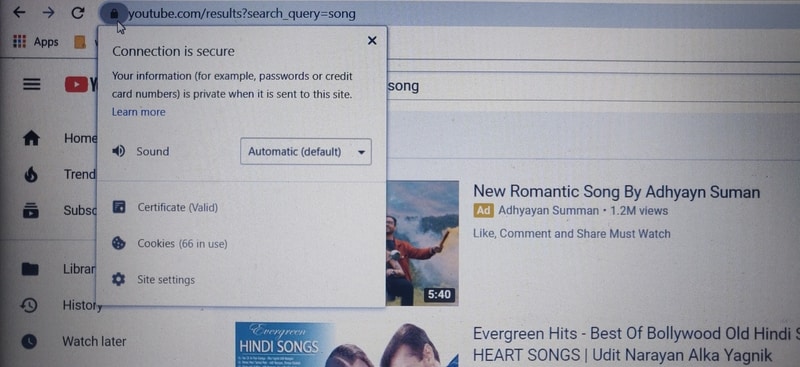
3. Go to the last item on the menu list, which is the Settings option next to the Gear icon, and hit Select.
A new page will open in a new tab which carries the list of browser permissions the site uses while displayed on your device.
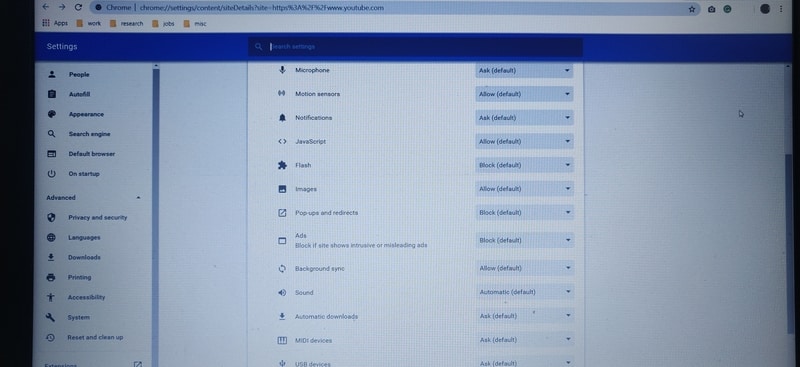
4. Scroll down until you find the Sound option. Next to the option is the list of actions you can take relating to the website’s sound profile.
The Sound option is usually set as Automatic by default, meaning audio files on the site automatically start playing when you open the site. Click on the drop-down menu to the right of Sound and choose Mute. The website will have its audio muted from then on.
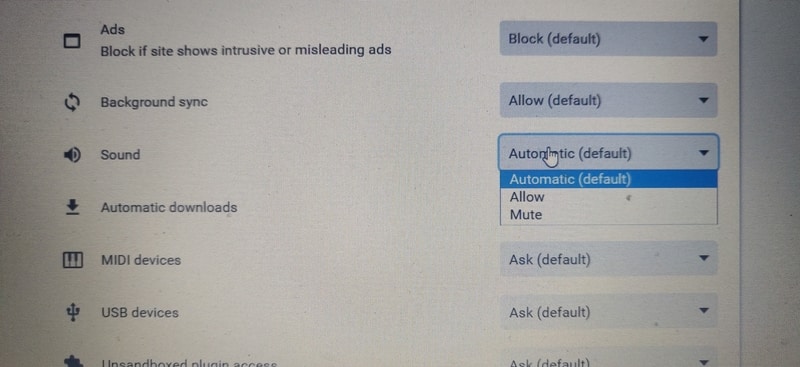
If you wish to restore sound, repeat the above steps and choose the Automatic option for sound this time.
Conclusion
These two simple methods are a great way to target specific sites you wish to hear less from, instead of having to constantly lower or mute your speaker’s audio every time you visit the site. Even though the pop-up ads will continue to run in the background, you can simply scroll past them without having to look at or hear the ads launch into their sales spiel.