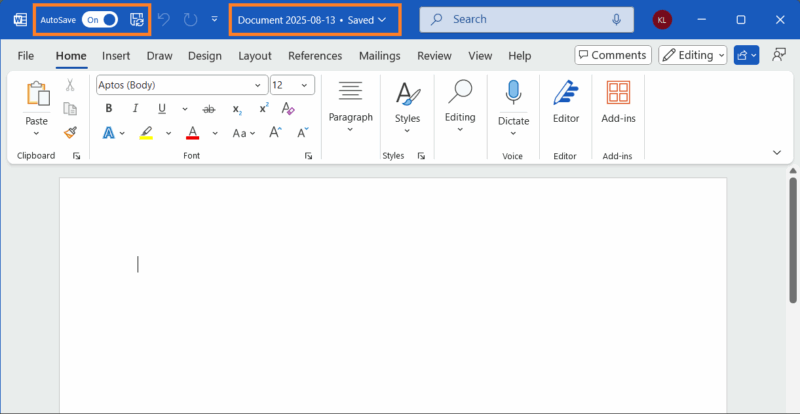
Microsoft has made Word’s automatic cloud save default for new documents, pitching it as a safety net against lost work. On the surface, it’s convenient — no more lost drafts, seamless access anywhere. But convenience often comes with strings attached. Let’s look at the risks that come with it, and whether it’s a win for you or Microsoft.
The Cost of Convenience: Privacy or Control?
At first glance, Word’s automatic cloud save feels like a lifesaver for a smooth workflow. Your documents sync to OneDrive instantly. As a freelancer who works from anywhere without a designated office, I appreciate not worrying about manual saves.
But it comes with a catch. Every file you create is immediately stored in Microsoft’s servers by default. With the alarming rate of recent hacks and data breaches on giant software companies these days, are you okay with your sensitive drafts in the cloud, potentially vulnerable to breaches?
Microsoft’s motive seems clear. By nudging users toward OneDrive, they’re locking you into their subscription ecosystem, where free storage (5GB) runs out fast. Even if you can maximize your OneDrive storage, at some point, you’ll need more space and be forced to get a Microsoft 365 subscription.
Thus, making this feature feel like a design to push paid plans. It’s convenient but comes with a hidden loss of control till you’re cloud-dependent.
How Auto Cloud Save Impacts Different Users
For casual users, Microsoft Word’s automatic cloud save by default feels harmless. Your grocery list, vacation plans, or essay draft easily sync across devices online.
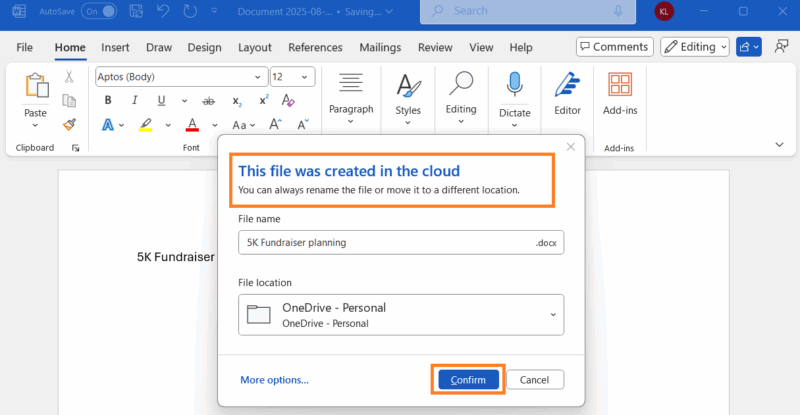
No more emailing files to yourself since everything saves directly to OneDrive. But that free storage fills up quickly, and unless you tweak settings like preventing Windows auto-save to OneDrive, you’re stuck choosing between deleting files or paying up.
Professionals, like marketing teams, will benefit from real-time edits. I’ve seen teams save hours with cloud-based workflows. However, even with strong encryption, cloud storage carries exposure to breaches and government data requests.
Privacy-conscious users get the short end of the stick. If you’re meticulous about data security, the default cloud save feels like an invasion. While local save is still possible, it’s no longer the intuitive option, which can frustrate offline workflows.
Who Really Wins?
There’s no doubt that users gain some perks like fewer lost files and easier collaboration. But Microsoft’s the real winner here.
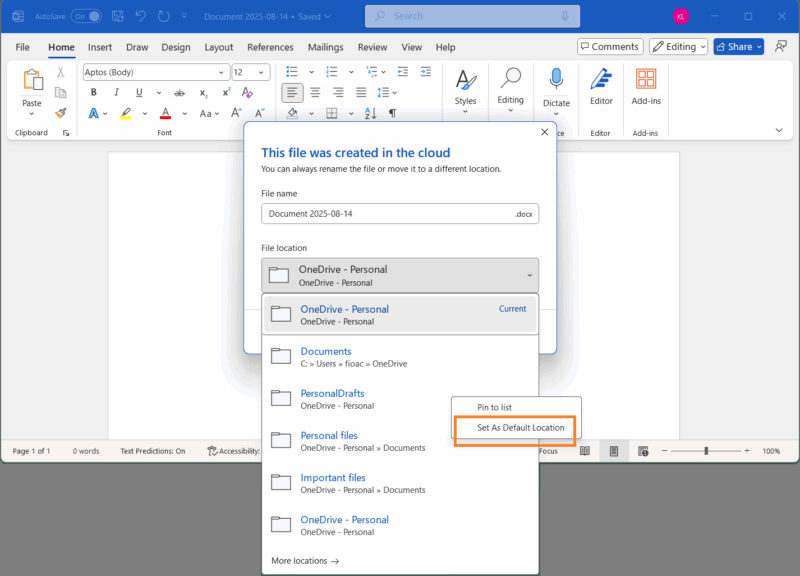
Every time you save a document, you’re investing deeper in OneDrive and Microsoft 365. Since OneDrive is your only option to save documents, the more you store, the harder it is to switch.
I’ve used Word since college, and this feature feels less like a user-friendly upgrade and more like a calculated push to keep you in their ecosystem. It mirrors iCloud, where users’ data is tied to the platform; hence, leaving becomes almost impossible.
Extra: Ditch the paid plans and explore how to use Microsoft Office for free with these workarounds.
Escaping Microsoft’s Cloud Ecosystem: Alternatives
Thankfully, users aren’t locked in fully, yet. If this feature feels intrusive, you still have choices.
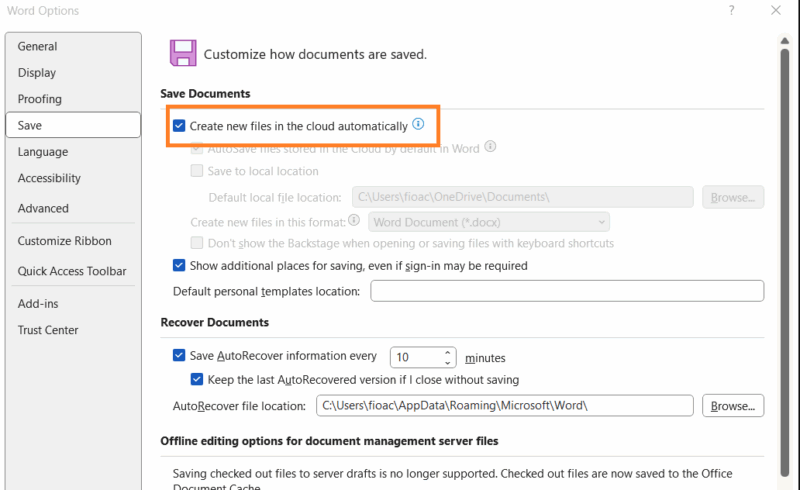
First, there’s a backdoor to disable the automatic cloud save default. Navigate to File -> More -> Options, then head to the Save section. From here, you can disable the Create new files in the cloud automatically setting. After unchecking, you decide when your files are saved to the cloud.
Switching to local-first tools like LibreOffice and OnlyOffice lets you keep files offline with optional cloud syncing, giving you full control. If you’re considering a switch, take a peek at our comparison of Microsoft 365 and LibreOffice. For note-taking, try Obsidian for a distraction-free, local experience.
Cloud alternatives exist, too. Google Docs gives transparency about its cloud-based options without the same Microsoft lock-in. You can easily convert Google Docs to Word when compatibility matters.
These alternatives offer the control Microsoft is slowly taking away. They let you dictate your workflow, not Microsoft.
The Bigger Picture
This feature signals a shift in the default experience to the cloud, making local storage feel like an afterthought. Over time, non-subscribers, like solo users and small businesses, will face consistent nudges and will likely miss out on new features.
We’ve already seen this with OneDrive storage prompts in Windows updates and the subtle pushes to upgrade Microsoft 365 when it’s not worth it. Word’s automatic cloud save default is only the beginning of a larger shift to reshape how you work to fit Microsoft’s vision.
The good news is alternatives exist, and exploring them now may save you from feeling boxed in later. As a long-time Word user, I urge you to weigh what’s more important to you: convenience or independence.