If you’re on LinkedIn, you’ve got a problem. Very soon, your posts, resume, and even profile details will be used to train its generative AI models, unless you do a quick LinkedIn AI training opt out. It’s sneaky, and it is activated by default. It could turn your career advice into fuel for bots that might edge you out. Let’s fix this now.
What’s New in LinkedIn’s AI Policy?
LinkedIn, owned by Microsoft, just updated its terms to automatically feed your data into AI training. They’ll use public data like your profile details, posts, and activity to build AI tools such as “Rewrite with AI.” Private messages stay safe, but everything else is fair game by default.
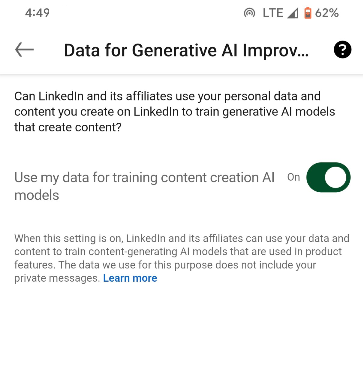
This hits members in the EU, EEA, Switzerland, Canada, and Hong Kong first, with a possible global rollout soon.
I’ve seen these policy shifts before, and it’s not about improving your feed. Microsoft is leveraging this to strengthen its access to billions of data points from recruiters, jobseekers, and advertisers, to feed its AI empire.
For us, the downside is equally clear. We’re not being asked, just an assumption we’ll go along. It ties in with Microsoft’s steady nudge to save Word files to their cloud. The framing is convenience, but the real driver is control of your data.
Why Opt Out? Real Risks Beyond the Hype
Opting out of LinkedIn AI training isn’t just paranoia; it’s smart self-defense. LinkedIn argues that smarter AI will improve your experience. In practice, your data could train biased algorithms that skew hiring tools, like favoring certain networks over merit.
Worse, it feeds the irony of AI cutting jobs. Remember Dropbox’s 500 layoffs blamed on AI? Your posts might help build the very tech that automates roles in your field.
From my experience networking on LinkedIn, which is basically the go-to spot for job hunts if you’re unfamiliar, sharing feels safe until it doesn’t. Add scams lurking in connections, and suddenly your info powers not just AI, but fraudsters too.
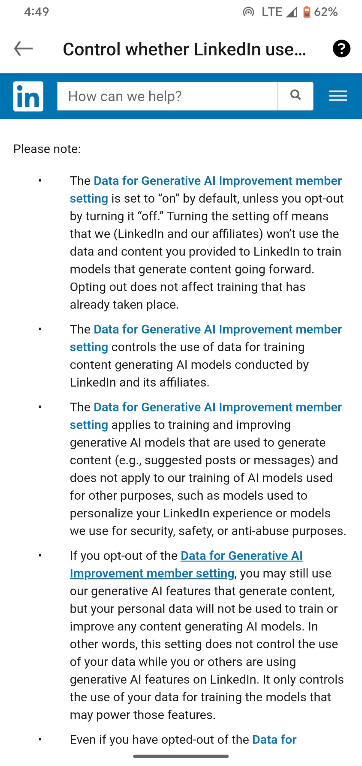
Several users are raging, calling it data theft, since the announcement. Some are even threatening to upload fake resumes or just fill their profiles with gibberish text. While all these are understandable, the only effective action is using the LinkedIn AI training opt-out before your data becomes irreversible AI fodder.
Opt Out Before It’s Too Late
The good news is that the process to opt out of the LinkedIn AI training is simple. Click on your profile photo and select Settings & Privacy.
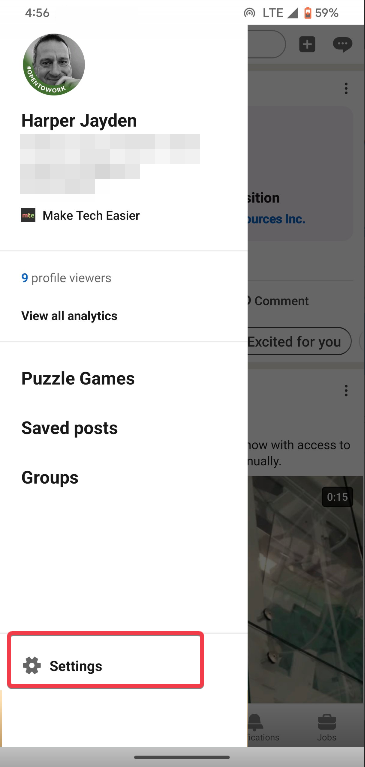
Go to Data privacy and find Data for generative AI improvement. Then toggle off Use my data for training content creation AI models. For non-content AI-like security tools, submit an objection form via the same page.
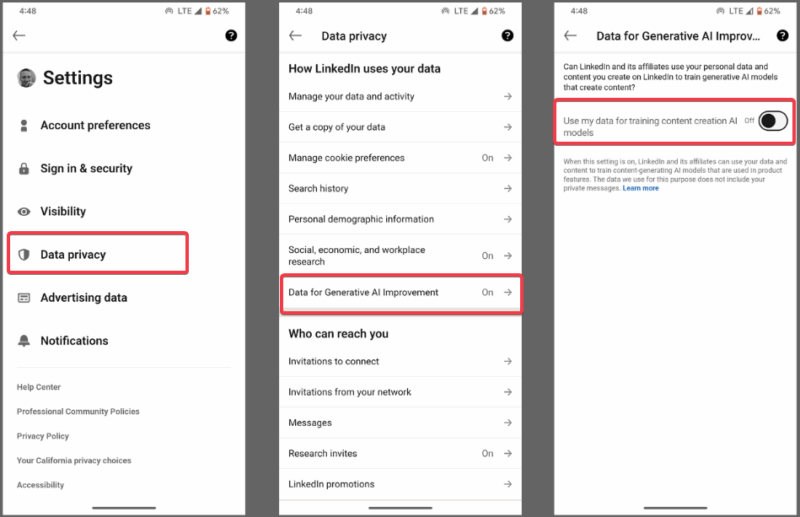
I did this yesterday, and it felt like a weight off. No confirmation email needed, but double-check the toggle sticks. While it stops new use of your data, it won’t erase what’s already been ingested.
Extra Steps to Lock Down Your LinkedIn Data
One toggle isn’t enough; layer up your defenses. Start by enabling private mode to hide your profile from random searches and browse quietly. Audit your content by removing old posts or resumes you don’t want feeding algorithms.
If you’re in the EU, file GDPR complaints through the data protection authorities if LinkedIn ignores opt-outs.
Join the users on Reddit and X to demand opt-in laws, not this default grab. It’s time Microsoft stopped assuming and force-grabbing our data.
Don’t let LinkedIn turn your professional life into AI fuel. My advice is to opt out of that default AI training today, lock down your data, and stay ahead of the curve. Don’t assume LinkedIn has your best interest in mind.








