


Google Classroom has become the go-to LMS (learning management system) for many educators and students. However, if you’re wondering how to exit a Google Classroom, this guide walks you through the process.
Good to know: just starting out with Google Classroom? Learn how to create a new class.
[mte_toc]How to Unenroll from a Class in Google Classroom as a Student
As a student, you can only unenroll from a class if your school admin/teacher has enabled this option. This should be the case if you’re part of an organization that uses Google Workspace for Education and provides its users with school accounts.
If you’re using Google Classroom with your free Google account, then you should encounter no problems when unenrolling.
PC
Go to Google Classroom in your browser. It should open on the Home page, where all the classes you’ve enrolled in should appear.
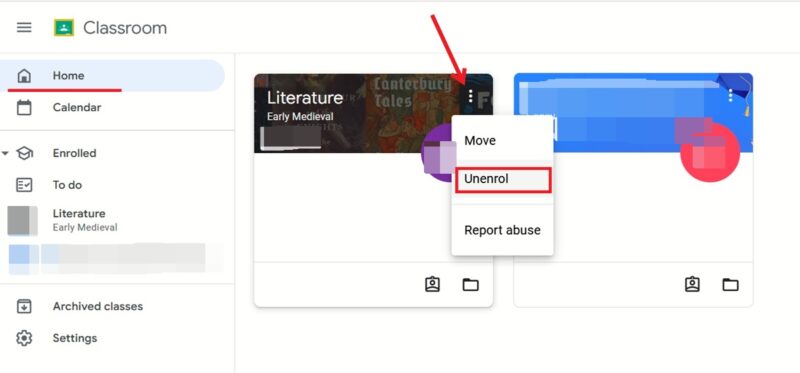
Locate the class in which you want to unenroll, and click the three dots in the upper-right corner of its card. Select Unenroll.
Click Unenroll again to confirm to no longer be part of the class.
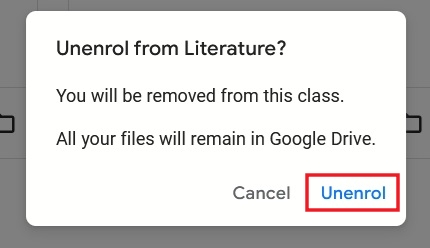
Note: you can’t unenroll from an archived class, so if the teacher/school admin already archived the class, your only unenrollment option is to contact them and ask them to unarchive the class briefly so that you can unenroll.
Tip: learn how to clear your Google search history on Android.
Mobile
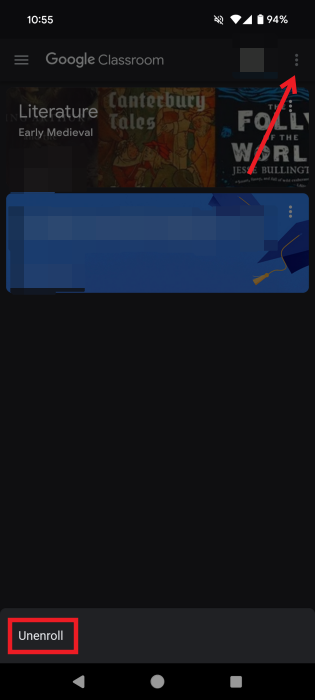
On Android or iPhone/iPad, open the Google Classroom app to view the classes you’ve enrolled in. The next steps are the same on both platforms.
Tap on the specific classroom you wish to exit, then press on the three dots that appear on the class card in the upper right, and select Unenroll at the bottom. Lastly, tap Unenroll again in the pop-up.
How to Leave a Google Class as a Teacher
Google Classroom lets primary teachers invite co-teachers to a Google Classroom. As a co-teacher, you can do most of the things a primary teacher does, except you aren’t allowed to delete a class, remove the primary teacher, or mute them in the class. If you’ve been invited but now wish to leave, you can without disrupting the flow of the classroom.
PC
Open Google Classroom, and make sure you’re logged in with your co-teacher account. Click the class, and switch to the People tab. Find your name underneath the Teachers column, and click the three dots next to it.
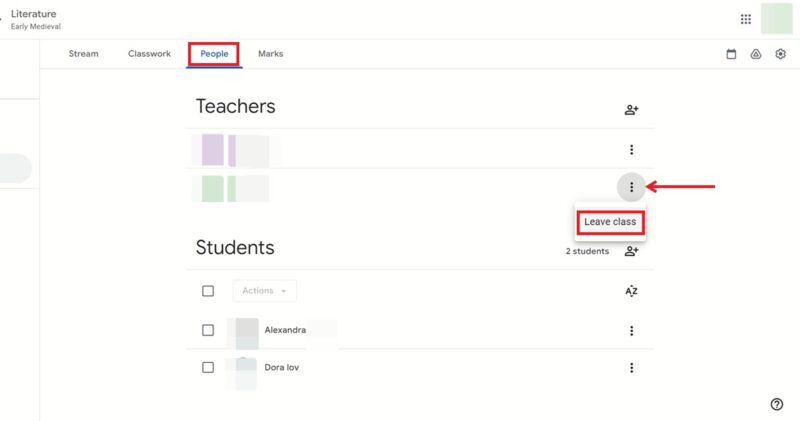
Select the Leave class option.
Note: if you’re the primary teacher, there’s no option available to just leave the classroom. You can either archive the classroom so that you won’t see it anymore in the Home screen, or transfer ownership to someone else. If they accept, you can leave the class as shown above.
FYI: these are the best Chrome extensions for students.
Mobile
On either Android or iPhone/iPad, open the Google Classroom app to view your list of classrooms. Tap on the one you wish to leave. Switch to People at the bottom.
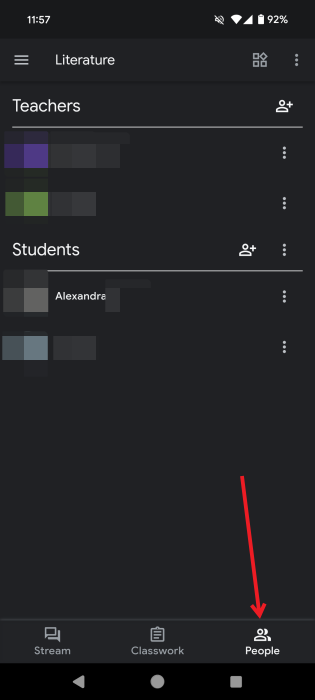
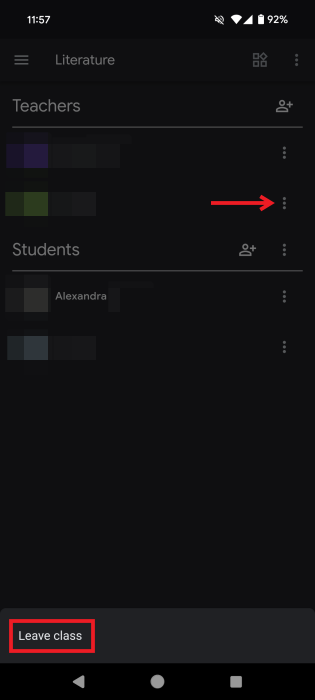
Press on the three dots next to your name in the Teachers column. Tap on Leave class at the bottom.
Good to know: want to play something real quick? Check these addictive hidden Google games.
If you’ve decided to leave so that you can pursue a Google Classroom alternative, check out our picks. Or, if you’re looking to boost your productivity while studying or working, check out these great Google Chrome extension aids.
Image credit: Pexels. All screenshots by Alexandra Arici.