
Ever built a custom AI helper in Gemini only to wish your team could use it too? The new Google update changed that, making sharing Gemini gems as easy as passing a Google Doc link. While it simplifies collaboration, it raises questions about why Google chose this moment and whether it’s enough to make Gemini stand out.
Sharing Gemini Gems with Others
Gems used to feel like solo projects. You could customize them with prompts, styles, and files for tasks like brainstorming and planning, but you had no way to pass them on.
Now, things have changed as Google allows you to share your Gemini Gems with others, the same way as sharing on Google Drive and Docs.
Open the Gem Manager by clicking on Explore Gems.
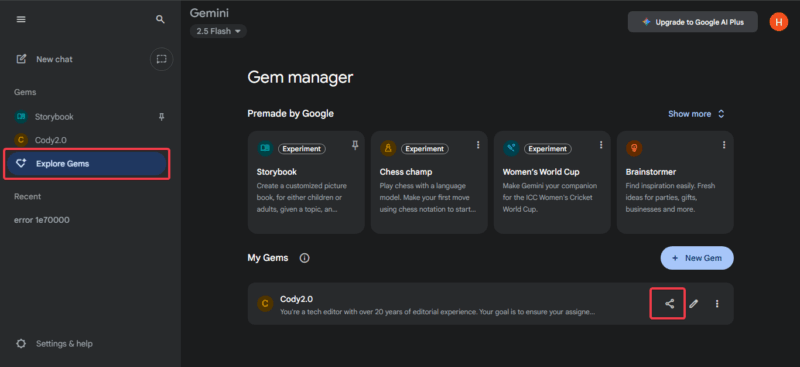
Select your Gem, and hit share to send a link or add emails. Recipients can view or copy it right away.
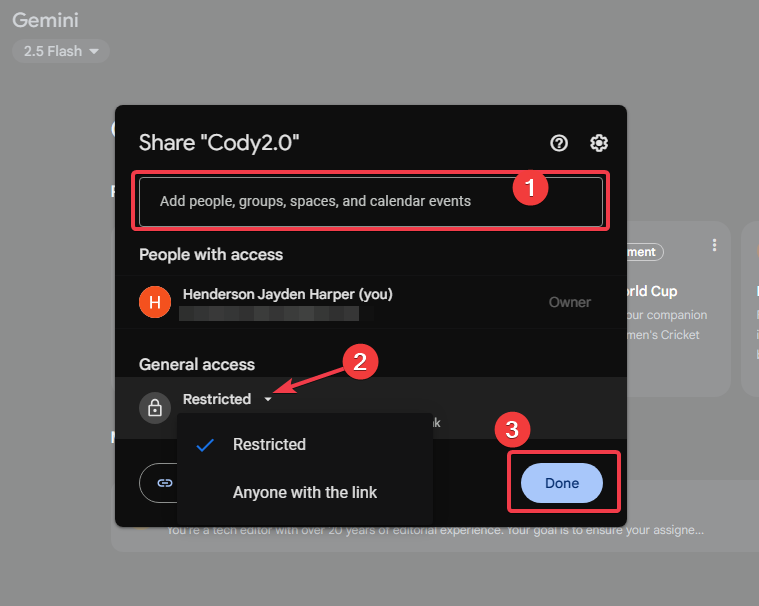
The good thing is, you don’t need Gemini Advanced to access and use the gem.
Why Google Only Allows Gem Sharing Now
Google’s decision to roll out sharing for Gemini Gems stems from a mix of pressure points that necessitate it. Back in March 2025, when Gemini launched Gems, they were an instant hit. But one thing was evident: users wanted to collaborate with this feature to mirror the custom GPTs.
At this point, OpenAI’s custom GPTs are already shareable, Anthropic has built prompt libraries, and Microsoft has embedded Copilot into Office apps. Each of those platforms was starting to make Gemini look behind. Google needed to prove its AI tools could support teamwork, not just individual use.
The second is Google’s larger product strategy. Gemini hit over 450 million monthly users by July 2025, fueled by integrations everywhere from Search to Android. To compete with tools like Copilot, Gemini has to feel like a natural part of collaborative workflows rather than a standalone chatbot.
Also, Google teased this since June, but held off until September to iron out the basics. With antitrust heat rising and AI ethics under scrutiny, Google needed a safe collaboration feature with no immediate functional issues. This helps to build users’ trust in Gemini’s ability to collaborate without hassles.
Sharing Gems encourages teams to build habits around them. Once those workflows take root, it is harder to switch away. That’s good for Google’s subscription business, especially now that Gemini can remember old chats.
Finally, timing was forced since Google has positioned Gemini as the glue for hybrid work by shoving it into everything. However, it lagged in fluidity to ensure collaboration; hence, sharing became a necessity to fill that void.
In short, Google acted now to prevent its users from defecting to more fluid rivals like ChatGPT, who have more collaboration features. It’s a move to keep pace with rivals, expand Workspace adoption, and keep people spending more time in Gemini.
Google and Enterprise Gain Most from Sharing Gemini Gems
This feature does not benefit everyone equally. The primary winners are Google itself and enterprises that already pay for Workspace.
For Google, shareability increases stickiness. If a company builds its workflow around Gems, it’s more likely to stay in Google’s ecosystem. This creates lock-in, which means they adopt more Google Workspace features and pay for higher tiers. That’s a strategic win for Google beyond the user convenience headline.
Enterprises also win because shared Gems reduce training costs, cut out repetitive tasks, and accelerate standardization, hence ensuring more consistent results across departments.
Creative teams follow closely as they can build collaborative story templates inspired by features like Gemini AI storybooks. For solo users and freelancers, the upside is narrower. Unless you collaborate regularly, this feature is just nice to have, not mission-critical.
Where Gem Sharing Still Falls Short
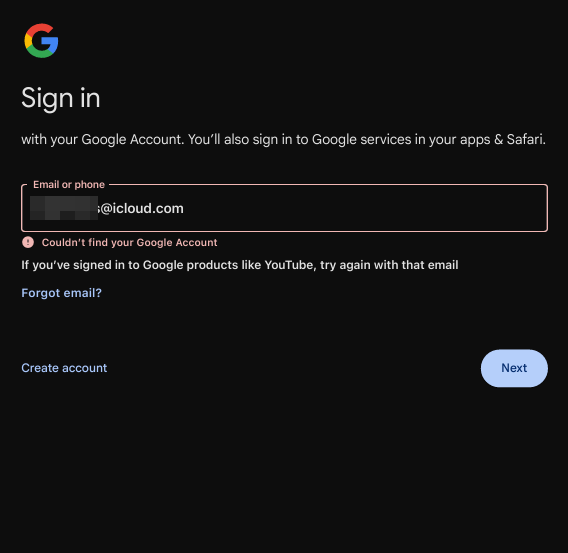
Gem sharing opens collaboration, but its flaws create barriers that undermine its potential. First, Gems require a Google account for access, tying everything to Drive permissions. This exclusivity in Google’s world may be fine for some but limiting for others.
For instance, in a mixed work environment, your partner may be a non-Google user, so you can’t share Gems with them. Even links require a Google sign-up to access the Gem. So, you have to look for alternatives like copying and pasting the prompts to them. This defeats the whole purpose of collaboration.
Permission issues also creep up. Unlike the preview-only option on GPT sharing, there’s no strict read-only mode here. If you set permission to view only, they can still duplicate and store a copy of your Gem in their Drive.
Editors can alter your original Gem and mess up its function for everyone, or just re-share it with unintended people. And if the prompts contain proprietary info like a business strategy or unique code snippet, a copy lets others reuse it at will, no longer in your control.
This is a worry for creators sharing work tools, as intellectual property may leak outside the team. Google lacks safeguards like watermarked previews, time-based link restrictions, export blocks, or audit logs that prevent misuse of shared Gems.
The mobile experience is inconsistent. You can share/view Gems on the mobile app, but full editing is web-only. App access might delay syncing, and attachments don’t load smoothly. In a mobile-first world, these lags lead to errors and frustration, especially for free users, who are capped at five prompts.
What Google Must Do Next
To make sharing Gemini Gems impactful, Google must address gaps with updates. Implement sandbox previews for interaction without exports like custom GPTs, reducing leak fears.
Introduce permission tiers like expiring links, redacted prompt exposure, and preview-only. These go beyond just edit and view only.
Ease account barriers and expand sharing with guest modes or universal links to increase reach without forcing people to commit.
Improve mobile optimization with offline caching to match the desktop fluidity.
Finally, weave Gems into Workspace apps like Docs for auto-embeds and ROI dashboards to prove value. These specifics would shift Gems from nice-to-have to must-have, outpacing rivals.
A Necessary but Late Move
In my view, sharing Gemini Gems is not just a convenience update; it is necessary. Google had to deliver this feature to stay competitive and to convince everyone that Gemini isn’t just a one-person experiment into a potentially powerful team asset.
This feature is helpful and overdue, but it’s only the first step, not a finished product. It needs better version control, deeper integration, and better safeguards. To become more than just another checkbox feature, Google needs to refine its AI sharing until it feels seamless.








