


They say multitasking does more harm than good in your productivity, but there are certain situations when you need to know everything that happens in your screen, specifically your browser. If you’re the type of person to open multiple tabs at one time and jump from one tab to another, then you know how tedious this process can be.
Whether you just want to take a peek at your email or check your Facebook for new updates, multitasking is simply an unavoidable option. Luckily, you don’t have to fiddle with your mouse to keep clicking back and forth through your windows and tabs.
If you use Firefox, you can install an add-on called Tab Notifier (only works for Windows and Linux). This add-on notifies you of any new activity from a webpage, including email and social media apps. The notification is in the form of a small rectangular pop-up box that appears in the bottom right corner of your screen.
After installing the plugin, you will notice the pop-ups occur as soon as you have new activity on any of your open tabs. Note that this application works for most webpages, including websites and blogs, so any new information added to that site will trigger a notification as well.
In the example below, I clicked on a YouTube video but switched to a different tab. As a result, I got a pop-up of the YouTube video currently playing on the background.

From here you can either click on the little block icon to stop notifications from that particular site or click on the little x mark to close the pop-up box.
Another important thing to note is that the add-on works even when you’re using other programs (not just your browser). In the next example below, I was using Photoshop when I got two notifications from my Firefox browser.

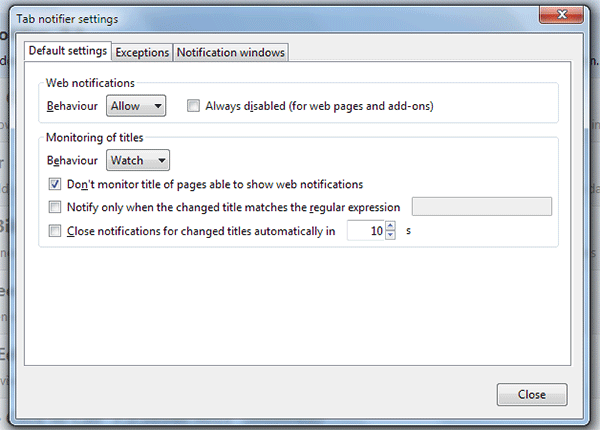
For adjusting the behavior of the add-on, you can go to the Firefox menu and click Add-ons. Select Options beside Tab Notifier. You should get the Settings dialog box.
On the first tab called Default settings you can change the number of seconds that the pop-up boxes appear. The other settings should be left as is if you want the notifications to work as designed.
On the second tab called Exceptions contain the list of any single website where you have customized the settings.

To do this, simply right click anywhere on a website’s page and click on “Configure tab notifier for site.” You can then proceed and adjust the add-on’s functions accordingly only for that website.

On the last tab called Notification windows, you can adjust the appearance of the pop-up box and change the animation speed and other properties of the notifications.
Tab Notifier is a quick fix for anyone who wants to multitask without going through a series of redundant steps. This add-on is not at all intrusive and gives you the freedom to either switch from doing one thing to another or simply carry on. Tab Notifier may be a multitasking tool but one that is helpful rather than distracting.