


Google is the popular option whenever you need to find out information about any subject under the sun. In addition, you can also use the search engine giant to look for any photo ever published online. But what if you already have a photo but desire more information about its source? Fortunately, Google offers a method of reverse-engineering an image search to find out the details regarding when and where an image was originally published, the contents of the image and any other detail found online.
Finding an Image’s Source
1. Go to the Google Image search page.
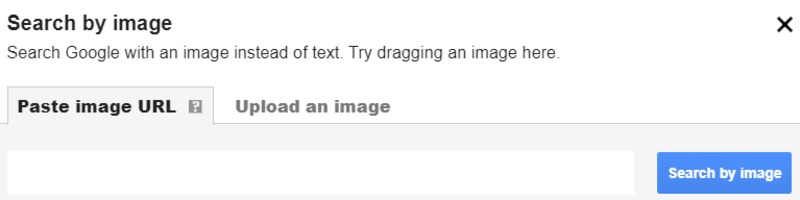
2. Click on the Camera icon that you can find at the right end of the search bar. A new search bar pops up. You will find two options to choose from, either of which can be used to select the image you wish to find the source for:
Paste image URL: Use this option when searching for an image you found online.
If you found the image on a particular website, you can open the image in a new tab by going to the website, right-clicking on the image, and from the drop-down menu that appears, selecting the “Open image in new tab” option.
Once the image is open in a new page, copy the URL of the page and paste it into the search image bar under the “Paste image URL” option and hit Enter.
Google will analyze the image to determine all the available data regarding its previous appearances on the Internet.
Upload an image: Use this option when searching for an image that is saved on your device.
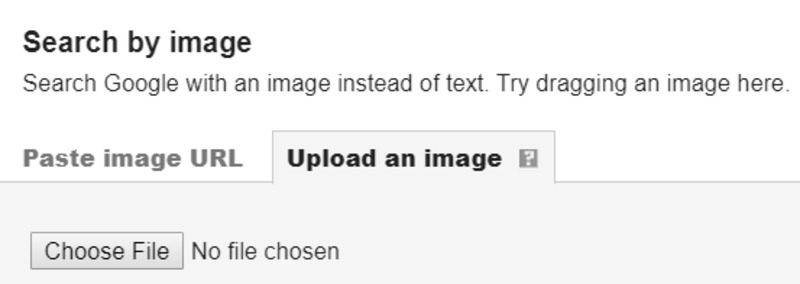
Simply select the “Choose File” tab that is visible under the option. You will be redirected to your own device’s file locations. Go to the folder that carries the image you wish to run a search for and upload it to Google by clicking on the image.
Once the image has been uploaded, the search will start automatically, and within seconds Google will show you the search results relating to the image you uploaded.
Fine-Tuning the Results
Whichever option you use to run an image search, you can fine-tune the results that Google displays. Click on the size and resolution from a selection of images similar to the one you are searching for so you can view the same image in different dimensions, from small to large.
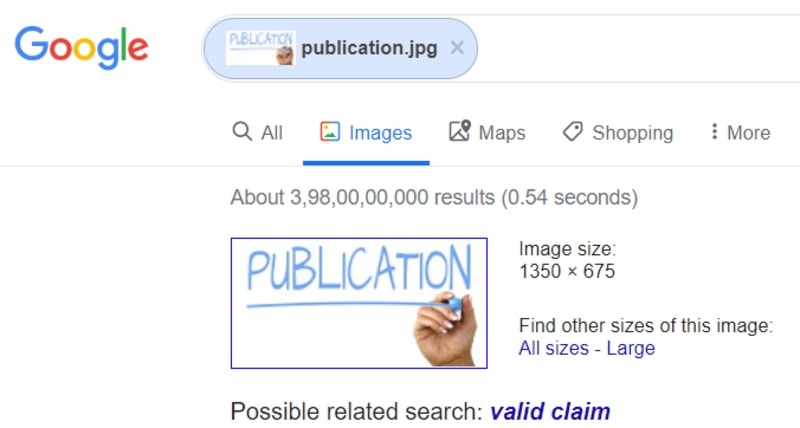
Also, Google will suggest a possible title highlighted in blue for the contents of the image. It will describe the contents or the original title of the image. You can click on this suggestion to run a written Google search for the discovered source of the image.
Finally, if you have a regular need to run searches for images, you can install the Search by Image extension available for Chrome for free. Using this extension, you can run a search for an image’s source simply by selecting the image in Chrome, then right-clicking and selecting the feature with your mouse.
You can also add the feature to the extension bar on Chrome and click on it to add the URL of an image or upload an image and run a search to find out its source information.
Conclusion
With so many interesting images floating anonymously around the Internet, Google’s image search option is a useful tool for tracking the original source of an image or simply finding out greater details regarding the contents of the image.