

Digital banking allows us to access our financial details wherever or whenever we like. No longer do we have to wait for bank statements for our info. With just a few clicks, we can get all the information we need. Of course, internet banking is a lucrative target for hackers and criminals who strive to hack and scam their way into bank accounts.
If you’re concerned about your internet banking security, here are some tips to keep safe online.
1. Use a Separate Password for Your Bank
A guilty pleasure for some, using the same password for every site can be tempting. It can be a hassle to go through a catalogue of passwords wondering which one you used for a specific website. However, in this day and age, database leaks are ripe and frequent, and using the same password over multiple websites can be fatal.
It doesn’t even have to be your bank’s database being targeted; if you’re using another site with the same login details as your bank, your bank account’s security is compromised as soon as that site’s database is leaked. Always use a separate and unique password for your banking system. If necessary, use a password manager to create and manage your password.
2. Enable Two-Factor Authorisation (If Possible)
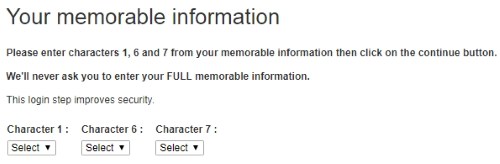
If your bank is up to date on cyber security, they should offer you two-factor authorisation. This is a second line of defense on top of your regular password, such as texting you a code or asking security questions. This bank asks for a second password entered via drop-down menus, so it can’t be picked up by keyloggers:
If you can, enable this feature. It stops a password leak from cracking your account open and keeps you safer.
3. Install a Good Antivirus Solution
While on the topic of keyloggers, a good line of defense on your own PC can help. Make sure you have antivirus installed, and keep it up to date. These days viruses are more focused on harvesting personal information so the developers can make a lot of money. Keeping your PC virus-free means you won’t be leaking personal details to a hacker.
4. Don’t Perform Banking Using Public Connections

If you can, try not to use a public WiFi hotspot to perform your banking. Public hotspots are ripe for hackers to perform “man-in-the-middle” attacks. These attacks intercept data travelling from your device to the Internet and extract personal details and passwords from it. Of course, not every single public WiFi connection will be infested with hackers; however, if your banking needs aren’t urgent, waiting until you’re on a more secure network is ideal.
5. Check to See If the Banking Site Is Legitimate
A while ago we wrote about the dangers of pharming. Its ability to spoof a website, even after you’ve entered the correct URL, can be fatal. When you visit your bank’s site, take a moment to ensure you’re actually looking at the legitimate site. If the URL for your banking site doesn’t have a security certificate or “https://” at the start, when it usually does (and it should!), you may be on a fake site. Don’t enter any personal details into a fake site.

6. Double-Check Email Correspondence
In a similar vein, make sure not to click any links in suspicious emails. A common tactic called a “phishing” attack involves fooling people into believing a fraudulent email has been sent from a legitimate source. This includes fake banking emails which ask for login details so hackers can access your information.
Always double-check the sender of emails from your bank, and hover over (but don’t click!) any links to check where they go. If either look suspicious, don’t click any links in the email. If you’re in doubt the email address is actually owned by your bank, contact the bank before clicking anything.
7. Check in Regularly
While the above tips should keep you safe, there’s no harm in doing some manual investigation yourself. Make sure to keep tabs on your internet banking account. Some banks will inform you of your last login date which will tip you off if someone else logged in using your details. Check your online statement every so often for strange purchases or movement of money that you can’t explain. If you see any weird entries and have no idea where it came from, contact your bank immediately.
Banking on Safety
With the invention of internet banking comes hassle-free money management as well as a whole world of scams, viruses, and attacks. With a few simple tips you can keep your details safe from criminals.
Do you have any tips for safer internet banking? Tell us below!`