


The amount of personal data found online about each one of us is staggering. The information comes not only from what you knowingly put online but also from passive data collection by companies like people search sites.
What are People Search Sites?
People search websites were designed to help marketers advertise to you or let old friends find you. Now the sites are used for much more heinous purposes. Doxxers, criminals, and trolls don’t have to work hard at all to find the information they need to victimize you.
People search directories like WhitePages and Spokeo get their information from public websites such as Facebook and other public sources. These sources include telephone directories, vehicle records, property listings, online directories, business data, blogs, and forums. The sites make this information available in a neat little package that is easy to find with a quick Google Search.
But with so much information out there, how can you possibly get rid of it all? Whether you can completely clear your digital footprint or not, there are some things you can do to make it a lot less visible.
Also read: AI Used to Search for People in Surveillance Videos by Height, Gender, and Clothing
Use Google Search
First, check yourself on Google. It may seem sort of counterintuitive to use a site that many people consider synonymous with privacy problems to check up on your privacy. However, a search on Google can give you direction on where to go first to do damage control. Just search for your name and make a note of websites, social media accounts, and anything else you may want to remove.
You can get rid of a lot of information by first limiting the amount these people search sites can find and removing yourself from those sites entirely.
Lock Down Social Media Sites
First, lock down Facebook, Twitter, and other social media sites that you own. Even if you don’t want to lock everything down completely, you can change some settings and prevent information about you from being referenced by people search sites. Check your settings in each of your profiles. Especially noteworthy is the option “Do you want search engines outside of Facebook to link to your profile?” If this is an option, make sure it’s set to “No.”

Get Rid of Unused Accounts
Getting rid of unused accounts can also lessen the amount of information about you online. Two sites you can use to help you do this are AccountKiller and Deseat.me. AccountKiller has a comprehensive list of account deletion instructions for a large number of sites. Deseat.me finds all your active accounts and takes you through them one by one, so you can decide which ones to keep.
Of course, you can always delete social media sites altogether. But if you can only deactivate them, eliminate as much information as possible. If the account is no longer relevant to you, consider changing the name, personal details and changing photos to generic alternatives.
Remove Your People Search Listings
Once you have removed or reduced the amount of personal information that is available about you online, you can go to the people search sites and delete your data. Unlike signing up for a do-not-call list, there is not a way to do this on all the people searching sites at one time. You must complete each one individually.

The following are some of the top people search sites and the steps you will have to take to opt out from having your information on their website.
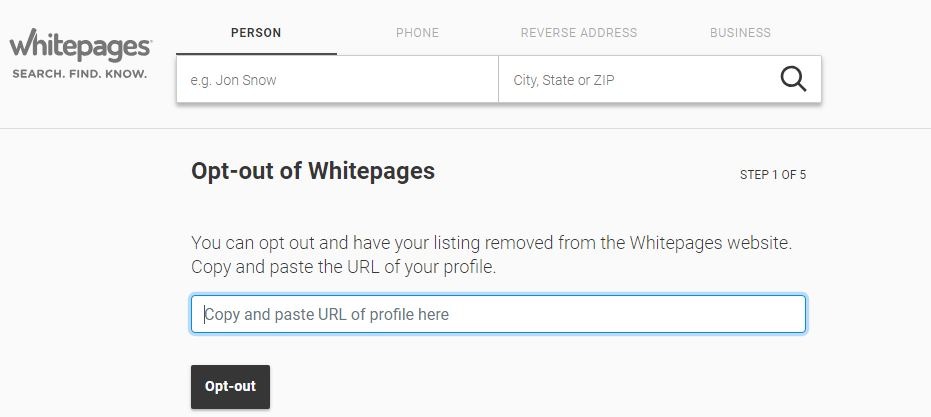
WhitePages
- Search for yourself on the website and copy the URL of your profile.
- Open the opt-out form. Paste the URL in the box.
- Put in your phone number, and WhitePages will ask you to confirm your request with an automated call.
Intelius
- Go to the Intelius opt-out page.
- Take a picture of your driver’s license. Then as required, cross out the photo and your license number.
- Click “Browse” and upload your photo ID.
- Enter your email address to be notified when Intelius has removed your listing.
Spokeo
- Search for your profile on Spokeo and then copy its URL.
- Go to the opt-out page and enter the URL of your profile.
- Enter your email, then click “Send Verification Email.”
- Check your email, and click “Verify Opt Out.”
PeekYou
- Search yourself on PeekYou, and copy your profile’s unique ID, which is the last digits shown in the URL after your name.
- Go to the PeekYou opt-out page, then enter your information.
- Select “Remove My Entire Listing” and your reason for doing so. Enter the unique ID of your profile, and then click “Submit.”
If you find your information on a site not listed here, and I’m sure you will, search “how to remove my information from” and the site name.
Even though it’s difficult to completely erase yourself from the online world, some of the tips in this article will help you reduce the possibility of your personal data being used against you.