


With the rise of cloud computing and complex application architectures, businesses needed more efficient and scalable ways to deploy and manage their software. This led to the use of two popular solutions: Docker and Virtual Machines. While both create isolated environments, they have different approaches. Let’s explore these differences to understand which option best fits your needs.
What Is a Virtual Machine (VM)
A Virtual Machine (VM) is a software-based computer system that runs inside your main computer. It behaves just like a real physical machine but uses your computer’s hardware resources, such as CPU, RAM, and storage, through a layer called a hypervisor.
The hypervisor is the key component that allows multiple VMs to run on a single system. It divides hardware resources among virtual machines and keeps them completely isolated from each other.
Each virtual machine runs its own guest operating system independently of the host system. This means you can run different OS environments on the same computer, like running Linux inside a Windows system, or vice versa.
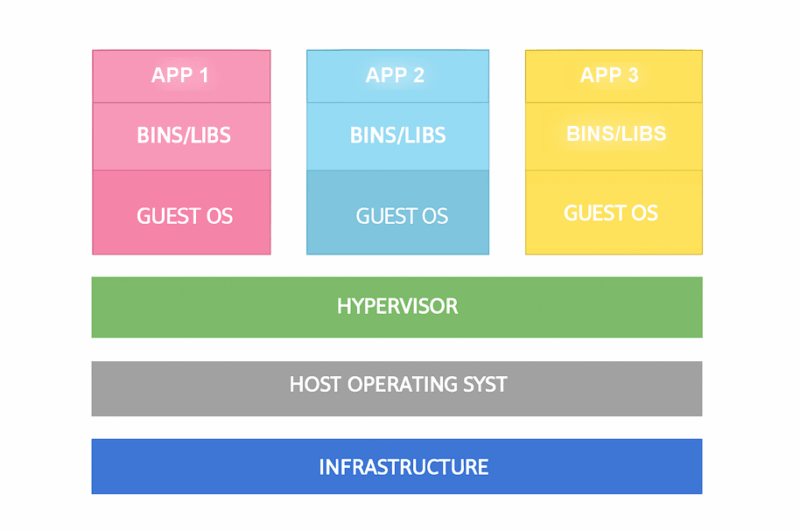
VMs are ideal for testing, development, or running applications that require full operating system functionality and strong isolation.
What Is a Docker Container
Docker is a platform that lets developers bundle an application along with all its required components into compact, portable units known as containers. Each container contains all the essential elements an application requires, including its code, libraries, and system utilities. This allows it to operate consistently across any environment, whether on a laptop, data center, or cloud server.
Docker containers do not rely on their own operating system. Instead, they use the host’s OS kernel, resulting in greater speed and improved efficiency.
At the core of Docker’s architecture, there are three key components:
- Docker Engine is the core software responsible for creating and executing containers.
- Docker Images are the predefined blueprints used to generate containers.
- Docker Hub (or registries) are cloud-based repositories used for uploading, storing, and distributing Docker images.
Docker uses a client-server model. The Docker Client interacts with the Docker Daemon (server) to handle and control containers. Networking and data sharing between containers are handled through virtual bridges and volumes.
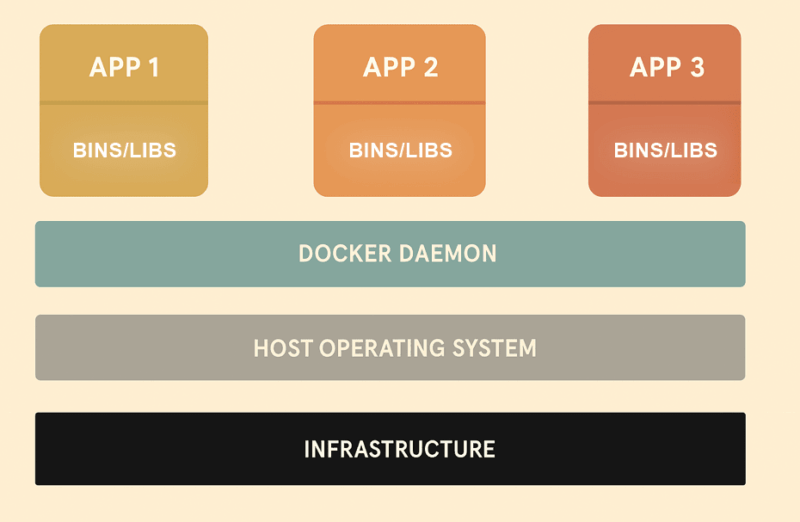
This containerized approach makes Docker popular for microservices, cloud-native applications, and continuous deployment pipelines, as it ensures consistent performance across environments.
Similarities Between Docker and Virtual Machines
Docker and VMs provide isolated environments, which enable multiple applications to run on a single machine without interference. They enhance portability, which allows applications and their dependencies to be packaged and deployed consistently across different systems. Both of them are widely used to improve scalability, streamline testing, and increase deployment flexibility in modern software environments.
Moreover, they support features like system snapshots, replication, and rollback, which make them reliable for managing system states and ensuring recoverability. Apart from this, Docker and VMs allow resource allocation, such as CPU, memory, and storage, to optimize performance for applications.
Overall, Docker and VMs serve the same purpose of providing isolated environments for applications. However, they differ significantly in their architecture and the way to achieve this isolation.
Key Differences Between Docker and Virtual Machines
Let’s compare Docker and virtual machines side by side based on key features.
| Feature | Docker | Virtual Machine |
|---|---|---|
| Architecture | Uses container-based virtualization. It shares the host OS. | Uses hypervisor-based virtualization. Each VM runs its own OS. |
| Boot Time | Starts within a few seconds. | Takes several minutes to boot since each VM loads a full operating system. |
| Resource Usage | Lightweight and efficient. | Heavyweight and resource-intensive. |
| Portability | Highly portable; runs consistently across systems. | Less portable and depends on the hypervisor environment. |
| Virtualization Layer | Uses container-based virtualization at the application level. | Uses full virtualization with its own OS kernel. |
| Execution Engine | Runs on a Docker engine. | Runs using a hypervisor. |
| Security | Relies on the host OS, making it less secure. | Offers stronger security through hypervisor isolation. |
| Performance | Near-native speed. | Slower due to OS overhead. |
| Scalability | Can run many containers simultaneously, even on modest hardware. | Can only run a few VMs on the same machine due to higher resource demands. |
| Ease of Use | Slightly complex; uses both Docker and third-party tools. | Easier to use with simple management tools. |
When to Use Docker
Docker is ideal for developers who need to build, test, and deploy applications quickly. It works especially well with microservices, where each service runs in its own container. It’s also a great fit for CI/CD (Continuous Integration and Continuous Delivery/Deployment) pipelines because it enables fast testing and deployment. Cloud-native applications benefit from Docker too, as it ensures consistent performance across different environments.
For end users, Docker is a great choice when you want to self-host applications on your home server, or quickly run lightweight applications like a personal website, database, or media server without installing them directly on your system. Since containers are lightweight and start up quickly, Docker is best used when speed, scalability, and consistency are your top priorities.
When to Use Virtual Machines
Virtual Machines are ideal when you need to run multiple operating systems on a single computer or test software in different environments. They’re most commonly used for high-security applications that require strong isolation and for running legacy software that depends on a full operating system. System administrators also use VMs to manage complete server environments efficiently.
For end users, Virtual Machines are useful when you need to run apps on a different operating system from your main OS. For example, a virtual machine is great if you want to run a Windows app on a Linux (or Mac) machine. VMs are also ideal for homelab setups where you want full control over the OS, strong isolation between systems, and reliable recovery options.
Wrapping Up
Both Docker and Virtual Machines help developers and organizations isolate workloads and improve resource utilization.
Docker is perfect when you need speed, efficiency, and scalability, especially for cloud-native or microservice-based projects. Virtual machines are better suited for applications that demand strong security and full OS functionality. The right choice depends on your project’s needs, not just the technology itself.
To take your virtualization experience to the next level, check out this guide on improving virtual machine performance.