


When using an identity-obscuring service like a VPN, it’s extremely important to make sure all exterior network traffic is sent through the VPN’s encrypted tunnel. Without doing that, the user’s actual IP address can be leaked, revealing their location, browsing information, and, subsequently, their identity. The most common way this type of leak occurs is through a DNS leak, which occurs when the user’s IP address is exposed via an unencrypted DNS request to their ISP’s DNS server.
What is DNS?
DNS, or Domain Name System, is used to translate typed URLs to their numerical IP addresses. Just about every internet service provider includes a DNS server in their infrastructure. This allows users of their service to make DNS requests from a geographically local server, helping cache frequently visited website identities and permit fast communication. Many third-party DNS services also exist: the most popular services are from Cloudflare and Google.
DNS has been in the news for two main reasons: denial-of-service attacks through the DNS protocol and draconian restrictions of internet freedoms by some countries. Hackers can use DNS protocol to force a huge variety of traffic to a given domain, resulting in a denial of service attack that doesn’t require a bot network. Countries like Iran and Turkey have periodically used the DNS protocol to restrict access to some or all websites by local users. By using public DNS services like Google, Internet users in those countries are frequently able to circumvent such regulations.
How Does a DNS Leak Happen?
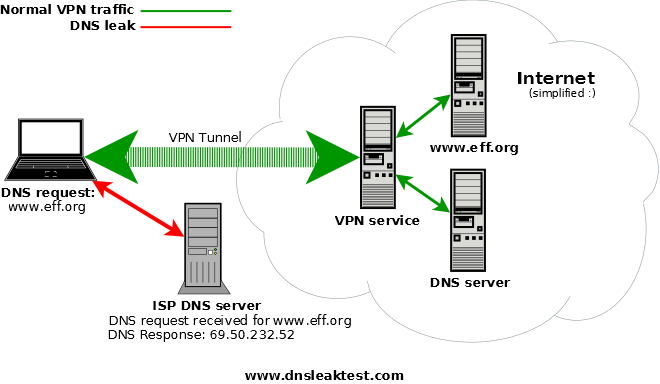
When connected to a VPN, a user’s external network traffic is sent through the VPN’s encrypted tunnel. This can obscure both the content and origin of traffic, helping users stay safe and anonymous online. All DNS requests should also be sent through the encrypted tunnel to the VPN’s DNS servers. If the VPN is configured improperly, unencrypted DNS requests can be sent to the user’s ISP’s DNS server. As a result, the user’s browsing information and IP address are sent in the clear. This can be observed by advertisers, eavesdroppers, and anyone else who might be interested in listening.
If you’re concerned that a DNS leak is happening on your system, first connect to your VPN, then use a site like DNS Leak Test to determine what your DNS address is.
Click “Standard Test” or “Extended Test” on the homepage and look at the location and IP address related to your DNS requests.
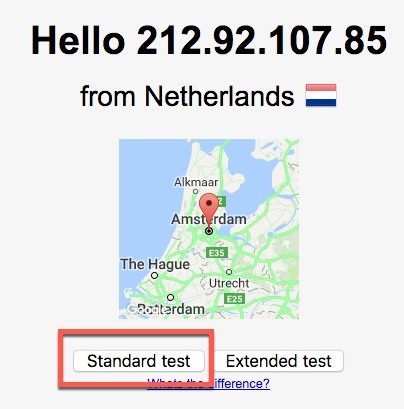
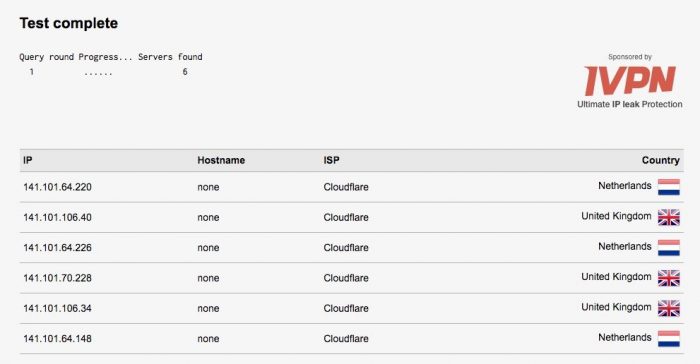
If you see your actual location and IP address rather than that associated with your VPN, you have a DNS leak.
Fixing a DNS Leak
It’s crucially important that any discovered DNS leaks are fixed. Otherwise, your VPN will offer little to no identity protection. Depending on the software you’re using to connect to the VPN, there are different ways to fix the problem.
OpenVPN 2.3.9+
With versions of OpenVPN greater than 2.3.9, users can set an option to only permit DNS requests through the VPN.
1. Open the .conf or .ovpn file for your connection.
2. Add the text below on a new line:
block-outside-dns
Windows
DNS leaks can also be addressed through Windows network settings.
1. Switch from using DHCP to a static IP address, which allows you to specify your own DNS settings.
2. Use an open DNS service like one of the following for your DNS settings:
- Open DNS (preferred
208.67.222.222alternate:208.67.222.220) - Google (preferred
8.8.8.8alternate8.8.4.4) - Cloudflare (preferred
1.1.1.1alternate1.1.0.0)
You can also manually type in the IP address for the DNS server used by your VPN.
Routers
DNS settings can also be adjusted on most routers. You’ll want to set that to a public DNS like Google or Cloudflare, as mentioned above.
Conclusion
Protecting DNS requests is crucially important for maintaining the shield of privacy provided by VPN services. If you have a DNS leak due to shoddy VPN operation, you’ll want to change VPN services as soon as you can. Poor handling of DNS requests also likely indicates poor handling of core VPN functionality.