

As people become wiser to how malware works, malicious developers have had to up their game in order to trick people into downloading their payloads. One of the more interesting methods that has arisen in the past few days is a type of malware that starts off changing how a desktop shortcut works so that it executes a file. It’s a very interesting attack vector which people should definitely keep an eye out for in the future!
How Desktop Shortcuts Work
To understand how the malware works, we need to first break down what a shortcut is. If you install a piece of software on your PC, it typically puts itself in a folder such as Program Files. When you want to access it, you need to run the executable file inside the software’s folder within Program Files. Having to navigate through a network of folders every time you want to run software is a real chore! Fortunately, shortcuts were made to help speed up the process.
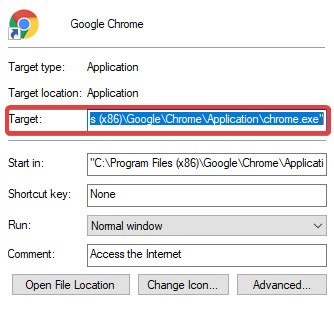
Shortcuts are just as the name says: a shortcut to the executable’s home on your computer. When you double-click a shortcut, it goes into the folders and runs the executable for you, so you don’t need to do any work. You can see what a shortcut will activate by right-clicking it, clicking “Properties” and looking in the “Target” box.
How the Attack Works
This particular strain of attack begins its life as a Word macro. Somehow you’ll have downloaded a document in Russian with a photo of a house on it, but theoretically, this macro could be put into any document.
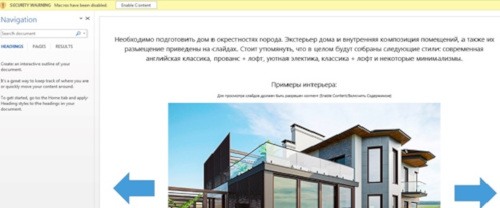
Image of infected document from Trend Micro.
Once the macro activates, the malware looks for specific shortcuts on the desktop. This includes Chrome, Firefox, Internet Explorer, Opera, and Skype. Once it finds one, it downloads a malicious executable file, then changes the target of the shortcut it found to point at the malicious file.
When the user double-clicks the infected shortcut, they end up running the infected target, and more malicious code is downloaded. Part of the code includes setting up an Ammyy Admin, a remote desktop software that malware developers use maliciously to gain control of people’s computers. It also harvests some system information and sends it via email to the attacker.
How to Stop It
Of course, constantly checking your desktop shortcuts for altered targets is not ideal! The best defense here is to not download shady documents, let alone running macros off of them. Always double-check that the document you’re downloading is coming from a good source.
Of course, this may be the start of something larger as people take on this new attack vector. In this case a strong antivirus should hopefully detect the malicious executables being installed and warn you of them before they can do any damage. There are many free antiviruses available that do a stellar job of protecting your PC despite their nonexistent price tag.
Cutting Out Shortcut Malware
The prospect of your desktop shortcuts suddenly morphing into malware activators can be distressing, but getting the malware onto your system in the first place involves a lot of steps that should never be done in general. Now you know how to dodge this attack and can keep aware of it in the future should it return.
How do you feel about this malware attack vector? Does it worry you? Let us know below.
Image credit: Desktop – before