


When you visit a site, it will often leave a cookie in your browser so it knows who you are when you return. Most of the time it is safe to leave a cookie in your browser, and it is quite essential for the functioning of the Web. However, there are times when you just want to delete a site-specific cookie, i.e. a cookie left behind by a specific site, maybe for privacy reasons or because a web developer needed to test a site for a new user. Whatever the reason, here is how you can delete site-specific cookies in Chrome.
Deleting Site-Specific Cookies from Chrome Settings
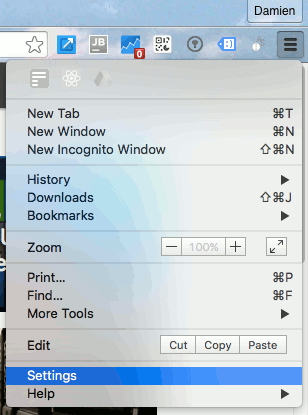
1. In Chrome go to the Settings page by clicking the hamburger button and select “Settings.”
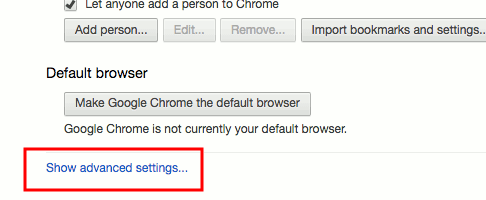
2. In the Settings page scroll all the way down and click “Show advanced settings…”
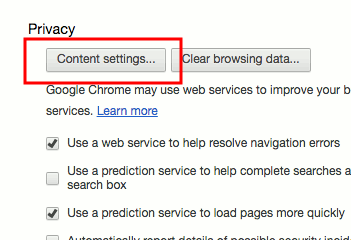
3. Under the “Privacy” section click the “Content settings…” button.
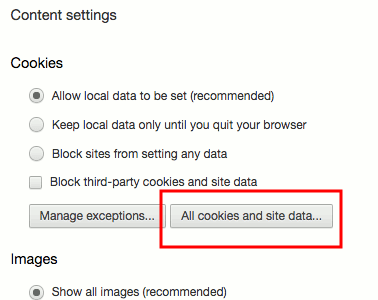
4. In the popup window click the “All cookies and site data…” button.
5. Now, scroll through the list to find the URL of the site where you want to remove the cookies. If the list is long, you can search using the input field at the top-right corner. Once you have found the URL, select it and click the “x” at the right-hand side. This will remove all the cookies for this site.
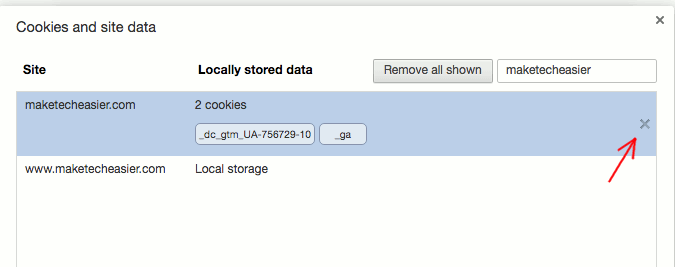
Once you are done, simply close all the windows to return to your Chrome browser.
Deleting Site-Specific Cookies with Cookies Extension
If you have a need to delete site-specific cookies often, the above steps might be too troublesome for you. A more convenient way is to use the Cookies extension for Chrome.
1. Install the Cookies extension from the Chrome web store.
2. Once installed, open up the Cookies page, and you should see all the cookies stored in your browser sorted according to their associated URLs. Scroll through the list to find the site where you want to remove the cookie.
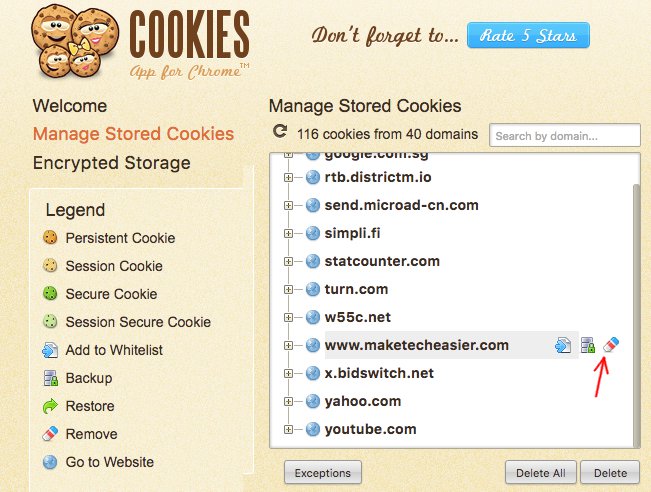
3. Once you have found the site, select it and click the Eraser icon on the far right. This will remove the site-specific cookies for this URL.
The Cookies extension also comes with many more abilities such as changing the value of the cookies, whitelisting a cookie, and exporting to encrypted storage.
If you want to delete site-specific cookies, simply follow the above steps, and you can get it done quickly and easily.