
Customize Google’s New App Launcher and Add Custom Shortcuts

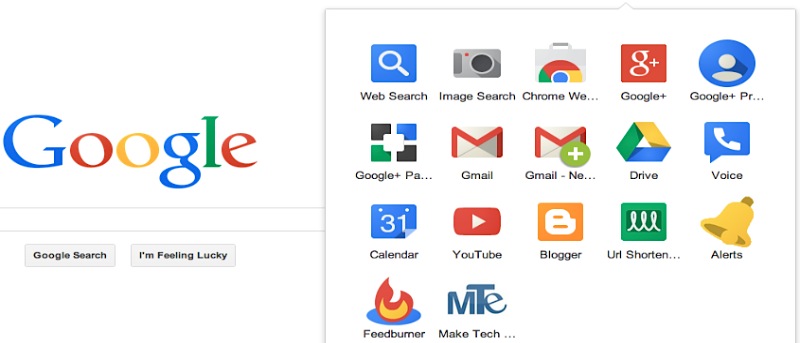
By now, you’ve probably noticed Google’s new App Launcher, which has replaced the black navigation bar that used to run along the top of most Google products. This App Launcher gives you quick access to Google’s top products like Google+, YouTube, Maps, 4Drive, Gmail and Calendar.

For now, this 3×3 grid is not customizable, which for some is extremely frustrating. What if you rarely or never use many of the “apps” on the launcher? There’s no way to remove them by default. Plus, what if you’d like to add your own custom shortcuts? That cannot be done either.

Luckily, the App Launcher Customizer for Google changes all of that. It’s a Google Chrome extension that allows you to customize the App Launcher and add more than 170 Google shortcuts. Additionally, you can also create custom shortcuts to any web page that you’d like.

To get started, install the extension and visit your favorite Google site (ie. Google Search). Click on the App Launcher icon and you’ll now see that it is a 3×4 grid, plus there should be a “configure” link at the bottom of the launcher.
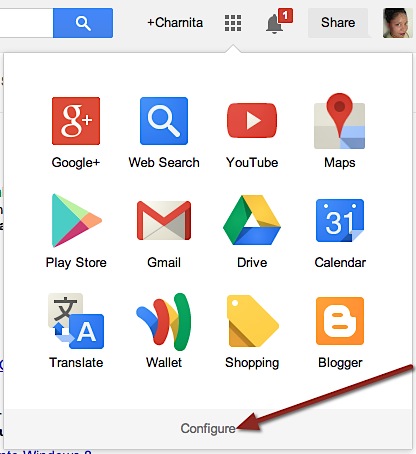
The Google App Launcher is now 3x4 with a configure link.

When you click on “configure” a new options window will pop-up. Here you can and and remove services from the launcher (via drag-and-drop), rearrange your chosen services and add custom shortcuts (you can even add an optional tooltip and/or icon). You’ll also notice that if once you go past 12 services, your grid will begin to grow to accommodate your new “apps” – good bye multiple pages!
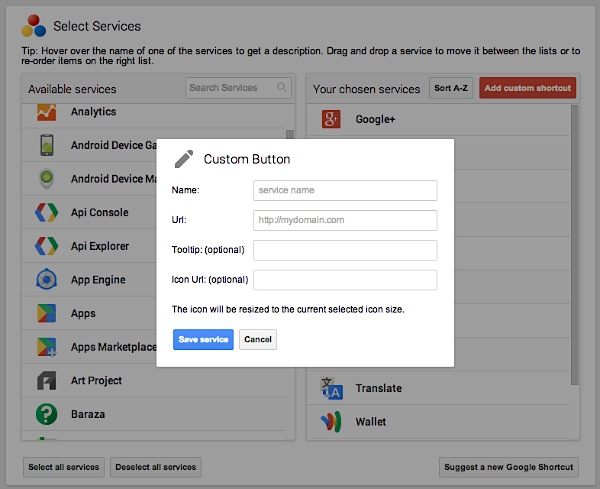
Add and remove services to Google's App Launcher, and add custom shortcuts.

The process is pretty straightforward and in a matter of minutes you’ll have your very own custom Google App Launcher.

Note: If you’d like to add Make Tech Easier to your App Launcher for quick access, here is a link to our icon – https://maketecheasier.com/wp-content/uploads/2013/10/mte-icon.jpg.

Subscribe to our newsletter!

Our latest tutorials delivered straight to your inbox

Charnita Fance Avatar

Read next

Wi-Fi doesn’t actually slow down when a café gets crowded — the signal is fine, but every device has to wait its turn to speak on the same frequency, and the polite queuing is what you feel as lag
In 1988, a 23-year-old Cornell graduate student named Robert Morris released a self-replicating program to measure the size of the internet — within hours it had crashed roughly 6,000 of the 60,000 machines then online, and computer security became a field
In July 2026, Psy’s Gangnam Style passed six billion YouTube views, fourteen years after its horse-riding dance became the platform’s first billion-view video and long after engineers had replaced a counter designed to stop at 2,147,483,647
Suzanne Simard sealed paper birch and Douglas fir seedlings inside plastic bags, fed them carbon-14 and carbon-13 dioxide, and nine days later found carbon had crossed between species through fungal threads in the British Columbia soil beneath her boots
A species of jellyfish called Turritopsis dohrnii can revert its adult cells back to a juvenile polyp stage when injured or starving, effectively restarting its life cycle, and biologists have so far failed to identify any natural limit to how many times it can do this.
A Japanese man named Jiroemon Kimura, who lived to 116, was born in 1897 when Queen Victoria still ruled and died in 2013, meaning a single human life personally overlapped with the invention of the airplane, the atomic bomb, the internet, and Instagram
The Hollywood sign originally read HOLLYWOODLAND when it was built in 1923 as a real estate advertisement for a housing development, and it was only meant to stand for 18 months, but nobody ever got around to taking it down and the city eventually adopted it as a landmark
Almost all of the world’s internet traffic does not travel by satellite but through fibre-optic cables lying on the ocean floor, a hidden web of wires crossing the deepest parts of the sea to connect the continents.