

For any website, URL structure is one of the most important factors for good SEO ranking. However, there are times when a webmaster didn’t start his/her website with proper URL structure and wants to change it later on when the site becomes popular. If done improperly, this can lead to tons of 404 errors and a drop in SEO ranking.
In this quick guide, let us see how to change WordPress permalink structure from date or category-based to post name-based URLs with proper redirects from old URLs to new URLs.
Note: This guide only covers the scenarios for WordPress installed in the root directory and not for the WordPress installed in the sub directory. It is also assuming that you are using Apache as your web server.
Change Permalink Settings in the WP Dashboard
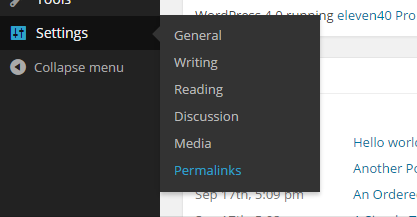
The first thing you need to do is to change the WordPress permalink structure to “Post name” in your WordPress dashboard. To do that, open up your WordPress admin dashboard and navigate to “Permalink” (settings -> permalinks).
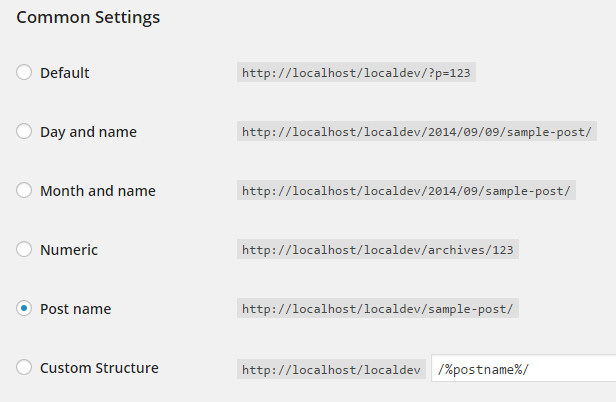
Here in this screen, select the radio button “Post name” under common settings and click on the save changes button to apply the changes.
Once you have done that, check if all the posts and pages are working as they should without any errors whatsoever. If everything is fine at this point, you can head to the next step of creating .htaccess rules for proper redirects.
Creating .htaccess Rules
Now the second step is to add the below redirect rules to your .htaccess file located in the root directory so that all the old URLs will be properly redirected to the new URLs. That way you won’t lose any traffic or the search engine rankings. Just go through the scenarios below, find the ones you were using in the past and copy paste the .htaccess rule.
Note: If you are using “www” in front of your domain name, then add that “www” to the .htaccess rule you are going to use.
Remove “/year/month/day” from the URL
If your old permalink looks something like this,
http://example.com/2014/08/21/post-name
then use the redirect rule below to redirect this old URL to the new post-name only URL.
# Remove year and day from permalink structure
RedirectMatch 301 ^/([0-9]{4})/([0-9]{2})/([0-9]{2})/(.*)$ http://example.com/$4
Remove “/year/month” from the URL
If your old permalink looks something like this,
http://example.com/2014/08/post-name
then use the redirect rule below to redirect this old URL to the new post-name only URL.
# Remove year and month from permalink structure
RedirectMatch 301 ^/([0-9]{4})/([0-9]{2})/(.*)$ http://example.com/$3
Remove “/category/” from the URL
If your old permalink looks something like this,
http://example.com/category/post-name
then use the redirect rule below to redirect this old URL to the new post-name only URL.
# Remove category from permalink structure
RedirectMatch 301 ^/([^/]+)$ http://example.com/?p=$
Redirect “/archive/post-id” to Post Name Structure
If your old permalink looks something like this,
http://example.com/archive/123
then use the redirect rule below to redirect this old URL to the new post-name only URL.
# Redirect archive to post name structure.
RedirectMatch 301 ^/archives/(\d+)$ http://example.com/?p=$1
That’s all there is to do, and it is that simple to change permalink structure for an already established website. Hopefully that helps, but do comment below if you face any problems while changing or redirecting the URLs.