

YouTube is one of the biggest sites in the world (2nd biggest, to be precise). The vast repository of videos about everything is so integral to our lives, in fact, that it’s grown to become a verb unto itself, as “YouTubing” something has become synonymous with “watching a video” of something.
But YouTube is not all sunshine and silly videos. There are a lot of poorly-rated, bad and even fake videos out there that you don’t realize are a sham until you begin to watch them, wasting your valuable time. Here are a few tweaks for YouTube that will ensure you don’t start watching worthless videos anymore.
1. See Video Ratings Before You Watch Them
One of the bigger oversights (or perhaps intentional omissions) on YouTube is the fact that you can’t see the ratings of a video before you actually click through and start watching it. So if a video isn’t what it claimed to be and lured you in under false pretenses, you’ll come away feeling resentful and helpless.
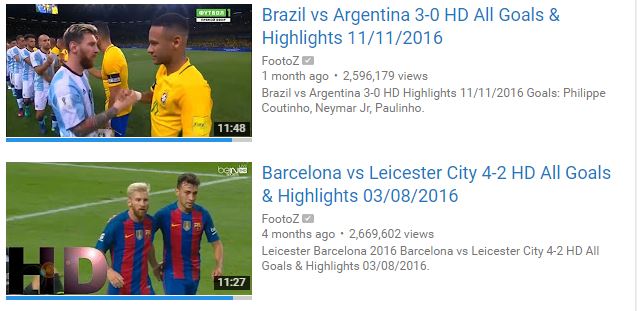
That’s where the Ratings Preview for YouTube extension comes in. This life-saving extension for Chrome and Firefox probably makes my top 10 of all time for the simple reason that it displays a thin bar under video thumbnails showing the likes/dislikes of the video. Once you’ve installed the extension, it should appear as an icon in the top right corner of your browser.
It will work automatically, though if you click the icon, you can go into its options and tweak various things such as what the bar looks like and how thick it is. Bear in mind that the bar sometimes appears a couple of seconds after the rest of YouTube has loaded, so don’t panic if you don’t see it instantly!
2. Block Channels from Appearing in Your Recommendations
If you’ve clicked on one or two fake or dodgy videos in the past, then YouTube foolishly assumes that you’re into these kinds of videos now and that you want to see more of them. This means they’ll start appearing in your Recommended Videos list.
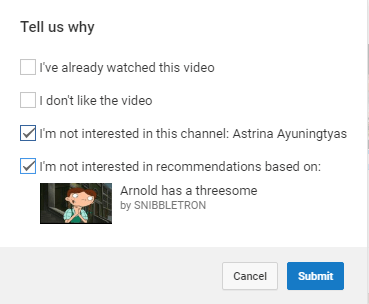
The first step to not seeing videos from such channels is by clicking the menu icon next to the thumbnail of the video in your ‘Recommended’ list, clicking “Not interested,” then “Tell us why” and ticking the bottom two boxes. Do this for all the videos in your recommended list.
Next, to prevent similar videos as those from appearing, click “Recommended” on your YouTube homepage, then “Based on your Watch History” to see your entire watch history. This is what YouTube bases your recommendations on, so you can remove specific unwanted videos from your watch history by clicking the cross next to them, and they’ll no longer affect your future recommendations.
It’s good practice to do this kind of purge at least every couple of months so your YouTube homepage remains free of the stuff you don’t want.
3. Video Blocker Extension
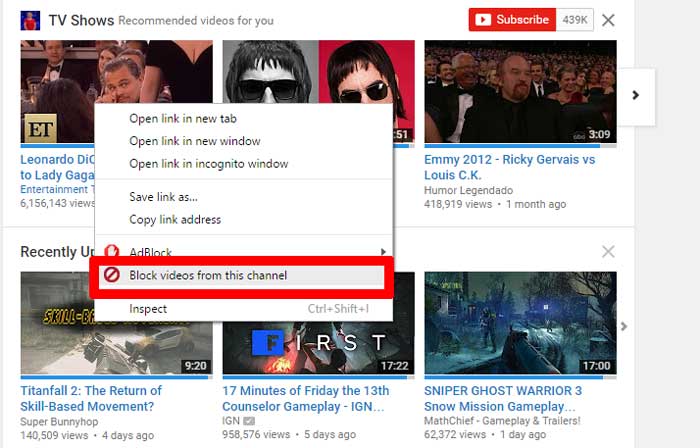
This comes a little lower down the list because users have been reporting mixed results about its functionality. But this extension for Chrome works very well for me and brings up an option to instantly block certain YouTube channels simply by right-clicking a thumbnail featuring one of their videos and selecting “Block videos from this channel.” This will also block that channel from appearing in future search results.
Like I said, though, while this works great for me, it’s not 100% reliable for everyone. For a more in-depth guide about this extension, check out our article about it.
Conclusion
All of these tricks have helped me fine-tune my YouTube experience to be smooth and free from unwanted videos. These tools are so simple, in fact, that you wonder why YouTube can’t just build some of them into the website by default, though in a world where user clicks count for a lot, YouTube presumably isn’t too interested in helping us cut down on the clicking. Get these tools, and don’t play by their rules!