
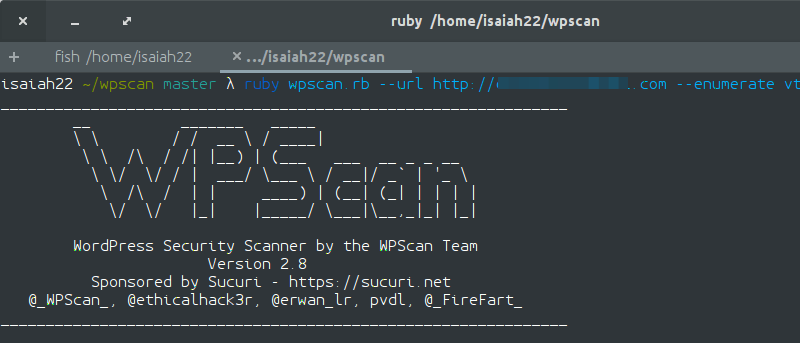

WPScan is a Ruby-based WordPress security scanner that is run from the command line and used to detect vulnerabilities on a WordPress installation.
While there are plenty of plugins out there that do the same job, it makes a lot of sense for server administrators to scan their installations from the backend and not the frontend, so WPScan could be really handy for them and people who just love the terminal.
Installation
WPScan is shipped by default on a couple of Linux distributions such as Kali Linux and BlackBox Linux. You can also install on the popular distros such as Ubuntu and Arch Linux.
Windows is not supported, so if you’re hoping to make use of WPScan, your server has to be running either Linux or Mac OS X.
While WPScan installation is fairly simple, there are a couple of prerequisites and dependencies to set up before attempting installation.
Prerequisites:
- Ruby – v1.92 and later (Recommended 2.2.3)
- Curl – 7.21 and later (Recommended latest)
- RubyGems – Recommended latest
- Git
Installation on Ubuntu
Since WPScan is hosted on Git, we must install Git first by running the following command:
sudo apt-get install git
Then we need to install the needed dependencies for WPScan,
sudo apt-get install libcurl4-openssl-dev libxml2 libxml2-dev libxslt1-dev ruby-dev build-essential
and then clone WPScan from Git.
git clone https://github.com/wpscanteam/wpscan.git
Enter the newly-created WPScan directory and use bundler to install the necessary Ruby gems
cd wpscan
sudo gem install bundler && bundle install --without test development
Installation on Arch Linux
You can run the following commands in turn to get WPScan on Arch Linux. Make sure Ruby and Git are installed first though.
pacman -Syu ruby
pacman -Syu libyaml
git clone https://github.com/wpscanteam/wpscan.git
cd wpscan
sudo gem install bundler && bundle install --without test
gem install typhoeus
gem install nokogiri
Using WPScan
WPScan is very simple to use. All you need to do is type in the appropriate commands for enumerating plugins and themes or for performing non-intrusive checks on your WordPress website.
Make sure you are in the WPScan directory before attempting to use the tool:
cd wpscan
To enumerate all your installed plugins, run the following command:
ruby wpscan.rb --url http://yoursiteurl.com --enumerate p
Replace “http://yoursiteurl.com” with your website URL. The -enumerate p flag stands for enumerate plugins.
To display only vulnerable plugins, use:
ruby wpscan.rb --url http://yoursiteurl.com --enumerate vp
Sample output:
[!] Title: W3 Total Cache - Remote Code Execution
    Reference: https://wpvulndb.com/vulnerabilities/6622
    Reference: http://www.acunetix.com/blog/web-security-zone/wp-plugins-remote-code-execution/
    Reference: http://wordpress.org/support/topic/pwn3d
    Reference: http://blog.sucuri.net/2013/04/update-wp-super-cache-and-w3tc-immediately-remote-code-execution-vulnerability-disclosed.html
    Reference: https://cve.mitre.org/cgi-bin/cvename.cgi?name=CVE-2013-2010
    Reference: https://secunia.com/advisories/53052/
    Reference: http://osvdb.org/show/osvdb/92652
    Reference: https://www.rapid7.com/db/modules/exploit/unix/webapp/php_wordpress_total_cache
    Reference: https://www.exploit-db.com/exploits/25137/
[i] Fixed in: 0.9.2.9

[!] Title: WordPress SEO by Yoast
From the sample output above, we can see that WordPress SEO by Yoast is vulnerable to Blind SQL injection and the W3 Total Cache is vulnerable to Remote Code Execution. Both vulnerabilities have been patched in this case, so it is recommended to update the plugins.
In addition, WPScan can be used to check all installed themes
ruby wpscan.rb --url http://yoursiteurl.com --enumerate t
or just vulnerable themes.
ruby wpscan.rb --url http://yoursiteurl.com --enumerate vt
In the same manner, you can perform non-intrusive checks on your installation with the following command:
ruby wpscan.rb --url http://yoursiteurl.com
Finally, to update WPScan’s database, run:
ruby wpscan.rb --update
Conclusion
The security of your WordPress website is very important, and tools like WPScan are extremely helpful for running checks to help find and fix vulnerabilities and prevent hackers from exploiting them.
Have you used WPScan? Share your experiences in the comments section below.