
How to Add Google Analytics to Your WordPress Dashboard

Are you constantly checking your Google Analytics data and looking for an easier way to keep up with it? If so, the Google Analytics Dashboard plugin for WordPress will be perfect for you.

The plugin will give you access to your Google Analytics data right from your blog’s dashboard, thus saving you time. Additionally, the plugin also allows you to embed parts of your data into a blog post or anywhere else within your WordPress theme.

For now, I’m going to show you how to add Google Analytics to your WordPress dashboard.

1. Before installing the plugin, you should already have your Google Analytics tracking code installed on your blog. You can either get this from your Google Analytics account or use a WordPress plugin like Google Analytics for WordPress to insert the code for you.

2. Go to your installed plugins and click on “Add New” at the top of the page. Alternately, you can also go to the “Add New” submenu under the Plugins menu.

3. Search for the “Google Analytics Dashboard” plugin, install and activate it.

4. Go to the “Google Analytics Dashboard” submenu under your Settings menu. You’ll need to go here to login into your Google account using OAuth and grant the plugin access to your Analytics account.
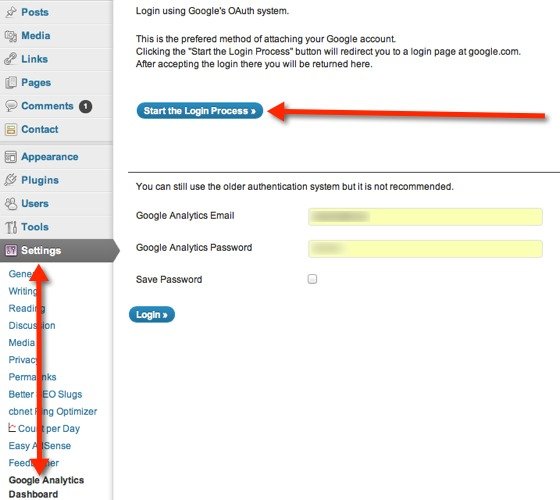
Google Analytics Dashboard plugin settings - login via OAuth.

5. Once directed back to your blog, you’ll see the plugin’s settings. Choose the appropriate Google Analytics profile that you want to track on your dashboard and customize the rest as you’d like. You can also choose which user roles can view the Google Analytics data.
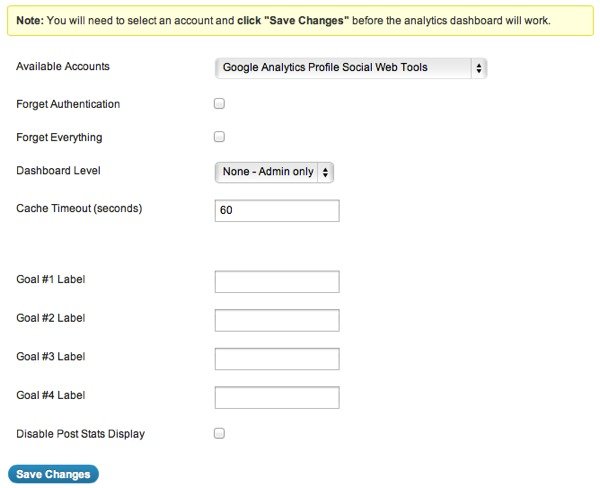
Choose your Google Analytics profile to monitor on your WordPress dashboard.

6. It may take a while for your data to show up, so you may need to check back later. However, the final result is the screenshot you see below.
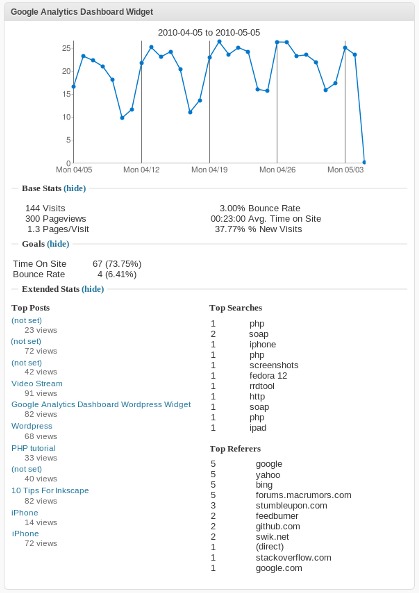
Google Analytics Dashboard widget in action on WordPress.

All done. Now you can see a glimpse of your Google Analytics data whenever you want.

Subscribe to our newsletter!

Our latest tutorials delivered straight to your inbox

Charnita Fance Avatar

Read next

Suzanne Simard sealed paper birch and Douglas fir seedlings inside plastic bags, fed them carbon-14 and carbon-13 dioxide, and nine days later found carbon had crossed between species through fungal threads in the British Columbia soil beneath her boots
A species of jellyfish called Turritopsis dohrnii can revert its adult cells back to a juvenile polyp stage when injured or starving, effectively restarting its life cycle, and biologists have so far failed to identify any natural limit to how many times it can do this.
A Japanese man named Jiroemon Kimura, who lived to 116, was born in 1897 when Queen Victoria still ruled and died in 2013, meaning a single human life personally overlapped with the invention of the airplane, the atomic bomb, the internet, and Instagram
The Hollywood sign originally read HOLLYWOODLAND when it was built in 1923 as a real estate advertisement for a housing development, and it was only meant to stand for 18 months, but nobody ever got around to taking it down and the city eventually adopted it as a landmark
Almost all of the world’s internet traffic does not travel by satellite but through fibre-optic cables lying on the ocean floor, a hidden web of wires crossing the deepest parts of the sea to connect the continents.
People who flip their phone face down on every table aren’t being secretive. They figured out that staying interruptible meant handing their time to whoever rang first
Twitch vs. Facebook Gaming vs. YouTube Gaming: What’s the Best Live Game Streaming Platform?
Chrome Extensions Ownership Transfer is a Direct Threat to You: How to Stay Safe