

Have you ever tried to access a website only to get the error message “Service is Unavailable?” It can be very frustrating, especially when you are in urgent need of information that you had earlier found on that website. The good news is nothing vanishes completely from the Internet. So whether a website has been down for some minutes or inaccessible for months, there are some ways that you can still view its content.
If you are trying to access a website and it won’t load but others can access it, it could be due to a number of reasons. The first thing to do is determine which end is the issue. Here are three possibilities:
- Your ISP (Internet Service Provider)
- Your terminal
- The website servers could be down
If the issue is with the website servers, there is nothing more you can do but wait. However, you can still view your recently opened pages through the various options described below.
How to access a web page when it’s down
Option 1: Google cached pages
Google makes a cached version of every web page you visit, and if the site is inaccessible, Google lets you access the cached version of that page instead. So if you are trying to access a website that isn’t available from Google search, you can easily access its cached copy. All you have to do is type the site’s URL prepended with “cache:” in the Google search box. It should like this:
cache: https//maketecheasier.com
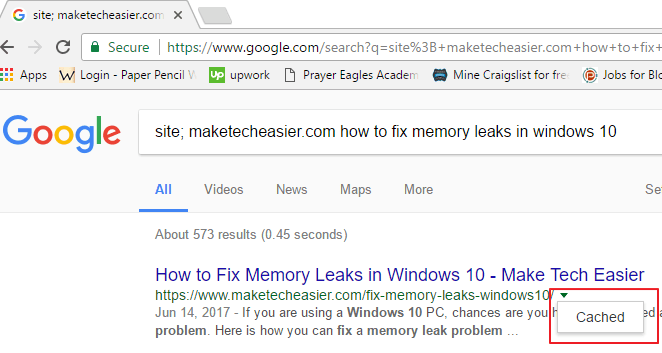
This will load the last cached version of that page. Alternatively, when a site does not load, you can hit the back arrow on your browser to return to the search results. If you had opened that page before, you should see a down arrow towards the end of the page’s address. Click the arrow and then hit “cached,” and you’ll be able to view the cached copy.
If the page is taking too long to load, you can view the “Text-only version” which will open instantly but won’t display images. To do so, click on the “Text-only version” link at the top of the cached page. This comes in handy especially when your Internet is slow, or the website’s server is down.
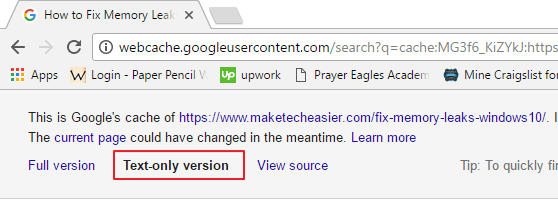
With this method you will also be able to see the date and time when Google created the cached copy.
Option 2: Internet Archives Wayward Machine
Another place you can find old versions of web pages is the Internet Archives Wayback Machine. While the Wayback Machine might not display as much as you would find in Google’s cache, it does allow you to go further in time to see how a website looked years ago.
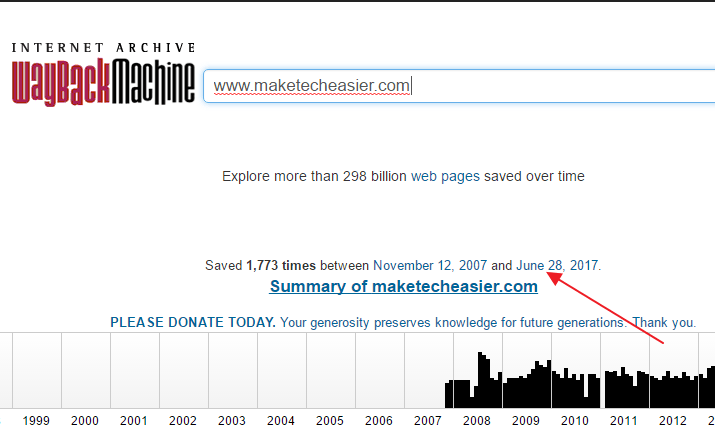
To use this tool, simply head over to the Internet Archives Wayback Machine page. Enter the URL of the website you want to view or the address of a web page you want to visit and hit enter.

If you wish to see the most recently saved copy of a page, click the date at the top of the website’s archived page summary.
To view an older version, just select the year and date on the calendar to see how the website looked on that date. After it opens, you can also click on the links on that page to see how individual pages looked.
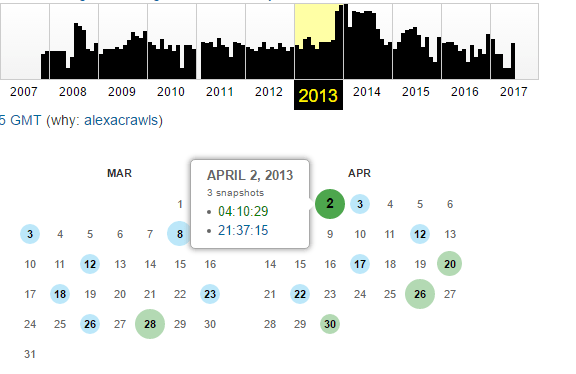
The more popular the site is, the higher the number of archived pages that this tool will provide. With this tool you can access a website if it’s down at the moment. However, if you are interested in fresh content, the Wayback Machine won’t help.
Conclusion
With the cached version, you won’t be able to access a web page as you could if it were up. However, if you are looking for an old post and the site is inaccessible, a cached copy of the page can prove to be very useful. But if the website is blocked, you may have to get your hands a little dirty. Check out our article on how to access blocked websites.