


WiFi calling can be a real lifesaver when your cellular phone network doesn’t work. It’s a great plan B to have if you need to always be available, whether it’s for work or personal reasons.
You can also save some serious cash, especially if you’re overseas. You won’t have to deal with roaming or those annoying international charges that are usually ridiculously high.
There are other benefits to WiFi calling as well. Once you discover what they are, you’ll wonder how you ever did without it.
What is WiFi Calling?

WiFi calling is just what the name indicates, but it doesn’t require any special logins or apps. It allows you to either call or text using any available WiFi network instead of your cellular network. You can make a call to any number by using any WiFi network.
Keep in mind that carriers such as T-Mobile, Sprint, and Verizon will charge you if you are calling (even over WiFi) an international line that has a number based in the United States.
At least with Sprint, using WiFi calling won’t go against your minute limits on your plan. You can still use apps while on a call, something that is definitely a plus. Check with your mobile carrier to see if they support it, and if they do, all calls and messages will appear like they always do on your logs.
How to Enable WiFi Calling on Android Smartphones
You may be asking yourself how you can know if your smartphone supports WiFi calling. If you have a recent high-end phone, there is a good chance that your phone supports it.
The steps to enable WiFi Calling on most phones are similar, but the first steps are always the same.
Go to “Settings” and look for the “WiFi Calling” option. If you don’t see it, try typing into the search bar. The choice to tap to turn it on will be disabled by default. If you see a “Location Services Disabled” window pop up, select “Enable” and turn on Location.
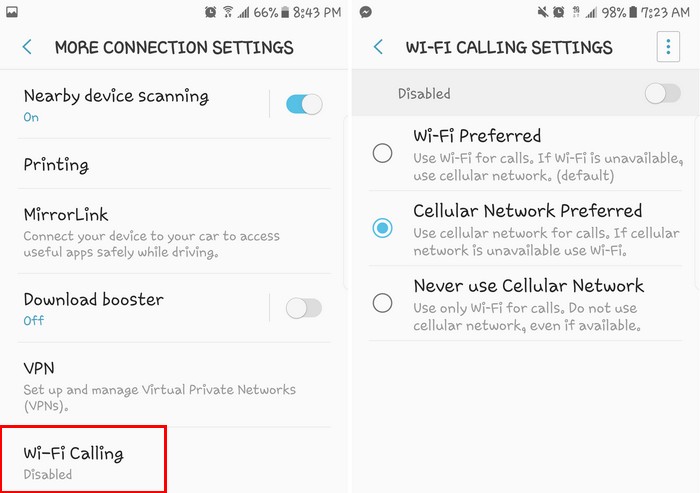
If you notice that you’re having trouble with WiFi calling, it could be because the WiFi connection is using an old router with standards older then 802.11. Just switch to a router that supports either the 802.11n or 802.11ac standards, and everything should be up and running again.
You’ll know that you’re using WiFi calling because the icon of a phone with a WiFi signal coming out of it will be turned on. If you move out of the WiFi range, the call may be automatically switched to a cellular network, but this is something you should check with your mobile carrier.
How to Turn Wi-Fi Calling Off on Android Phones
To turn off WiFi calling, merely follow the steps you did to turn it on but going to “Settings > Wi-Fi Calling > Turn Off.” Remember that if the option is not there, you’ll need to use the search bar.
This will only turn WiFi calling off, but if you want to deactivate it, you’ll need to go to “Settings > Wi-Fi Calling,” and at the top right choose “Deactivate Wi-Fi Calling.” If you come across the 911 Registered Locations screen, just scroll down all the way to the bottom and follow the onscreen instructions.
Conclusion
Thanks to WiFi calling, you always have a backup option when it comes to calling. If your mobile carrier is having issues and you’re unable to make a call, WiFi calling can definitely save the day. How often do you use WiFi calling? Let us know in the comments below.