


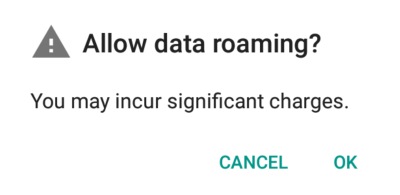
If you’ve poked around the inside of your phone’s settings for a while, you may have come across a setting called “data roaming.” If you enabled it, you might have seen a scary pop-up message saying that turning this option on may incur significant network charges. As far as explaining what data roaming is, however, phones typically don’t tell you what it’s used for. So, what is data roaming, and why would you enable it if it could incur these charges?
[mte_toc]Also read: 6 Best Android Auto Alternatives You Can Use
What “Roaming” Is
First, let’s tackle what it means when your phone is “roaming.” Roaming is when your phone leaves the range of your network and loses its signal. This goes a little further than simply going into rural parts of the country; it means leaving the country altogether! When you’re in a country that’s out of range of your network provider’s territory, your phone is now roaming. “Data roaming”, therefore, is the act of getting data while outside of your network’s range.
But if you’re outside of your network, how can you get data in the first place?
How Data Roaming Works
Let’s say you’re a US citizen and a happy customer of America Telecoms who provides you with a phone signal and 4G data. You feel like taking a holiday, so you decide to jet off to sunny Spain for a bit. While you’re there, you’d still like to catch up on your YouTube videos and podcasts while you’re on the beach, so you take your phone with you.
There’s a problem, however; America Telecoms doesn’t have a presence in Spain. They’re only concerned with providing a stellar service in America right now. Therefore, if you left for Spain, you’d be stuck without a phone signal. If you had an unlocked phone, you could exchange the SIM card with a Spanish provider to get data there. But what if your phone was locked to America Telecoms and you can’t change the SIM?
In order to tackle this problem and help their customers get a signal no matter where they are, America Telecoms struck a deal with the Spanish network España Móvil. America Telecoms says that if any of their customers goes to Spain and wants to use 4G or make a call or text, España Móvil will pick up the slack and give them a network signal, despite the fact that the customer is an America Telecoms user. In return, America Telecoms will support any España Móvil customer coming from Spain.
The Result
Now when you take that flight to Spain, you can use España Móvil’s signal to get 4G; however, there’s a good chance that additional charges for using a foreign network will come into play. To prevent itself from accidentally racking up a huge phone bill, your phone won’t automatically connect to España Móvil’s network when you arrive. You have to manually tell your phone to connect by enabling data roaming. Once done, you can now enjoy 4G abroad without changing SIM cards.
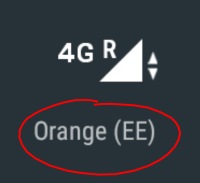
When you arrive at Spain with roaming enabled, you’ll see that your network provider’s name will change to something like “España Móvil (America Telecoms)”. This just means you’re currently using España Móvil’s network as an America Telecoms customer. If you travelled with a friend and they used a different network, they may see a different Spanish name pop-up corresponding to the network their provider struck a deal with.
What Are These “Significant Charges”?
While roaming is very useful, it can come at a hefty additional cost to your base data and call rates. This is what the pop-up is warning you about when you enable data roaming. Different network providers will have different charges depending on which country you visit, so be sure to wise up on the stated charges before travelling by checking their website.
In order to find these charges, you don’t have to find out what network you’ll be switching to when you arrive at your destination. Simply search for the one you use at home and look up their roaming charges, and it will apply when you go abroad, even after the network changes. Just be sure you select the correct country, as charges can differ depending on where you go.
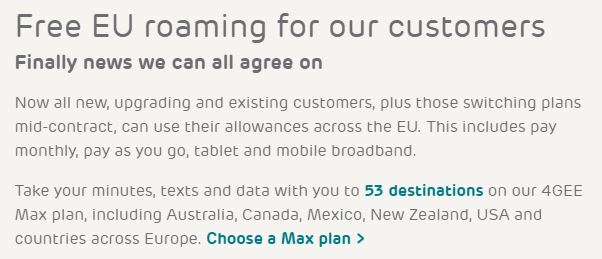
If you’re lucky, you may find there are no roaming charges at all! For example, if you’re in Europe, you’ll be pleased to know that the EU scrapped roaming charges for travelling within its boundaries, so you can go from France to Italy without worrying about roaming costs at all.
Does This Affect WiFi?
No! Roaming charges won’t affect any WiFi connections you access during your stay. If your hotel has WiFi, or you find a café with a hotspot, you can use that at its advertised cost (if any) without paying anything extra. Roaming only comes into play when you’re using a cellular network (like 4G) abroad.
Data Roaming Between UK and EU
Brexit has obviously caused a lot of complications in a lot of ways that people didn’t exactly foresee when they voted. While the UK used to enjoy free roaming within the EU when it was part of the EU, now that it’s left things are a little more complicated.
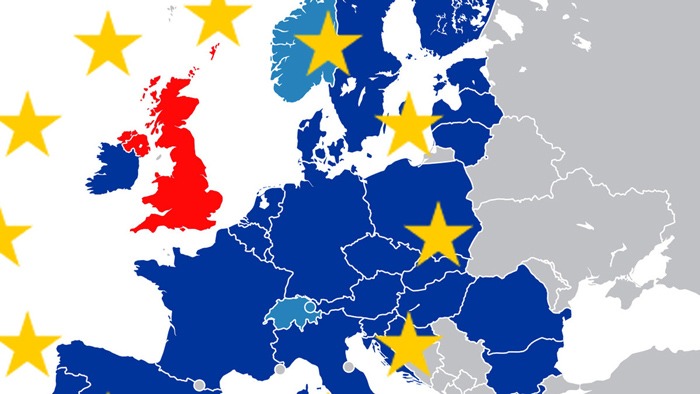
Brexit has meant that UK mobile networks can – but don’t have to – reintroduce roaming charges, and several networks have duly taken advantage of this. It’s frustrating, but at least it lets us distinguish between the networks who are shamelessly money-grabbing and the networks who are a little less so (or, maybe more accurately, the networks that believe there’s more money to be made from attracting customers through free EU roaming).
So behold our wall of shame of networks who are reintroducing EU roaming charges, followed by a wall of fame of networks who aren’t (for now).
UK Networks that reintroduced EU roaming charges
- Vodafone: £2 a day, 8-day and 15-day passes available at £1 a day
- EE: £2 a day from January 2022
- Three: £2 a day from May 2022
UK Networks With Free EU Roaming
- O2 (25GB fair usage monthly cap)
- Tesco
- Plusnet
- Sky Mobile
- GiffGaff (20GB fair usage monthly cap)
Roam Sweet Roam
While it’s not obvious at first sight what “roaming” is, the concept is very simple! It’s simply a way for you to get data and a network signal when abroad. If you’re going overseas with your mobile phone in the future, it’s worth checking out the roaming charges before you go to see if you can still catch up with your videos while exploring a new country.
When you’re out roaming in the world, you want your battery to last, so make sure it does by fixing the infamous Play Services battery drain issue on your Android phone. You can also see how to fix cellular data not working on iOS and Android.