


This is a sponsored article and was made possible by Website Backup Bot. The actual contents and opinions are the sole views of the author who maintains editorial independence, even when a post is sponsored.
When running a website or blog, one of the important things you should never ignore is creating regular backups. These backups will help restore your site in the event of any file corruption, hack attacks, unwanted changes to file(s) or database(s), etc.
Typically, many web-hosting services offer some sort of basic backup service to safeguard your data. However, you cannot rely on those backups because they generally don’t bother creating backups for individual websites, you have no control over how many backups are retained, and you cannot restore individual directories, files, or websites.
To bridge the gap Website Backup Bot will give you better control over creating, managing, and restoring website backups, and it will work with any type of website on any hosting platform.
Features of Website Backup Bot
Works with any type of website: Since Website Backup Bot uses regular FTP or SFTP connection to back up a site, it works with almost any type of website. It doesn’t matter if you are hosting a simple HTML website or using a custom or popular CMS software like WordPress, Drupal, Magento, etc. Just enter the FTP details and you are good to go.
You can back up your database in the same manner by entering the essential details like the port number, database name, and authentication details. You can get that information directly from the web-hosting control panel or by contacting your hosting provider.
One-click backup and restore: You can create or restore backups as and when needed with just a single click. It’s a very useful feature when you want to make sure that you have the latest backup before making any big changes to your website.
Schedule backups: Apart from creating on-demand backups, you can automate the backup process by creating custom schedules. For instance, you can create multiple schedules to create daily, weekly, and monthly backups. Since the storage space is limited, you can either configure the schedules to automatically delete backups older than a certain number of days or manually delete them as needed.
Password protect your backups: All the backups are password protected by default. When you download a backup, Website Backup Bot sends the password to your registered email address so that you can decrypt and access the backup files. Of course, you don’t need a password to restore a website via the Website Backup Bot admin page.
No strain on your server resources: Since Website Backup Bot does all the heavy lifting of running backup scripts, compression, etc., on their servers, there will be no strain on your server resources.
Pricing: Compared to other backup services like Codegaurd or BackupGuard, the pricing is very reasonable. The base plan starts at $8 per month which gives you 10GB storage. If you need more, you can upgrade the storage up to 200GB. The good thing is no matter what plan you choose, there is no limit on how many websites you can back up.
Email and phone support: Website Backup Bot offers one of the fastest email and phone support to fix any issues you are having. I personally tried the email support and got a reply from them within thirty minutes with solutions to fix the issue I was facing.
Using Website Backup Bot
First off, create an account with Website Backup Bot, and click on the “Add website backup” link appearing on the top navigation bar.

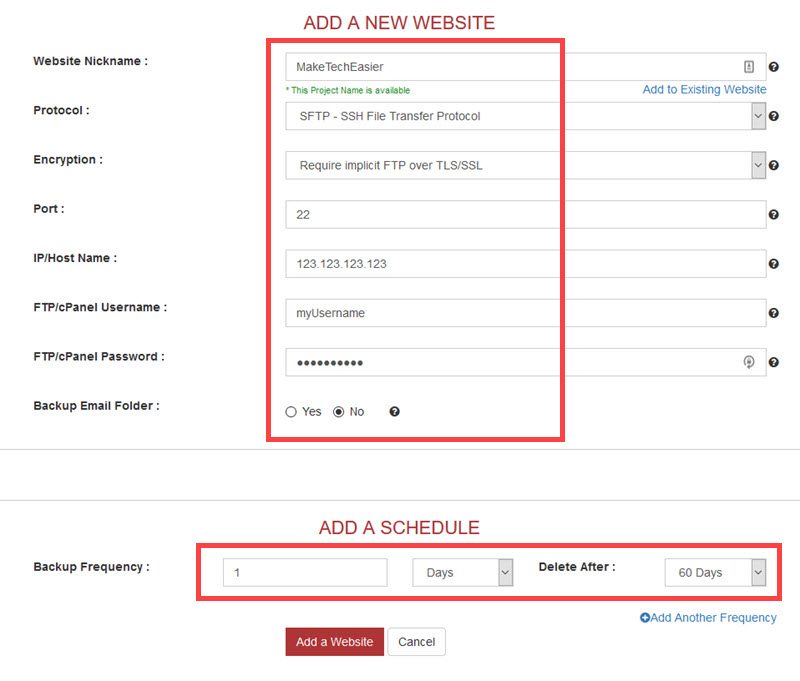
Enter a name and all the required FTP details like protocol, username, password, port number, etc. If you face any problems or confusion while filling up the form, click on those little “?” icons to receive on-page help. The help pop-ups are pretty detailed and on-point.
Next, create a schedule by filling in the fields under the “Add a schedule” section. For instance, I created a schedule to back up my website every day and retain the backups for sixty days. Backups that are older than sixty days will be automatically deleted. Once you are done, click on the “Add a website” button.
To back up the database, click on the “Add database backup” link on the navigation bar. Enter the necessary authentication details, and click on the “Add a database” button.

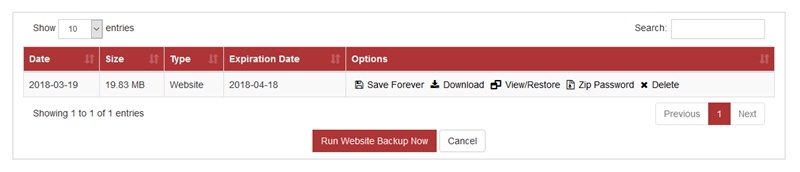
Once the site has been added, Website Backup Bot will initiate the first backup automatically. After the backup has been created, you will receive an email notification. You can see and download the backup from the admin page.
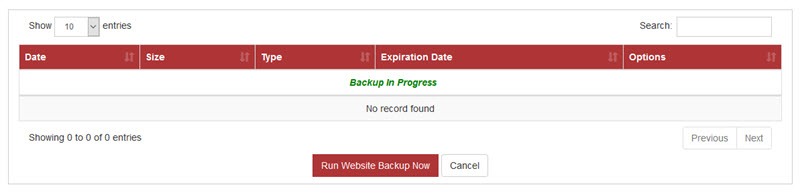
From now on, depending on the schedule, Website Backup Bot will automatically create website backups.
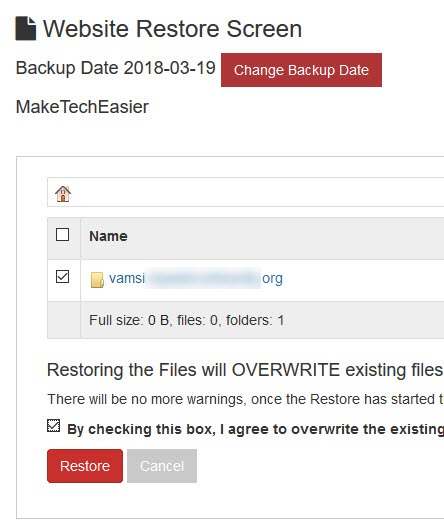
To restore a backup, navigate to “View Backups -> View or Restore,” select the folders you want to restore and click on the “Restore” button. Within a few minutes, your website will be restored. Follow the same procedure to restore the database.
Conclusion
WebsiteBackupBot does exactly what it says, and its one-click backup and restore feature is very handy. The best part about WebsiteBackupBot is that unlike other backup services, there is no limit on how many websites you can back up. Most of all, the response time of the Website Backup Bot team is is very quick, and that’s certainly helpful in not wasting any valuable time.
That being said, Website Backup Bot does not have some features that could make it even more useful than it already is, such as the ability to compare backups to see changed, removed, and added files, virus or malware scanning, and detailed logging and reporting.
Additionally, the backup process of Website Backup Bot was a little slow, at least for me. In my case, a new WordPress website which is less than 20MB took more than thirty minutes. However, if you schedule daily, weekly, or monthly backups, it’s really not a big deal.
All in all, Website Backup Bot is good at what it does. The service makes up for the few things it lacks with its ease of use, clean user interface, better pricing compared to its competitors, responsive support and the ability to back up an unlimited number of websites.
And to be frank, Website Backup Bot’s position is that they could offer those other features at some point in the future, but at this time they want to keep the price low for their users.
Since Website Backup Bot offers a thirty-day free trial with 5GB storage, there’s no reason to not try it out for thirty days to see how it works for you.