

WhatsApp recently included the picture-in-picture mode, so you don’t have to leave the app to watch a video. This is something that you can also do in Chrome and watch a video without having to have the YouTube tab open.
There are extensions you can try to get the picture-in-picture mode in Chrome. But, if the last thing you want to do is install yet another extension, there is now a way around that, and it’s only a few clicks away.
Also read: How to Watch Videos in Picture-in-Picture Mode with Media Player Classic
Make Sure Chrome Is Updated
For Chrome’s integrated picture-in-picture to work, you need to run on the latest version of the browser. Checking for the update is an easy task. Click on the three vertical dots at the top-right of the browser and place the cursor over the help option.
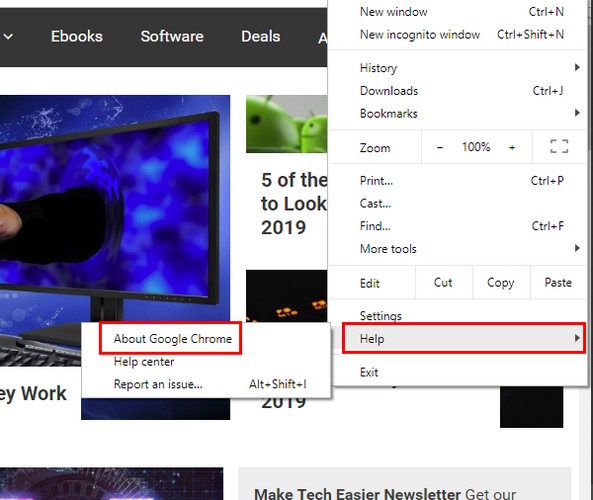
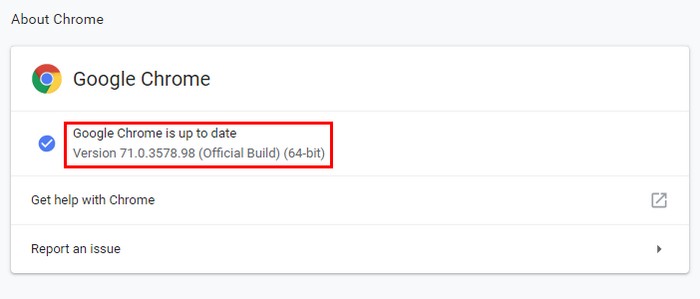
When the new window appears, click on the “About Google Chrome” option. Chrome will start looking for updates automatically. If it’s up to date, it will say just that, and if there is an update pending, it will begin to download it without you having to do anything.
How to Access Chrome’s Picture-in-Picture Mode
Before you open the video you want to use in this mode, keep in mind that the video needs to be delivered in HTML5. Also, not every video will work with the feature, but the feature shouldn’t fail when using a YouTube Video or Dailymotion.
Choose the video you want to see in picture-in-picture, and right-click on it. The first time you do this, YouTube’s settings will appear. Right-click once again without moving the cursor, and the “Picture in picture” option should be right below the “Copy video address” option.
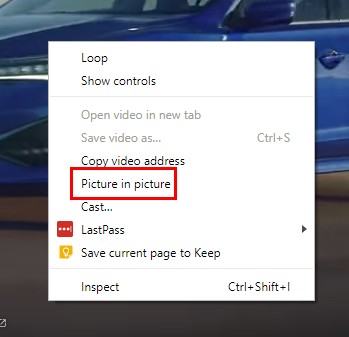
After clicking on the option, the YouTube video you right-clicked on will turn black. It will indicate that you are watching the video in picture-in-picture mode. The video will appear in the bottom right-hand corner of your display.
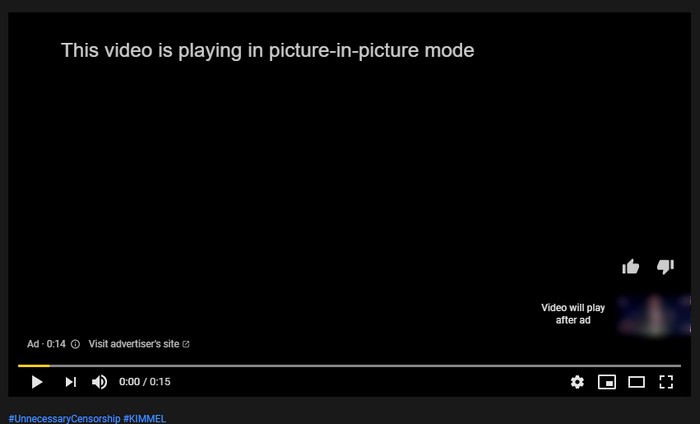
The pop-up window won’t have any on-screen controls to do things such as pause. You’ll either need to use blacked-out YouTube or the keyboard shortcuts you use for controling a video on YouTube. If you can’t remember the shortcuts, here are a few of them:
- Pause – Spacebar
- Go Back Five Seconds – Left arrow
- Go Forward five seconds – Right arrow
- Beginning of Video – Home
- Restart the video – Zeron but not from the keypad number
- Mute – M
How to Modify the Picture-in-Picture Window
When the window first appears, it’s a bit small. To either make it even smaller or bigger, place the cursor on the edge of the video. When correctly positioned, the cursor will turn into two arrows in one. Click and drag the window to the size you want and let go.
You can move the window to any area of your display by clicking anywhere on the window. When you move the cursor out of the window, the play will disappear, but it will return once you place the cursor back in the window.
Conclusion
It would be even better if you could see the option to control the video directly from the pic-pic-pin window. The pic-in-pic mode will demand a little bit more from your CPU, but if you have a modern computer, it should work fine. At least there is no need to install any extension to use the feature.
What are your thoughts on picture-in-picture mode?
Image credit: Picture in Picture