

Have you ever clicked on an article that was broken up into numerous pages? Those multi-page articles can be really annoying and time-consuming. If you’re like me, you get tired of clicking “next” over and over again and often give up halfway through the page. I’ve even gotten to the point now that if I see page numbers and “next” at the bottom of an article, I’ll immediately close the page.
I hate to miss out on good content, so I went on a search for a tool to help fix this issue, and I came across PageZipper. It’s a bookmarklet that automatically merges multiple page articles into a single page and adds auto pagination functionality.
Here’s how to turn those multi-page articles into a single page.
1. Add the PageZipper bookmarklet to your browser; drag the PageZipper link to your bookmarks toolbar.

Note: PageZipper is also available as a Firefox add-on. I’m using the bookmarklet simply because it’s lighter on my browser – I have enough extensions installed already.
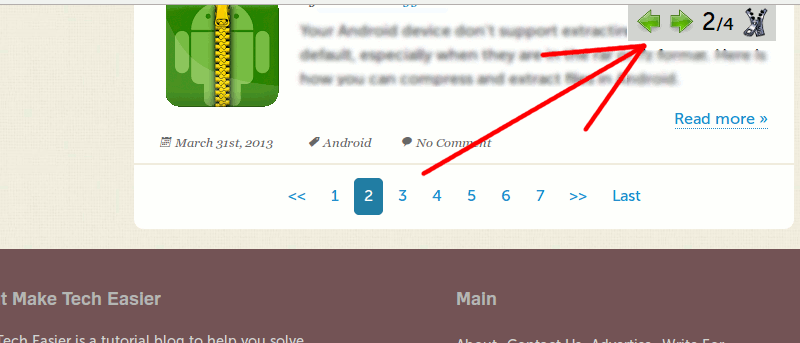
2. Click on the bookmarklet, and you should see a little box with arrows and page numbering at the top right of the page. As you scroll through the pages the numbering will automatically increase (2/3, 3/4, 4/5, etc), so don’t be alarmed if it only says 1/2 when you first click the bookmarklet.

3. As you scroll down the page, you’ll notice that the page keeps on scrolling continuously until you get to the end of the article; there’s no need to click on “next” to go to the next page. You can even use the arrows at the top to automatically scroll down and skip directly to the top of the next page.
These arrows really come in handy, because you’ll have to scroll through all of the comments on an article in order to get to the next page. If an article has a ton of comments, you’ll be doing a lot of scrolling. Those arrows really save a lot of time.
That’s really all there is to using PageZipper. It basically “unzips” those multi-page articles and eliminates the need to click next over and over again. It’s a huge convenience.