
Temporarily Suspend a Tab in Chrome to Free Up System Memory

Do you often open a lot of tabs in Google Chrome, just to leave most of them untouched for hours? If you’re like, me, you probably use tabs as a way to save Web pages that you want to go back to. Keeping them open helps you remember that you need to go back to them.

While this may be one of your personal productivity techniques for browsing the Web, it’s not always the smartest method. The longer you keep a tab open in Chrome, the more it eats away at your computer’s memory. Before you know it, your browser starts to move really slow and may even become responsive.

Luckily, there’s a simple way to avoid this huge headache, thanks to The Great Suspender extension for Chrome. With this extension, you can suspend a tab until you’re ready to use it, which in turn helps to reduce Chrome’s memory footprint. Here’s how to use it.

1. Install The Great Suspender Chrome extension.

2. Once installed, click on the browser icon and go down to Settings.
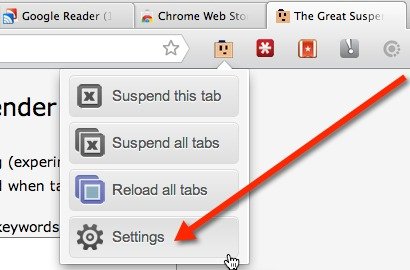
Go to The Great Suspender's Settings

3. On the Settings page you can choose to: turn on screen capturing, automatically unsuspend a tab when it gains focus, whitelist keywords or Web pages, view or clear your suspended tab history, and choose a length of inactivity that needs to go by before a tab suspend automatically.
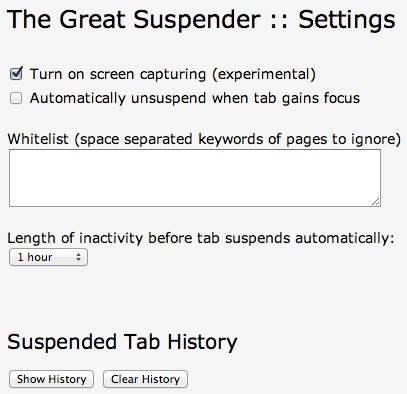
Customize the Settings for The Great Suspsender.

Everything is pretty self-explanatory, but if you’re wondering about the screen capture feature, it’s experimental. It’s done using a script called html2canvas. The script will take a screenshot of your suspended page and display it on the tab. This helps you to remember what was on the page.

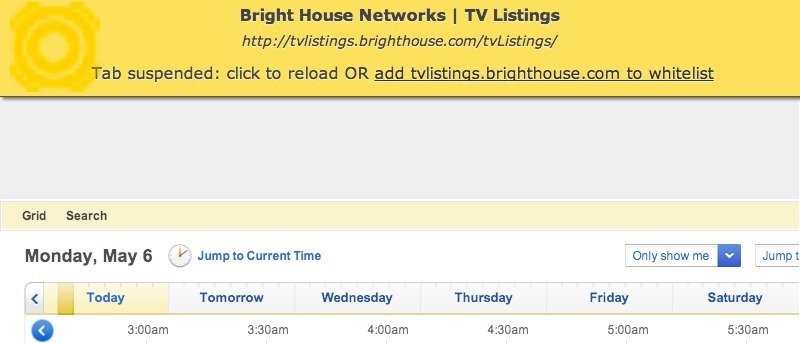
4. When you’re done, you’re ready to suspend your tabs. To do so, click on the browser icon and click on suspend this tab or suspend all tabs. Once a tab is suspended, you’ll see a yellow bar at the top of the page along with the name of the website, URL, and favicon. If you’ve enabled screen capturing, you’ll see the screenshot below the yellow bar.

5. To unsuspend the tab, click the yellow bar to reload the page. If you’ve suspended more than one tab, you can choose the “Reload All Tabs” option from the browser icon to unsuspend them all at once.

As you can see, The Great Suspender is an invaluable Chrome extension. Not only is it lightweight and easy-to-use, it also improves your browsing experience.

Subscribe to our newsletter!

Our latest tutorials delivered straight to your inbox

Charnita Fance Avatar

Read next

Content and cloud networks now account for three-quarters of used international bandwidth, while Google, Meta, Microsoft and Amazon own, co-own or buy capacity on a growing share of the 600-plus submarine cable systems carrying over 99 per cent of data between countries, a private map hidden below the wireless internet
Wi-Fi doesn’t actually slow down when a café gets crowded — the signal is fine, but every device has to wait its turn to speak on the same frequency, and the polite queuing is what you feel as lag
In 1988, a 23-year-old Cornell graduate student named Robert Morris released a self-replicating program to measure the size of the internet — within hours it had crashed roughly 6,000 of the 60,000 machines then online, and computer security became a field
In July 2026, Psy’s Gangnam Style passed six billion YouTube views, fourteen years after its horse-riding dance became the platform’s first billion-view video and long after engineers had replaced a counter designed to stop at 2,147,483,647
Suzanne Simard sealed paper birch and Douglas fir seedlings inside plastic bags, fed them carbon-14 and carbon-13 dioxide, and nine days later found carbon had crossed between species through fungal threads in the British Columbia soil beneath her boots
A species of jellyfish called Turritopsis dohrnii can revert its adult cells back to a juvenile polyp stage when injured or starving, effectively restarting its life cycle, and biologists have so far failed to identify any natural limit to how many times it can do this.
A Japanese man named Jiroemon Kimura, who lived to 116, was born in 1897 when Queen Victoria still ruled and died in 2013, meaning a single human life personally overlapped with the invention of the airplane, the atomic bomb, the internet, and Instagram
The Hollywood sign originally read HOLLYWOODLAND when it was built in 1923 as a real estate advertisement for a housing development, and it was only meant to stand for 18 months, but nobody ever got around to taking it down and the city eventually adopted it as a landmark