

For some, being able to play Super Mario Run is a blast from the past but something entirely new for others. Whatever category you fall into, one thing is for sure, and that’s that Mario is here to stay. Only time will tell if it’s here to stay.
But, for now it’s one very popular game, and you’ve probably been playing for hours on end. I’m sure you completed quite a few levels, but are you sure that you’re taking full advantage of the game? Here are some tips and tricks for you to master Super Mario Run.
1. Master the Different Kinds of Jumps
- Wall Jump – Jump when you’re heading towards a wall, and then tap on the screen again just as you’re going to hit the wall. This is going to make you jump in the opposite direction.
- Flutter Jump – You can only flutter jump if you’re Yoshi. If you are, just tap and hold on the display, and Yoshi will flutter in the air for a while.
- Climbing Jump – Mario can climb automatically, but if you tap on the screen while you climb, you’ll perform a Climb Jump. This move will get you many Toad fans at the Toad Rallies.
- Vaulting Jump – Your character can vault over enemies automatically, but if you jump from them in the middle of the vault, you’ll get more coins and fans at the rallies.
- Floaty Jump – This jump is exclusively for Princess Peach. To Flutter Jump, tap and hold, and she’ll float but only for short distances.
- Rolling Jump – Your character will automatically roll to break the fall, but to gain extra fans at the rallies, tap to jump in mid-roll.
2. How to Play Bonus Levels
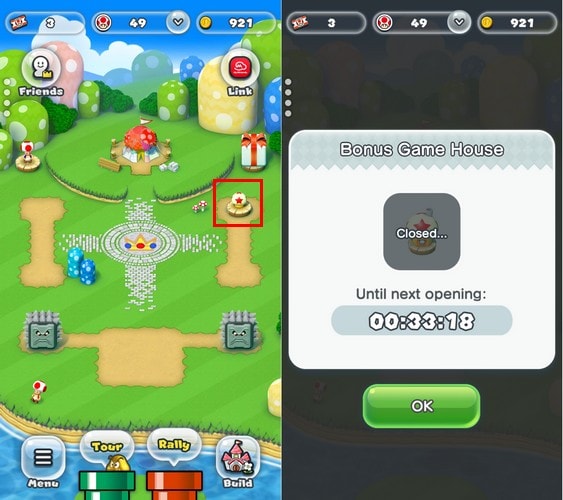
Super Mario Run lets you play bonus rounds every four hours. To play them, go to your kingdom and tap on the Bonus Game House which is the first building you installed.
3. Dying Can Be a Good Thing
You will lose a couple of coins in the process, but sometimes it’s worth it. By dying on purpose your character will be placed in a bubble, and you’ll rewind to the very beginning of the level. If you missed some coins, you can go back to that exact area by tapping on the screen.
4. How to Win Bonus Tickets for Toad Rallies
On every level you’ll see two types of coins: gold and pink. Collect all five of the pink coins, and you’ll get the bonus ticket. Not only that, but you’ll also unlock the purple coins, and if you get five of those, you’ll unlock the black coins.
5. Make Mario Stop in His Tracks
Once Mario starts running there is no way to stop him – or is there? Each level has its red blocks that will pause the timer as well as stop Mario. Unless you’re at a point where the path is going to split, you’ll need to avoid these red blocks.
The red blocks are meant to help you in situations such as getting on moving platforms or adjusting your timing. But remember to think quickly to see if they are useful or not at the moment.
6. How to Unlock More Characters
Playing with just one character can be boring. That’s why you should always have the goal of unlocking more characters. You can easily get the Toad character by linking your Nintendo account with the app.
To unlock more characters, simply build up your kingdom, and the extra characters will come. For example, to unlock Luigi, you’re going to need to collect 150 green toads by playing Toad Rally.
Then, you’ll need to buy Luigi’s house in the app’s store. To switch characters, tap on the character portrait icon in the bottom-right once you’ve chosen a level.
7. Improve Battery Life and Performance
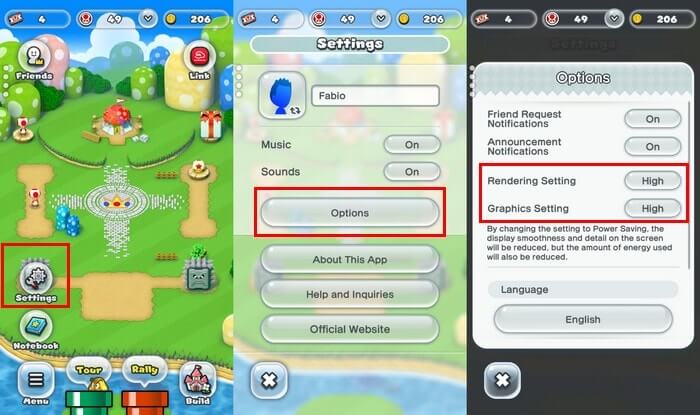
Super Mario Run can get addictive, and playing too much can drain your phone’s battery. To save battery life, go to your kingdom’s overview and tap on “Menu -> Settings.” Tap on the “Rendering and Graphics” settings, and they will automatically switch to low.
8. How to Remove the Thwomp Enemies
When you see your kingdom for the first time, you’ll see two Thwomp enemies crowding it. To remove those, you’re going to be given hammers as you progress in the game. You’ll receive them, but the game never tells you what they are for. Now you know. To use them, go to the Build menu and tap on the hammer icon in the bottom-right.
Conclusion
With Super Mario Run, you always say to yourself that you’ll only play one more but end up playing for another hour. If you’re determined to clear that level, you might as well know all the tips and tricks. Do you have any tips to share? Drop a comment below.