


Where were you on June 23, 2015? Don’t remember? Well, if you had an Android smartphone at that time, Google probably does. And if you were anywhere near a crime scene, they can turn your information in Sensorvault over to the authorities.
What is Sensorvault?
Sensorvault is a database of location history maintained by Google. Google apps disable “Location history” by default on Google apps, but you have probably been asked to enable it at some point, and you most likely did.
Google uses GPS and other location information from your computer to store a timeline of your movements. They gather this data to provide more personalized search results and recommendations for you. This isn’t breaking news. They’ve been doing it for years.
Recently, however, a new use for location histories has been developing.
Geofence warrants

In the past, police and other authorities were granted warrants for access to a specific user’s mobile account in the process of investigating a crime. Now they have begun getting warrants tied only to a particular location, known as a geofence warrant or a reverse location warrant. When presented with this kind of order, Google searches Sensorvault for any devices that were in the area of a crime at the time it occurred.
Law enforcement has so far not sent any geofencing warrants to any companies other than Google. Apple claims to have no ability to track this kind of information, and cellular carriers don’t have an easily accessible database that could be used to compile this information.
Don’t think this doesn’t apply to you just because you have an iPhone or another device. If you use any Google apps like Google Maps, Sensorvault is storing your information as well.
What happens if your device is in the search area of a geofence warrant?
First, Google gives law enforcement a list of devices that were in the area, protected with anonymous identification numbers. Police look at the locations and movements of these devices and decide which, if any, warrant more investigation.
Next, the police may request information on a smaller set of devices. Google gives them more detailed data, including where the phone was located outside of the search area and during a broader time.
Finally, once they narrow the list to just a few devices that may have ties to the crime, Google will give them the personal information linked to that account such as names and email addresses.
How to turn off Location History
Google only stores location data from “Location history” in Sensorvault. You can eliminate the transfer of this information to the database by turning off “Location history.” Remember, this applies to any device, including iPhones with Google apps installed.
There are other types of location data stored in a different place called “Web & App Activity.” Since it is not part of “Location History” This is not part of the information Google makes available to law enforcement.
On a computer
Using a computer is the simplest way to deactivate the Location history for your account.
1. Open Google’s Activity History page on your web browser.
2. If you have more than one Google account, make sure you sign in with the account you wish to access.
3. Click on “View timeline” under “Location history.”
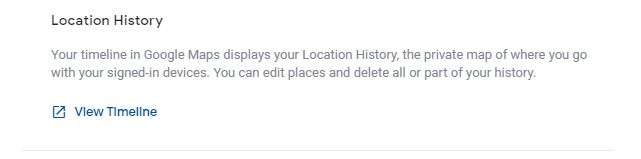
4. You will see a map that displays where your device has been over time.
5. Under that map, there is an option to manage location history.
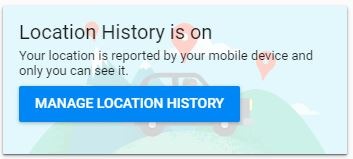
6. On this page you can toggle location history on and off.
7. If you would also like to turn off your Web and app activity, click on the “Activity controls” link.
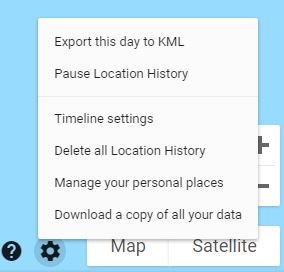
8. If you want to delete all of your location histories, click on the gear icon near the lower-right corner of the map, and click on the option to delete.
On a mobile device
If you need to use a mobile device to deactivate your Location history:
1. Open Settings.
2. Click on Google.
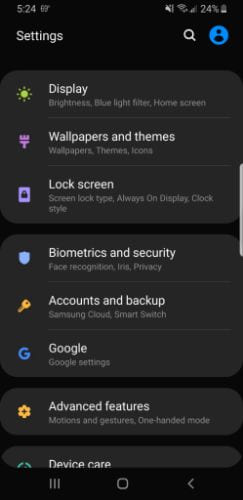
3. Tap Google Account.
4. Open Data & personalization.
5. Tap Activity controls.
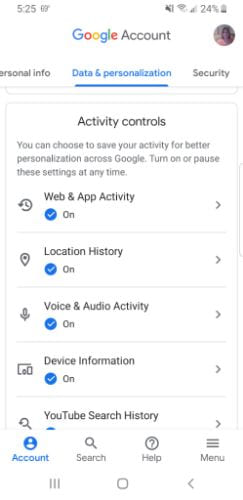
6. Select Location history.
7. Tap Manage activity.
8. This takes you to a screen to log into your account and see your timeline. There is an option on the first page to delete your history.
Keeping your location history out of Sensorvault is easy, but doing so will take away the level of personalization from Google that you currently enjoy. So whether you are bothered enough by this to eliminate your “Location history” or not is entirely up to you.
Of course, you are a law-abiding citizen. You won’t participate in illegal activity. However, because of Sensorvault you may end up near a crime scene someday and find yourself under suspicion for the crime itself, or you could help to solve a case because you were there and witnessed something helpful.