

Google Chrome is notorious for eating up system resources leading to performance issues. People with low-end devices have to think twice before opening a new Chrome tab. This is a big problem while Chrome is running, and it seems Chrome keeps haunting us even when it is closed.
By default Chrome allows applications/extensions to keep running in the background to provide their services like updates and notifications. This is handy for keeping you updated with notifications on Facebook or a new email in Gmail. However, it eats up system resources even when you don’t want to be updated. In this post we will show you how you can stop Chrome from running background apps.
The Good and the Bad
Before we stop this background service of Chrome, it is good to know both the good and bad sides to make a wise decision.
The Good
When you install an extension or use a web service that provides continuous updates, they may be capable of running in the background to offer notifications even when Chrome is closed. This allows you to always be updated and to take action right from the Chrome notifications. It’s really handy actually, and if you don’t want to leave your online life behind when you hit the close button, it does a great job of keeping you updated with important stuff. Turning this feature off means you will not be able to get updates on your PC and may lose important notifications.
The Bad
While Chrome is running in the background, it is using system resources and slowing down the system. For example, if you exit Chrome to get some resources to play a heavy video game, this little background service will get in your way and may not let you have the best experience. Furthermore, constant notifications may also be annoying for some people, especially if you are very active on social media platforms. Some people also want to completely leave their online life behind when they press the close button on Chrome, but this will keep bugging them even when Chrome is closed.
Disable Apps from Running in the Background
You can stop Chrome from running in the background from the Chrome settings. Below are step-by-step instructions.
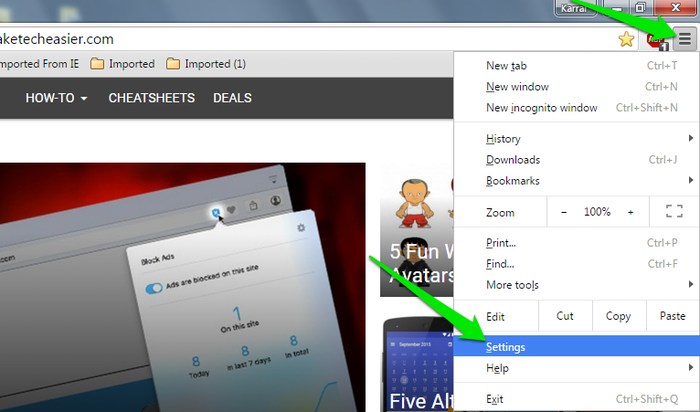
1. Click on Chrome’s main menu and select “Settings.”
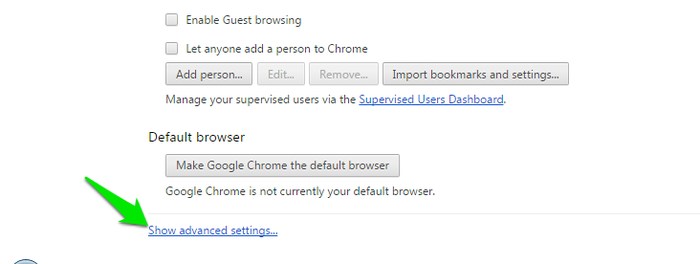
2. Scroll down and click on “Show advanced settings.”
3. Scroll down to the extreme bottom and uncheck the option “Continue running background apps when Google Chrome is closed” under the “System” heading.
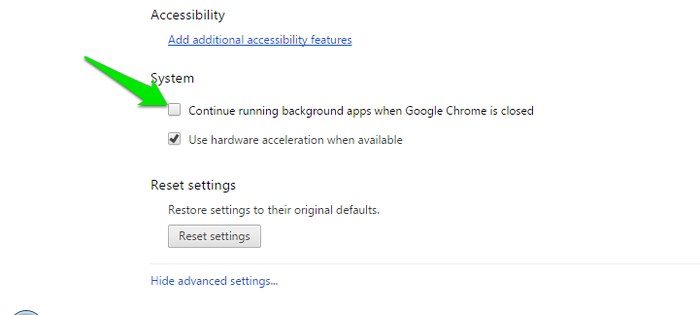
This will stop Chrome from running any apps in the background and will exit properly when you click on the close button. At any time later if you want to receive notifications, just go to “Settings” again and enable this feature.
Conclusion
If you are tired of Chrome eating up resources in the background, then you can follow the above instructions to easily stop Chrome from running in the background. If there is a particular notification that is bugging you, then turning this feature off completely isn’t necessary. You can also disable the extension or disable “desktop notifications” in the settings of the service.