


Many users access Twitter from their mobile devices, but there are other ways to tweet – you can even do it from the command-line. If you’re a Chrome user who prefers to manage Twitter from the browser instead of installing standalone desktop apps, Silver Bird might be for you. You can download it for free from the Chrome Web Store and install it as a browser extension.
First Look
To open Silver Bird, click the bird icon on the right side of your Chrome toolbar after the installation. You’ll be prompted to log in to Twitter and allow Silver Bird to access your account.
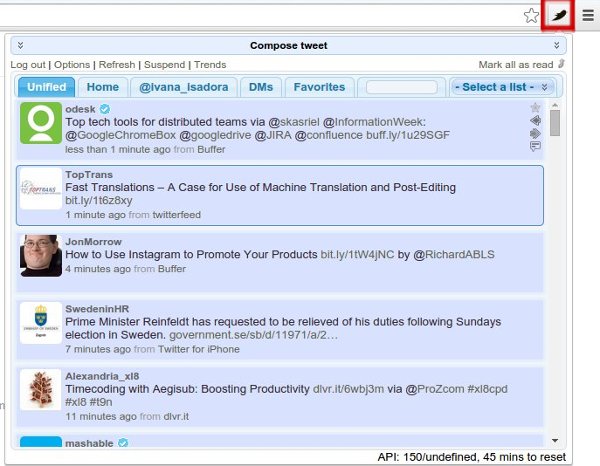
Silver Bird’s interface is a floating pop-up that covers the right half of your screen and contains tweets divided into tabs. Clicking on links opens them in a new Chrome tab, while clicking a username activates a small menu where you can view the person’s profile, open their tweets in a new Silver Bird tab, as well as follow and unfollow them.
Writing and Sharing Tweets
Hovering over a tweet brings up four small icons on the right side – you can use them to retweet, reply, favorite and share others’ tweets. If a tweet is a part of a conversation, click to expand it and you will see the other tweets. To see which hashtags are currently trending, just click the “Trends” option and a small menu with a list of hashtags will pop right up.
When you think of something cool to tweet, click the “Compose tweet” banner and another section will appear above the tabbed list of tweets. This is called the “Compose area,” and you can change its position in Silver Bird options.

Here you can attach photos via the “Choose file” button, or paste and shorten links by selecting one of the offered URL shortener services. To close Silver Bird, just click the bird icon again (or the “Log out” option). If you wish to customize Silver Bird, choose “Options”.
Setting Up Silver Bird
Silver Bird offers plenty of customization possibilities for such a small browser extension. They range from simple appearance tweaks, like setting your displayed name, fonts and colors, to advanced features like adjusting the number of Twitter API hits.
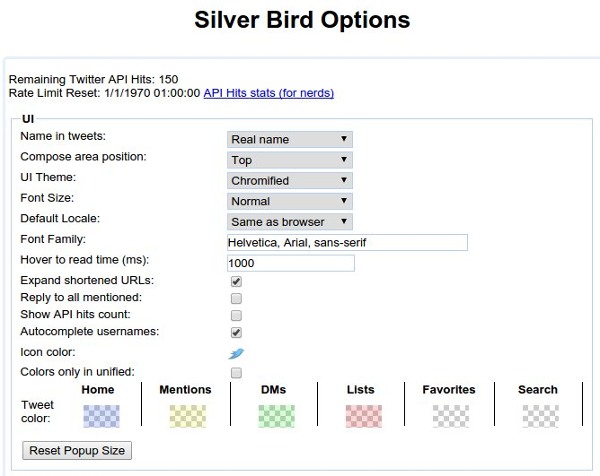
Roughly speaking, the API hits setting controls how often you “ping” Twitter’s servers to check for new tweets in your timeline. Silver Bird automatically checks for new tweets, but you can turn this off by selecting the “Suspend” option in the main Silver Bird window, and manually refresh your timeline by choosing “Refresh” from the same menu.
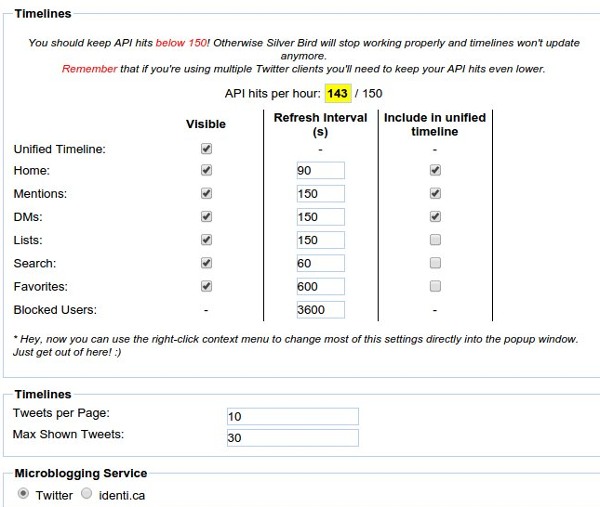
This part of the Options page also lets you specify the maximum amount of tweets per page, as well as set up your default Silver Bird tabs. You can turn off the visibility for tabs you don’t want to display, and choose what types of tweets will be shown in the Unified Timeline. For example, you can show Direct Messages and Mentions in their separate tabs, but hide them in the Unified Timeline.
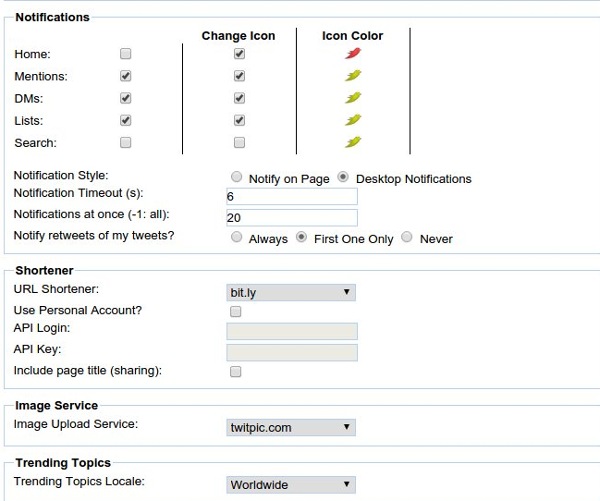
A great thing about Silver Bird is that it lets you choose where to host images and which service to use for URL shortening. Another useful feature is the notifications – shown either as pop-ups in the Chrome browser or visible as desktop notifications. Note that enabling them for “Home” notifies you about every new tweet in your timeline. This can be really annoying, especially if you follow a lot of people, so I suggest that you turn on notifications only for Direct Messages and Mentions.
Apart from default tabs, Silver Bird can display custom tabs created from saved search queries. You can also add new tabs to track tweets from a specific user or to list tweets containing a hashtag or a phrase.
Silver Bird Plus…and Minus
The Chrome Web Store also offers an extension called Silver Bird Plus from the same developer. This extension is supposed to be an improvement over Silver Bird, and while it does provide a smooth scrolling option and a more pleasant interface, it seems to lack the Favorites tab and doesn’t support custom fonts. Like Silver Bird, it can’t control multiple Twitter accounts either. This is my biggest complaint about this extension, but if you only have one account and just need a quick and practical way to check Twitter, Silver Bird should satisfy you. Those who have many social media accounts can try better-equipped tools like Hootsuite.
What’s your favorite Twitter client? Have you ever tried Silver Bird? Let us know in the comments.