

Apple Music has become a viable competitor to Spotify and similar streaming services, especially when it comes to account sharing. Using the Family Sharing option, you can share your subscription with friends and family so that everyone can access their version of the music streaming service. This guide shows how to share Apple Music via Family Sharing, a feature built into every Apple-made device.
[mte_toc]Who Can Share Apple Music Using Family Sharing?
Before we proceed further, there’s something important for you to consider. Not every Apple Music account can use Family Sharing, as you must have a “Family” subscription to Apple Music (priced at $16.99/month) to use Family Sharing. This is not applicable for “Student” or “Individual” subscription plans.
Alternatively, Apple One lets you subscribe to Apple Music (and a bunch of other services). However, to use Family Sharing, you need either a “Family” ($25.95/month) or a “Premier” account ($37.95/month).
Subscribers to the applicable Apple One plans can share Apple Music with up to five individuals. Those directly subscribed to the Apple Music Family plan can share their subscription with up to six individuals.
Set Up Family Sharing
As soon as you set up Family Sharing, you can start to share eligible Apple digital services, and that includes Apple Music.
How to Set Up Family Sharing on iPhone/iPad
Start by launching the Settings app on your iPhone or iPad. Tap on your name, which should be visible at the top of your device’s screen.
Select Family Sharing. If you haven’t used that feature before, you’ll see an option to Set Up Your Family. Apple Music will be among the services you’re allowed to share.
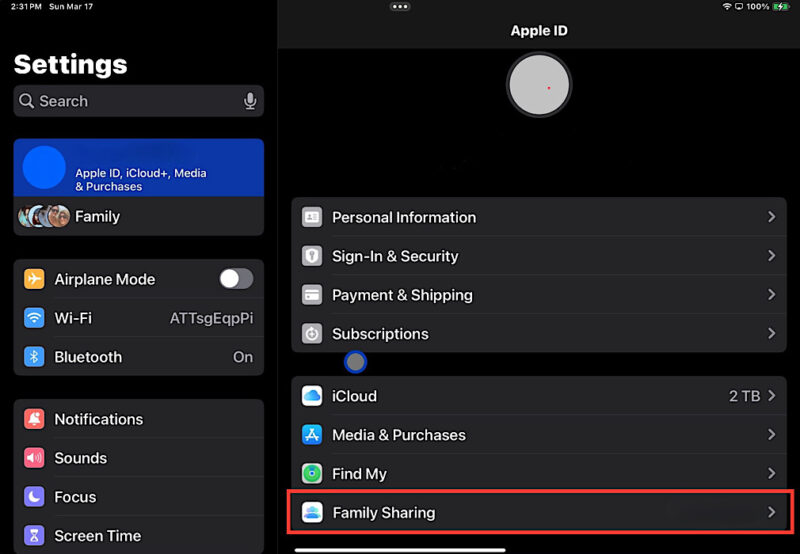
During the last step of setting up Family Share, you can invite your family members. Select the Invite People option, then choose how you’d like to share your invitation. It can be done via a text message, email, AirDrop, or in-person.
From this moment on, you have started sharing your Apple Music subscription. However, for others to start using this streaming service, they need to accept your invitation. Once they tap on Join Family, they’ll get access to Apple Music and any other service. Don’t worry about inviting everyone at once. You can always go back and add more family members.
How to Set Up Family Sharing on Mac
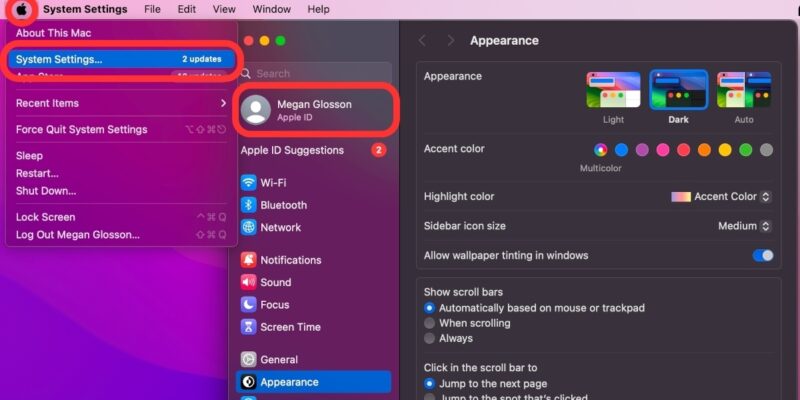
To set up Family Sharing on your Mac, begin by clicking on the Apple menu located in the top-left corner of your screen. From the drop-down menu, select System Settings. Click on your name at the top of the sidebar. If you don’t see your name, you’ll need to sign in with your Apple ID by clicking on Sign in with your Apple ID.
Once you’re signed in, click on Family Sharing, located on the right side of the window. If you haven’t used Family Sharing before, you’ll see an option to Set Up Family. Click on this to start the process. Your Mac will display which services you can share, and Apple Music should be among them.
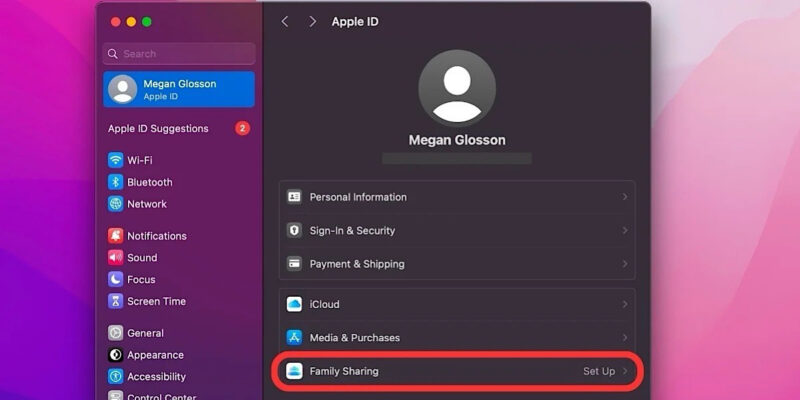
During the final step of setting up Family Sharing, you’ll be given the option to invite people. Click on Invite People, then choose how you’d like to share your invitation. If the person you’re inviting is nearby, you can choose Invite in Person and ask them to enter their Apple ID and password on your Mac. Your family members will need to accept the invites to start using Apple Music and any other shared services.
How to Share Apple Music by Adding New Members to Your Family Sharing Group
Now that you have set up your Family Sharing group, you can delete or add new members to it. If you decide to share your Apple Music with someone at a later time, follow these instructions for iPhone/iPad and Mac.
How to Share Apple Music on iPhone/iPad
On your iPhone or iPad, navigate to the Settings app. Select your name at the top, and choose Family Sharing.
Looking at your Family Sharing overview, add someone else to that group by selecting “+” in the top-right corner. You will be asked to choose whether you want to invite others or create a child account.
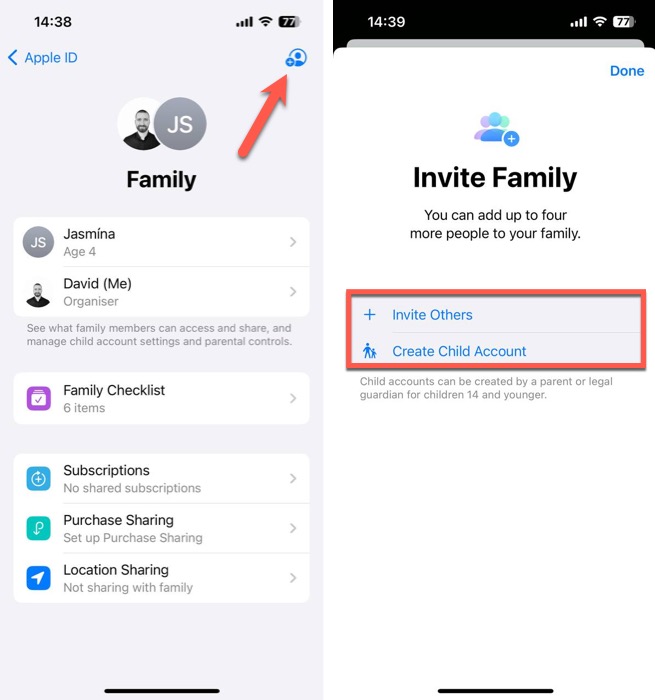
Tap Invite Others and choose how you’d like to send your invitation. (You can do that via a message, email, or AirDrop.) The recipient will need to interact with your invitation, activating their account along the way.
Once you send an invitation to share your Apple Music subscription, check the status of your invitation by going to Settings -> [your name] -> Family Sharing. In the case of a technical issue, you can always re-send the invitation by selecting Resend Invitation.
How to Share Apple Music on Mac
To share Apple Music on your Mac by adding new members to your Family Sharing group, start by clicking on the Apple menu in the top-left corner of your screen. Select System Settings from the drop-down menu. In the System Settings window, click on your name at the top of the sidebar, then select Family Sharing.
To add a new member to your Family Sharing group, click on the Add Member button, and follow the onscreen instructions. Click on the Invite People button, and choose how you would like to send your invitation.
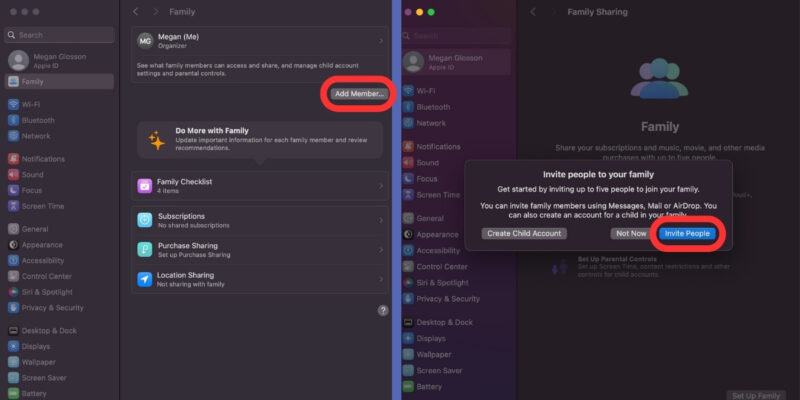
After selecting your preferred method, click Continue, and send the invitation. The recipient will need to accept the invitation to join your Family Sharing group to start using Apple Music and any other shared services. You can see sent invitations and optionally resend them in the Family Sharing section of the System Settings app.
How to Join a Family Group in Apple Music
To accept an invitation to join a family group in Apple Music on your iPhone, iPad, or iPod touch, open the Settings app, and tap on your name at the top of the screen. From there, select Invitations, and follow the onscreen instructions to accept the invitation. You’ll need to sign in with your Apple ID and password to complete the process.
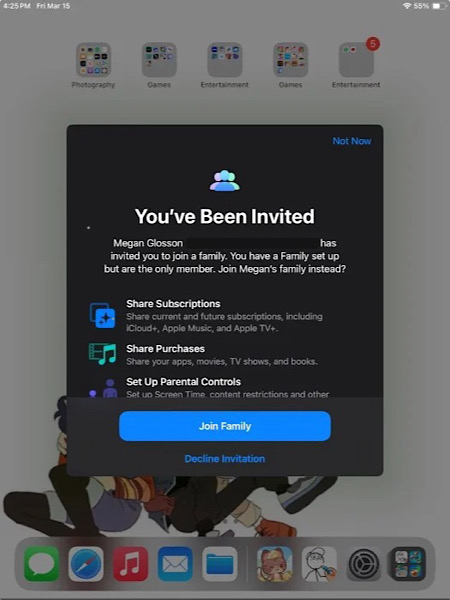
To accept an invitation to join a family group in Apple Music on your Mac, click on the Apple menu in the top-left corner of the screen, and choose System Preferences. From there, click on Family Sharing, and follow the onscreen instructions to accept the invitation. Again, you’ll need to sign in with your Apple ID and password to complete the process.
Once you’ve accepted the invitation, you’ll be able to share Apple Music with your family members, as well as other eligible Apple digital services. You’ll also be able to share purchases made with your Apple ID, making it easy to share apps, books, movies, and more with your family.
What to Try if Family Members Can’t Access Family Sharing
Sometimes, even after setting up Family Sharing, there can be issues with members accessing your Apple Music subscription. Try these troubleshooting tips:
- Check Apple’s system status page: before troubleshooting further, check whether the service you’re trying to share is online. Go to Apple’s System Status page, and scan the list of Apple services to see whether the one you’re trying to share has a green dot next to it.
- Verify Apple ID: make sure that the Apple ID being used for Family Sharing is the same one used for purchases. On your iPhone or iPad with iOS 16 or later, go to Settings -> Family, tap your name, and make a note of which Apple ID is listed. Tap Purchases, and sign in with the same Apple ID that you use for Family Sharing.
- Sign out, restart, and sign in: a little Apple ID reset on the device that isn’t receiving the shared subscription may do the trick. Sign out of your Apple ID, restart your device, and sign back in.
- Change Apple ID region: if your family members are in a different Apple ID region, they won’t be able to access the same subscriptions. Visit the Apple ID Personal Information page, and change your region to match that of your family members.
- Add family members again: if all else fails, try removing and re-adding family members to your Family Sharing group.
For more on Apple Music, learn how to create your own radio station in Apple Music and download Apple Music songs for offline listening.
All images and screenshots by David Morelo.