

If you’re always going to a specific site when you turn on your computer, you might as well make it your home page. Every browser comes with the ability to set a custom home page. The process doesn’t take very long on major browsers, and it’s also beginner friendly.
Note: Did your homepage change without your input? This is something you’ll have to investigate.
Setting a Custom Home Page on Firefox
Adding the home page of your choice on Firefox is an easy task. Launch Firefox, and in the Home section, click on the drop-down menu for the Homepage and new windows option. Select Custom URLs and start typing the URL of the site you want to add as your home page.
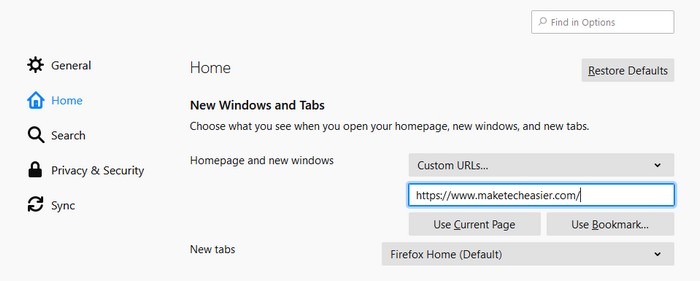
Once you’ve added the address of the page you want as your new homepage, restart Firefox, and the first page you will see will be your new home page. Don’t bother looking for a save button, as there isn’t one.
Also read: How to Change the Default Search Engine in Various Browsers
Change Homepage in Opera
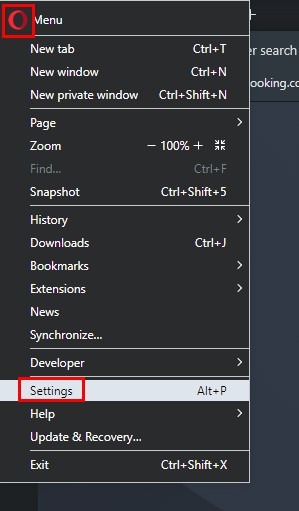
Opera also makes it easy for you to add any page as your new home page. Click on the red “O” on the top-left corner and go to Settings.
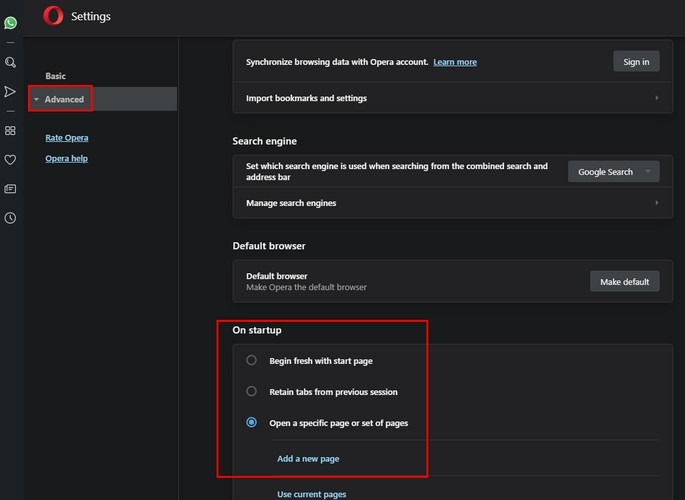
Scroll down until you come across the “On the startup” section. Choose the option that says, “Open a specific page or set of pages,” and click on the “Add a new page.”
When you click on the option, a new window will appear where you will need to add the new home page’s URL. Once you’re done, click on the blue Add button. To see your new homepage, you will need to restart Opera. As soon as you restart, your favorite site will be the first page you see.
Add Custom Homepage in Safari (iPad)
Things work a little differently when it comes to adding a custom homepage in mobile Safari. Open Safari and go to the homepage URL that you want to add. Tap on the first icon at the top right (the square with an arrow pointing up).
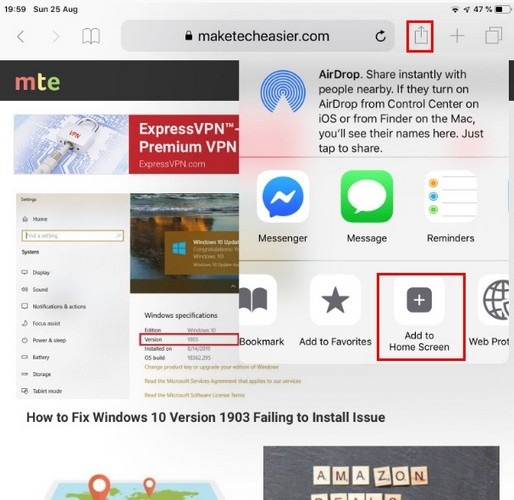
Swipe left and select the option that says “Add to Home Screen.” The window will change, and it will now show you the site’s URL. You should see a blue Add option at the top right.
Safari will close all of a sudden. Don’t panic, as this is normal. Go to your iPad’s home screen, and a shortcut to your new custom homepage will appear.
Adding a New Custom Home Page in Microsoft Edge
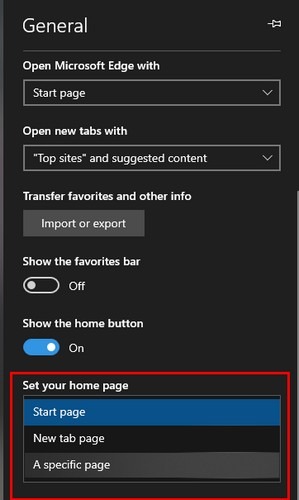
To set a custom homepage, click on the three dots at the top right, and go to Settings. Scroll down to “Set your homepage.” Click on the drop-down menu, select “A specific page,” and enter the site’s URL. Click on the floppy disk to the side to save.
Adding a Custom Home Page in Chrome
In Google Chrome, click on the three dots at the top right and go to Settings.
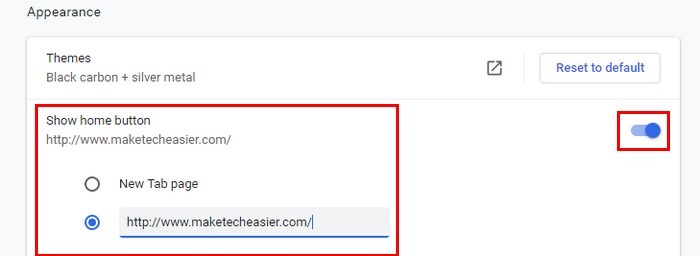
Enable the “Show home button” option and enter the page’s URL. To see your new home page, click on the home button to the left of the address bar.
Conclusion
The steps to make a specific site your home page are short and easy to follow. Since every browser is designed differently, the steps will differ slightly. The above instructions should allow you to set a custom home page on various browsers.