

Sending text messages from the web has been fraught with inconveniences such as saving conversations in one location, being able to receive messages easily and sending updates without paying outrageous fees. There are a few workarounds but one of the easier yet more unknown feature lies in Google’s Chat function.
Enable SMS in Labs
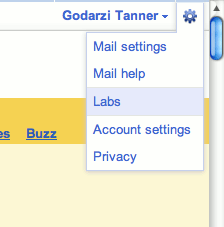
Sending text messages from Google Chat is easy to enable but hidden in Google’s experimental feature base called Labs. To add text messaging capability to your account, log in and select the gear icon located in the top right of the window. From the drop down choose “Labs” and you’ll be taken to Beta and other experimental features available for Gmail.
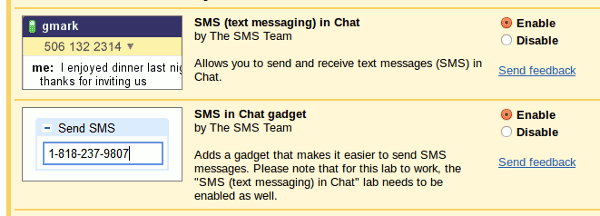
The selections you need to enable are listed as “SMS (text messaging) in Chat” and “SMS in Chat gadget.” Both of these features must be enabled to send, receive and display text messages when logged in to Gmail through the web interface.
Sending Text Messages In Gchat
Before you can start sending text messages from Gmail, you need to build a list of contacts that include names and numbers. If you use some sort of contact sync tool such as Address Book in OS X or Android’s native contact tool, you should already have names, numbers and emails attached to your contacts. If not, click Contacts in the top left navigation bar and add the appropriate information.
To send a text start typing the name or number of a contact and a menu bar should pop up with their number and an option to send a SMS. A normal chat window will appear but will send text messages (or an IM if they sign on with Google Chat) to their phone. Incoming messages will show up in this same window and act as a typical chat conversation.
However, there are some downsides to using Gmail for sending text messages. While the service itself is free, you are initially limited to 50 messages but gain 5 more when you receive a new message. If you manage to finish your quota of available text messages, your count will be increased to one in 24 hours.
A quick and dirty trick to get additional messages
If you feel that 50 messages are insufficient for your usage, a quick and dirty way is to send an SMS to your own phone, and then reply to that message multiple times. Since each time you receive a SMS in Gchat, your quote increases by 5, by replying the message from your mobile time (say 10 times), you are effectively doubling your message count. This will work for those who have free SMS usage on their mobile phone.