


When you want to find something on a web page, you can search for it. However, finding something specific on a long web page can be unnecessarily frustrating. The good news is that you can easily execute a few quick functions and find what you are looking for in no time. Learn how you can search for a word on a web page on various browsers.
Google Chrome
Searching a web page on the Google Chrome browser is done by pressing Ctrl + F. This keyboard shortcut is the gold standard for all browsers. The following method also applies for most Chromium-based browsers, like Microsoft Edge and Opera.

1. Press Ctrl + F on your keyboard. A search box appears in the upper-right corner.
2. Enter your search term or terms and press Enter. Your search executes and shows you where the word you are searching for is located.
3. The first location is highlighted in orange. The next locations of your search term are highlighted in yellow. They can also be identified by orange hash marks on the scroll bar on the right side of the browser.
Alternatively, you can also go to the menu bar and select “Find.” This method will also result in the search box popping up in the upper-right corner.
Safari
Unsurprisingly, Safari uses the very same keyboard shortcut.

1. Enter Command + F on the keyboard. A search bar appears in the upper-right corner of the window. Enter your search term here.
2. You can now go directly to the first instance of your search term which is highlighted in yellow. Unlike Chrome, all of Safari’s search results come back highlighted in yellow. You can quickly jump from result to result inside the search bar by using the forward or backward arrows.
Firefox
Firefox offers a variety of options for search in general and for how search results are shown. For a general search, you follow similar steps to its competitors.

1. Press Ctrl + F on Firefox. It opens up the search bar at the bottom left of the website you are browsing.
2. You can search for your chosen word and Firefox will highlight the selected terms in green throughout the page.
3. Firefox also enables you to perform your search as case sensitive. In other words, you can capitalize any letter and Firefox will only search for the word with the capitalized letter.
4. Finally, Firefox also enables you to search with “Match Diacritics.” This allows you to locate a word that includes an accent or cedilla, which may hint at a different pronunciation.
Firefox Tips
Additionally, Firefox adds three more specific search options if you want to narrow your search results.
1. To do a quick find without all of the extra search functions, press the / key to open up the Quick Find bar. This appears in the bottom-left side of the browser and is useful for fast searches. It automatically disappears if not used.

2. If you want to find a word specifically in a URL that may be listed on a web page, press the single quote ‘ key to bring up the Quick Find (links only) bar at the bottom-left of the screen.

3. Lastly, Firefox adds one of the most useful functions by enabling “Search for text when I start typing” as a setting in its Preferences menu. To enable this option:
3.1. Go to Preferences from the menu bar.
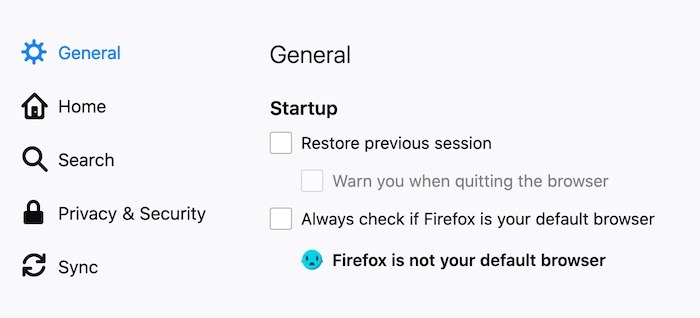
3.2. At the General menu option, scroll down to locate the “Browsing” menu set. Inside that set, click on the box to enable “Search for text when you start typing.”
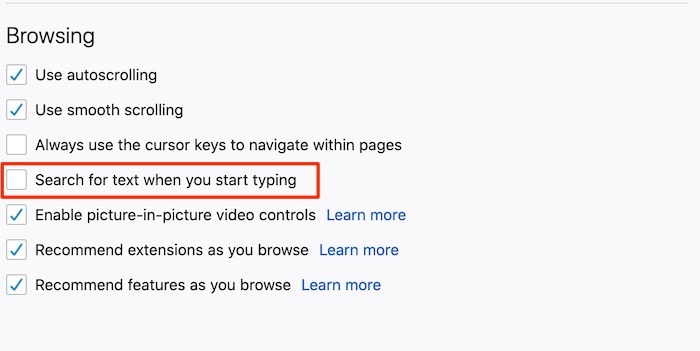
3.3. When enabled, this will immediately start showing search results as soon as you type the first letter. For example, when you type the letter “R,” every word on the webpage that includes the letter R will be highlighted.

Tips and Tricks
While each of the above-mentioned methods works well, there is another trick in case you don’t know on which specific page the word you are looking for is located. You can easily find what you need with a quick Google search.
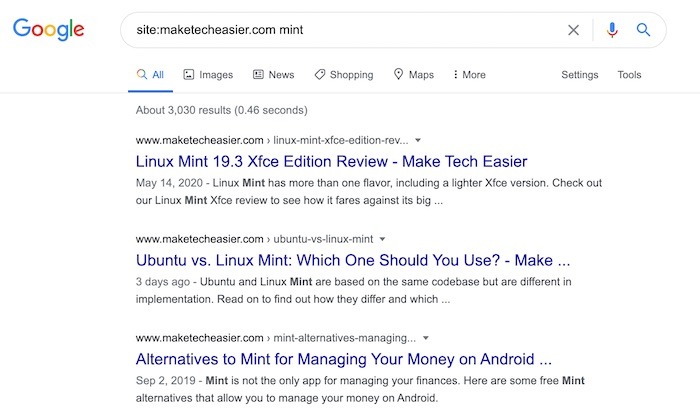
1. Go to Google.com or place your cursor in your browser of choice’s omnibar.
2. To search for “Mint” on www.maketecheasier.com, enter this text: site:maketecheasier.com mint and hit Enter.
3. Search results now pop up in the same way as Google’s general search results. You can help narrow the results by enclosing the word in quotation marks so Google looks for that exact word.
Conclusion
While Firefox is easily the leader in the number of options, ultimately, all of the major browsers enable a similar, if not the exact same, method for searching for a word. Non-mainstream browsers like Brave and Vivaldi also offer the same search option, making word search nearly a universal option for anyone browsing the web.