

The solid state drive has given us a leap forward in the ability to open applications and read files quickly. Its storage mechanism operates under the same principles that other flash storage mediums use, namely non-volatile memory, which prevents memory from disappearing due to loss of power like it does in RAM. Since both SD cards and SSDs use solid-state storage and have no moving parts, is there any notable difference between the two types of memory? Shouldn’t a massive-capacity SD card be just about the same thing as a small SSD?
Also read: SSD vs. HDD vs. USB Flash Drive: Everything You Need to Know
Explaining NAND Flash
Almost all the memory you use stored on a chip other than the RAM on your computer uses a technology known as NAND flash.
NAND flash memory depends on other hardware installed on the device or embedded into the chips. A NAND cell is a series of semiconductors that hold data inside them. The speed at which these cells read and write information is almost entirely contingent on how they are arranged and how the controllers that pick up and send the data coordinate the process.
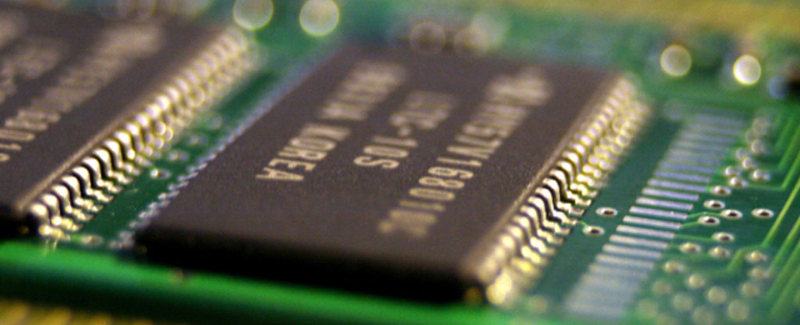
Additionally, although there are different types of NAND flash memory, each with its own disadvantages and advantages, you could theoretically move NAND transistors from an SSD (such as the 3D TLC NAND found in the Samsung SSD 850 EVO) into an SD card. For the SD format to work it just needs to be capable of communicating with the devices that read it.
This is important because differences in NAND flash almost entirely depend on how they are grouped into cells:
- Single-layer cell (SLC) – stores one bit per cell. This is by far the most expensive option. In normal consumer products, it’s only used for caching on SSDs and some high-end SD cards (though some SSDs like NVMe drives tend to use RAM chips for cache). Each block can be written to 100,000 times, making it the most durable option.
- Multi-level cell (MLC) – stores two or more bits, but most often stores two bits. This type of storage grouping is not common but is significantly cheaper than SLC technology. Blocks can be written to 40,000 times on average.
- Triple-level cell (TLC) – is a cell that stores three bits. This is actually the most common type of cell found on SSDs. Although block endurance is significantly lower than in the other variants described above (3,000 write cycles on average), it’s more than enough for typical home use.
- Quad-level cell (QLC) – stores four bits, as you may have guessed. Some high-capacity drives opt for this as it offers much cheaper storage for archiving, but the block endurance rating of 1,000 write cycles can be punishing on computers using the drive for caching or swap/page file.
SD Express Cards vs. SSDs
Theoretically, you could end up with an SD card that writes and reads just as fast as an SSD. Most of the time an average card available on the market will not be that fast. However, some manufacturers are putting chips on the table with a new technology known as SD Express, which includes a scaled-down version of an NVMe SSD controller that can surpass conventional SSD speeds!
Also read: Buying an SSD: What to Look For
Though impressive, it still can’t serve as a swappable replacement for SSDs for one simple reason: the space provided still doesn’t afford manufacturers the ability to create large, fast caches. Even if this was possible, you’d have to deal with the heat such a cache would generate. With the transistor density required, an SD card with a full-fledged and shrunk-down SSD controller and cache would output heat that it wouldn’t be able to dissipate in its plastic casing.
In theory, yes, these new SD Express cards have amazing transfer speeds that rival the modern NVMe drives that computer enthusiasts like myself salivate over. However, in practice, non-sequential read/write operations will still be lacking in speed because of the limited cache space.
Put simply, SD Express serves a valuable function as a platform for extremely high-definition video and audio recording, which is an activity that requires as much sequential read/write speed as possible. But it still wouldn’t be entirely accurate to compare SD Express cards to SSDs.
Also read: How to Mount an SD Card on Your Android Device
Let’s Focus on the Differences a Bit
Since SD cards have a limited amount of space, the microcontroller that fetches storage and writes to it is usually pushed to the edge of the card, like the following image.
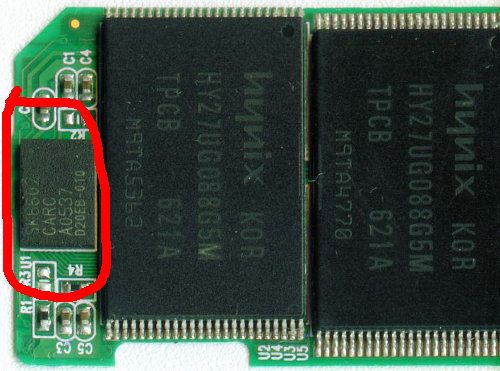
There are only so many instructions that could be programmed into a microcontroller of that size, and with such a tiny infrastructure, the way an SD card handles data is rather rudimentary. It will have a tendency to store data wherever there is free space and read things in as orderly a manner as possible.
This isn’t true of SSDs, which have the luxury of fitting all of their memory and their entire infrastructure into a space that fits into the average computer’s drive bay. The controller is highlighted in the image below.
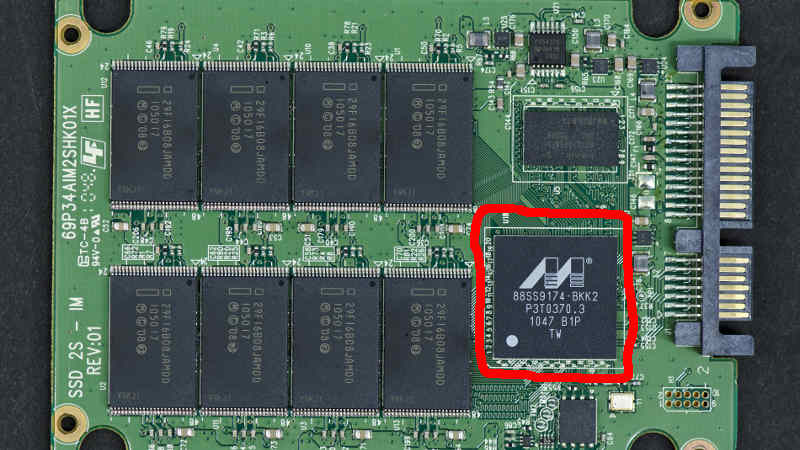
Even in NVMe drives, which are much smaller and boast some impressive read/write speeds on the whole, the amount of space afforded to the controller is roughly about the same as an SSD, with manufacturers choosing instead to use more expensive storage chips that have higher transistor density to save space.
The entire infrastructure of the SSD is built to ensure that no single cell is used more than the others, keeping every file operation as balanced as possible. This is exactly what you’d expect from a drive that does a lot of read/write operations on a platform where the lifespan of each cell is limited by how many times you write to it.
Also read: DRAM or DRAM-less SSD? What’s the Difference?
The larger amount of space also allows manufacturers to insert chips that store cached data, which is crucial for managing heavy and repetitive operations quickly. No time is wasted and everything transfers fluidly.
In addition to this, the added bulk of the drive allows it to dissipate more heat. This makes it capable of having more power-hungry controllers that would be unfeasible in an SD format (because it both draws more power than small handheld devices could provide and heats up significantly).
Overall, each platform was designed to work in specific environments. SD cards are best used for storing files and playing them back, while SSDs are optimized for running the operating system partition of a computer. One has a simpler role while the other needs to be smarter and more adaptable. It’s not just a question of speed here but also one about workflow and versatility.
Also read: 13 Things You Must Do When Running an SSD in Windows
Frequently Asked Questions
1. What does “N-bit MLC” mean?
Since multi-level cell (MLC) means “two or more bits per cell,” some companies will not use TLC or QLC terms to describe their drives. If you’re looking at an SSD’s specs and it says something like “3-bit MLC,” that just means it’s a triple-level cell (TLC) drive.
2. Why is cache so important?
When data is written to your SSD, the controller has to find a location to write it to. Because of wear-leveling and other technologies that help balance the drive, it may have to “think” for a while before it settles on a spot where it can put your new data. If you’re doing this heavily on a regular basis, this “thinking” period will be noticeable unless the drive has somewhere to put the backlog. Cache acts as a temporary container for this backlog.
Also read: Free Tools to Check SD Card Speed and Capacity
3. What are speed classes for on SD cards?
Speed class on an SD card is used to determine what kind of video you can record live directly to storage. A class 2 card can record compressed video while class 10 can do full HD (1920×1080 resolution).
Image credit: © Johann H. Addicks / GFDL1.2 (via Wikimedia Commons)