


When you’re hard at work, it’s very easy to forget to take a look at that website you saved. You set reminders, but you get distracted by something, and you end up forgetting again. If you keep this up, you’re never going to get the job done. But don’t worry, there’s still hope.
A tool that is going to help you remember to see that tab is a Chrome extension called Open Me Later! For the Chrome extension to work, you need to be using the browser. The extension won’t automatically launch the browser. Let’s just hope they add that feature soon.
Program a Tab to Open Automatically
Once you’ve installed the Chrome extension, open the page that you want to open later. Click on the Chrome extension, and decide how you’re going to set this up. For example, to the left you’ll see a calendar; click on the day you want the site to open.
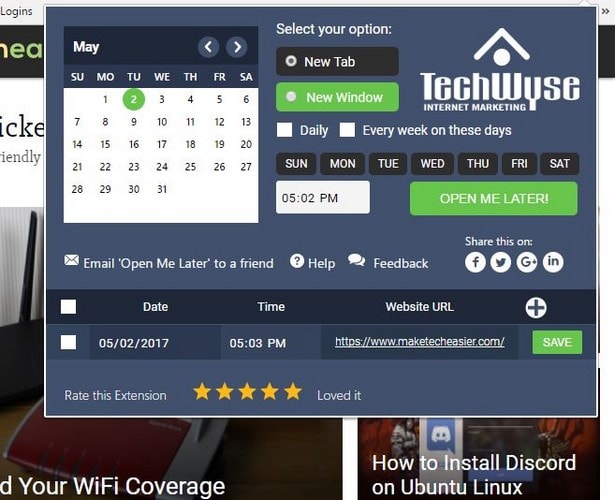
If this is a tab you want to see every day, then you can just check the “Daily” box. Setting the time is also an easy task. Just click on the hour, and then use the arrow keys to your right to set the hour.
Repeat the same steps for the minutes, and once you’re done, hit the “Open Me Later” button to save your changes. To the right of the Daily box, there’s also an option to open the tab every week followed by the days of the week below.
How to Change Your Setup
Let’s say you set up the app to open at a particular time and day, but you changed your mind and now need to make some adjustments. Not a problem.
All you have to do is click on the Chrome extension option that looks like a clock. At the bottom of the pop-up window is all the sites you have set up to open at a particular time.
Place the mouse cursor over the site you want to make changes to. You’ll automatically see the arrow keys appear. Just click either up or down, and when you’re done click on the green “Save” button to your right. You’ll then see a pop-up window confirming that your change has been saved.
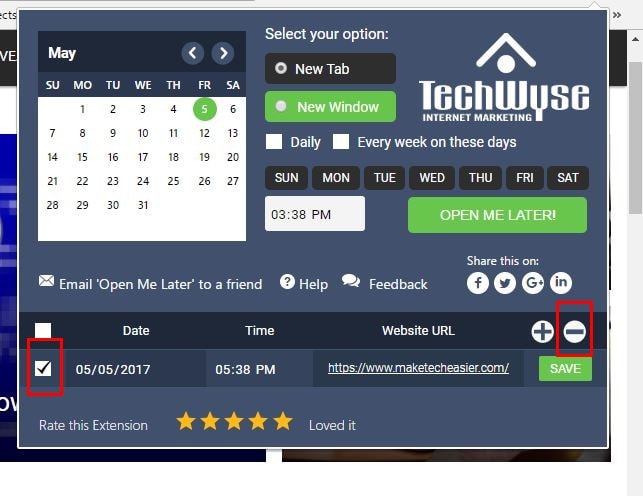
If you ever want to erase a tab you’v set up, click on the Chrome extension, then click on the box to the left of the date. Right above the green Save button, you’ll see a plus and minus sign. Click on the minus sign, and confirm your choice in the pop-up window that will instantly appear.
Conclusion
Thanks to this Chrome extension you don’t have to depend on those reminders that usually never work. The site will automatically open, so you can finally cross that site off your to-do list. It’s also beginner-friendly and works every time. Do you think you’ll give the Chrome extension a try? Drop a comment below and let us know.