

One of the hardest things about a meeting is the scheduling. I know when it is time to schedule a board meeting, I run into all kinds of schedule conflicts. To make things even harder, people use different email clients and smart phones. This makes it harder to send meeting requests by email.
Tungle.me helps relieve the pains associated with scheduling a group meeting by gathering the best common times for all of the invitees.
Getting started
After you enter in the username, email address and password you want to use, there is a setup wizard you will need to run through to get you going. Alternatively, you can sign in with other IDs such as Facebook, Linkedin, and your Google account.
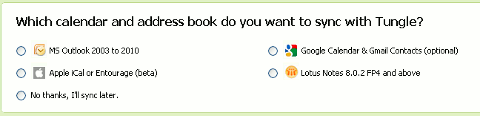
In the setup process, you are given chances to sync with different sources: Gmail, Outlook, iCal and Lotus Notes can be synced.
How Tungle works
Once you have made your way through the wizard, it is time to schedule some face time. Scheduling a meeting is simple, even if you did not sync your calendar. Start by clicking on the purple button at the top.

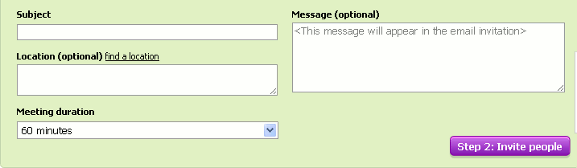
Fill in your basic meeting information; name, location, length of the meeting and any message you want to send along with the invite.
Once you have all of the basics set, its time to invite some people. If you have imported any contacts, this step is a little easier. If not, just type the name of the contact or copy and paste the email addresses into the box.
When you have the invitees added to the mailing list, you will need to suggest some times.
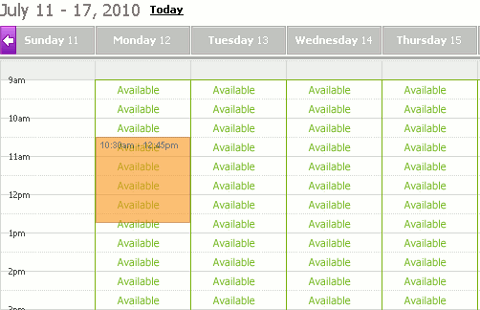
This is the part where importing your calendar is handy. Your other appointments will be blocked off in the calendar. You can however show suggest times when you are not available; be careful not to show yourself being available when you aren’t.
At this point, everything is ready to go, you can click the button to send the invites. The people you are attending will receive an email with a link specific to your meeting.
In the email there is a link for them to choose times that work for them. One thing I like is, just after the link, Tungle reassures the invitee they do not need to sign in or download anything. This will help get a better response to the email.
Tungle Blackberry app
I like they have a free Blackberry app (there is also an iPhone app [iTunes link]) available. I played a little with it and it is super nice. It is remarkably similar to using the site. Plus your calendar and contacts are shown when creating and meeting request.
Extras
Tungle offers several other ways to integrate their service into your digital life:
- download add-ons for iCal, Outlook or Lotus Notes
- add Tungle to your Wisestamp signature
- add a widget to your webpage or blog
Conclusion
I have tried out a few scheduling applications recently. I have to say, Tungle take the majority of what is great about the other applications and adds to it. For those of you who are still addicted to your Blackberry, this is a fantastic way to productively schedule meetings while on the go.
How do you productively arrange meeting times with multiple people?