

I am sure that you have backed up confidential data in your computer, but if you are running your business on WordPress, did you remember to back up your files and database as well?
BackWPup is a powerful WordPress plugin that allows you to schedule regular backup of your WordPress site to online storage site like Dropbox and SugarSync.
Installation
1. In your WordPress Dashboard, go to “Plugins -> Add New”. Search for “BackWPup” (without the quotes) and install the first result that comes up.
Alternatively, you can download the package, unpack it and upload the “backwpup” folder to your site’s wp-content/plugins folder.
2. Activate the plugin from the Plugins page. Once activated, a BackWPup option should appear on the left menu bar in your WP dashboard.
Usage
1. Navigate to “BackWPup -> Jobs” and click “Add New”.
2. Type in the Job name. I have chosen “Dropbox” as the job name in this tutorial.
3. Scroll down and find the “Backup to Dropbox” tab. Open a new tab in your browser and login to your Dropbox account. Return to the previous tab and click on the “Authenticate” button. BackWPup will now request an API access authorization. Grant it permission. You should now return to the BackWPup plugin settings page with a “Dropbox authentication complete!” message.
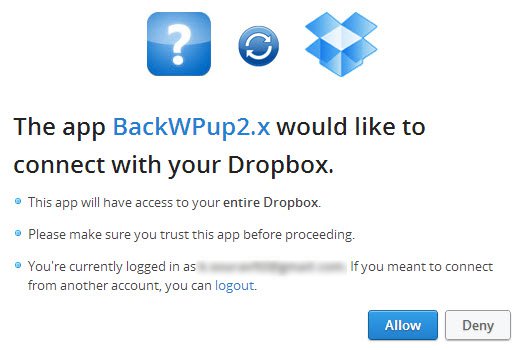
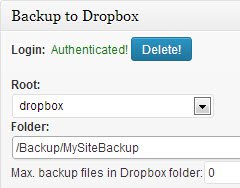
4. Scroll down to the “Backup to Dropbox” tab and enter the Dropbox directory under which the file is to be uploaded. If left blank, the file will be uploaded to the root directory, i.e. directly under the Dropbox folder. I have used “/Backup/MySiteBackup/” in this tutorial.
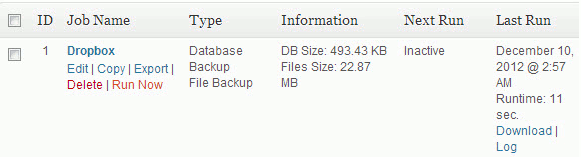
5. Scroll to the top and click on the “Save Changes” button under the Job Type tab. You’ll find that a new job called “Dropbox” is create under the Jobs page. Click on “Run Now”. This will be the first backup that you take of your site. Once completed, you should find the file in your Dropbox.
How to schedule automatic backups?
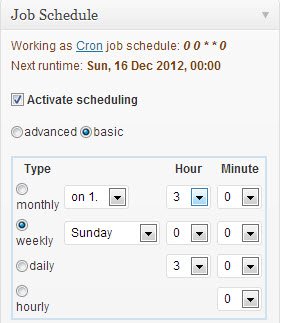
Under the “Job Schedule” tab on the right corner, select your type of scheduling. I recommend weekly for a site with medium traffic. The frequency of the backups should depend on the site’s traffic and the amount of new data incurred daily. Check the “Activate Scheduling” option and select the day of the week and the hour/minutes for the backup to run. Lastly, click “Save Changes”.
Some Tips
- Given that Dropbox gives you only 2 GB of free space, it’s better that you use the Tar GZip file format as it guarantees maximum compression and saves both space and bandwidth!
- If you’re looking for a free storage solution, then you might want to consider SugarSync as it gives you 5 GB of free storage compared to Dropbox’s 2 GB.
- The backing up process consumes considerable amount of CPU and RAM. Do not schedule an Hourly Backup unless absolutely necessary – especially on a shared hosting platform. Chances are they might suspend your account on grounds of resource abuse.
What other methods do you use to backup your WordPress site?
Image Credit: iStockPhoto