

Are you someone who can’t live without some type of ad blocking extension for your Web browser? Have you ever thought about simply replacing those ads with cool widgets, instead of completely hiding them? If you haven’t thought of it, maybe Adlesse will change your mind.
Adlesse is one of the coolest browser extensions I’ve come across in awhile. It’s available for Firefox, Chrome, Internet Explorer, Safari, and Opera. Adlesse gets rid of many annoying ads (text, image, animated) and replaces them with identical-sized widgets.
There are different types of widgets that you can enable: weather, local news, latest tweets, famous quotations, did you know, interesting links, Facebook, and calendar.
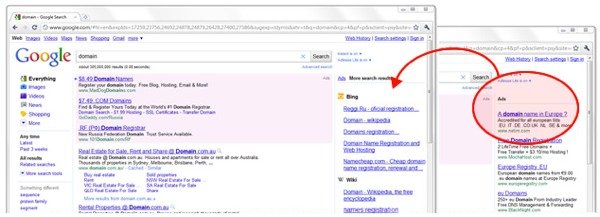
On Google.com, Adlesse will show you additional search results from Bing, Wikipedia, and Twitter. On Facebook, Adlesse will turn your Facebook ads into a functional mini Twitter client.
If you’re ready to start enriching your Web browsing experience, here we go.
Getting Started
1. Install Adlesse on your browser of choice.
Note: I’ve successfully used Adlesse in Opera and Chrome (both on Mac). For this tutorial I’ll be using Google Chrome.
2. Once you’ve installed the extension, you’ll automatically be taken to the Adlesse setup wizard. First you’ll be able to customize how often each type of widget is displayed. For each widget, you can choose to show it: often, sometimes, rarely, or never.
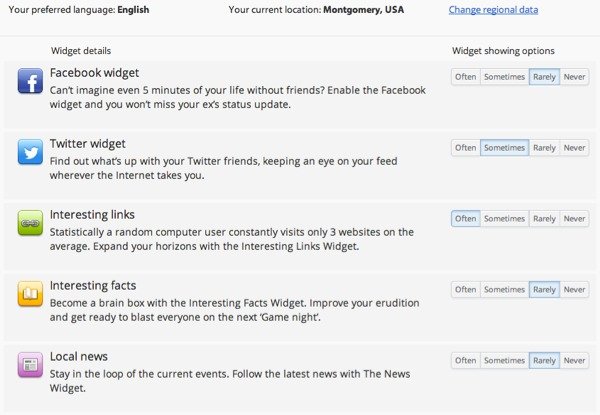
Don’t forget to set your current location so that Adlesse can display relevant news and local weather forecasts.
3. Next, you’ll need to authorize Facebook and/or Twitter (via AOauth) so that you can receive feed updates via Adlesse.
4. After that, installation will be completed. If you need to change your settings at any time, you can just visit the settings page.
Adlesse in Action
Now you can go to any Web page with ads on it to see Adlesse in action such as: a blog, Google, Facebook, or any other type of website.
Here is an example of Adlesse working on Make Tech Easier, where a Google AdSense block has been placed. Each widget shows at random, and you’ll often see 2-3 on the same page (if there are numerous ad units). How often a widget shows up is totally up to you, since you get to customize that in settings (as mentioned above).
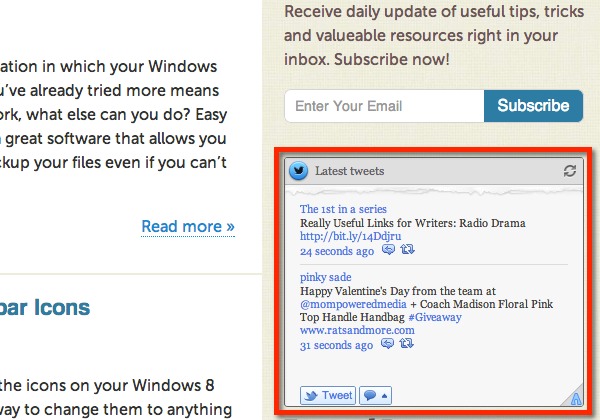
As you can see, Adlesse’s widgets are interactive. For instance, with the Twitter and Facebook widgets you can click on items to go directly to them; you can even retweet and reply to tweets.
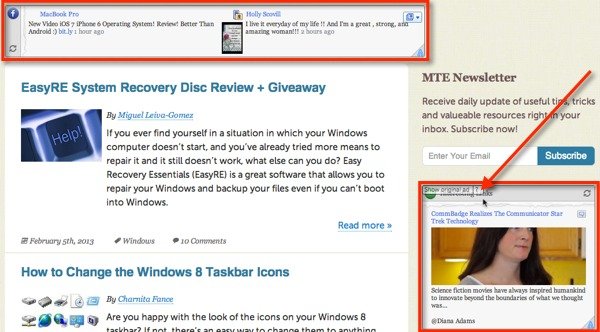
You can also refresh the widgets manually and even choose to show the original ad. To do this, just scroll your mouse over the widget and you’ll see the option to switch to the original ad, at the top left corner of the widget.
A Few Things to Consider
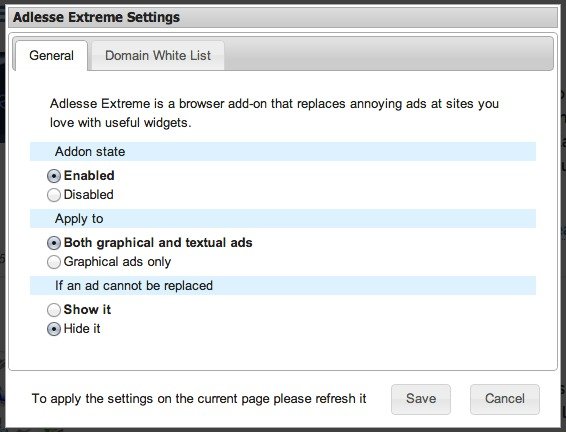
1. I have noticed that Adlesse does not work on all ad units. I’ve yet to figure out how it chooses the units to replace, but if you are using the Adlesse Extreme beta version, there is an option to hide ads that can’t be replaced. To do this in Chrome, click on the Adlesse icon in the address bar, go to settings, and then choose the “hide it” option (under “if an ad cannot be replaced” section).
2. I could not get Adlesse to work on Google or Facebook (as started on their website), but it could be because both of these sites have changed tremendously in the past year. On the Adlesse website, you’ll see screenshots of Adlesse working on the older versions of Google and Facebook. Hopefully, an update is in the works for the near future.
3. You can disable Adlesse on the domains that you choose. Just click on the icon in the address bar (at least this is how it works on Chrome), and then choose the “disable for this domain” option.
Final Thoughts
For the most part, Adlesse will have you looking forward to ads units. You never know what you’re going to see in their place, but you can rest assure that you’ll see something useful and worth looking at.
Side note: Make Tech Easier is able to sustain itself and come up with plenty of great content mainly because of the ad revenue. So before you proceed to block off all the ads on your favorite website, think how you can support the writers/developers/site owners by allowing the ads and show your appreciation.