


Large, uncompressed images can slow down a WordPress website. One way to avoid this is to set restrictions on the maximum image upload size so that users are encouraged to compress and resize images before uploading. There are several ways to reduce the maximum image upload size, and the easiest of them is with the help of a plugin.
There are a few plugins for the purpose. Some of them haven’t been updated in a while, so it’s not certain if they are working properly with the latest WordPress versions. Because of this I don’t usually recommend them. Unfortunately, WP Image Size Limit is the only plugin I managed to find that limits the file size of the image files you want to upload.
The next best thing are plugins that limit the dimensions of images. Unlike with file sizes, the choice here is rich. However, you need to install and use only one plugin – if you run two plugins simultaneously, this can cause conflicts. For the purposes of this tutorial I chose to use Max Image Size Control.
Install and Activate Max Image Size Control
As with any other WordPress plugin, before you can use it you need to install and activate it. To do this, in your admin interface go to “Plugins -> Add New.” In the search box enter the name of the plugin, and when it shows in the list, click Install. Then click Activate. Now go to “Settings -> Max Image Size Control,” and open the configuration page for the plugin.
Set the Desired Restrictions
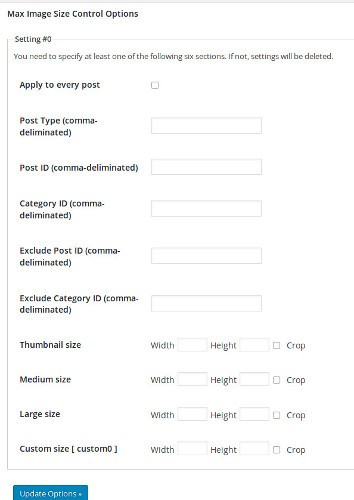
When you are inside the configuration page for the plugin, you can set the desired limits. As you see, the plugin gives a lot of flexibility – you can choose whether to apply image size restrictions to every single post or only to specific posts/categories. This makes sense because sometimes you really need the image in whole, in its glory, and if you restrict image sizes everywhere, your hands are tied.
Next set the thumbnail, medium, and large sizes. You can also set a custom size.
All image sizes have the option to automatically crop the images to the desired size. While this is handy, I don’t recommend it. When images are autocropped, you don’t have much control over what’s left and what’s cropped. You’d better do the cropping manually in a graphics image editor such as GIMP so that you can see the result before you upload it to WordPress.
Rescale Images with Imsanity
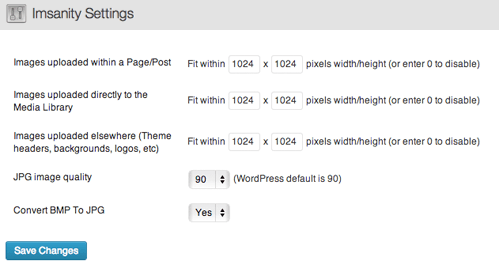
If you are not happy with Max Image Size Control, you can check other plugins. For instance, Imsanity does a similar job, but instead of cropping files, it scales them. This means everything in the image remains, only its sizes are proportionally scaled down. The plugin doesn’t allow you to set different rules for individual posts or categories, though, which is kind of limiting.
There are other approaches to setting max image sizes, too. You can set the image size restrictions in the configuration files for your site or (sometimes) in the theme itself, but you’d better stick with the plugin approach. Mess with the configuration files as a last resort only, because if you make a mistake there, you might render your whole WordPress site worthless for a while. The plugin approach might not be that flexible, but it’s the much safer way to restrict the maximum image upload size in WordPress.