

Have you ever been asked how to do something tech-related by a friend or family member but realized that the process requires quite a few steps they may have trouble following? With Screencastify (a Chrome extension) you can record everything that goes on your screen.
Many other programs can also record what happens on your screen, some more complete and straightforward than others. Screencastify stands out because of its simplicity, and it is completely free to install and use.
Once you have installed the extension, you will see its icon in the upper right-hand corner of the browser, and if you click on it, a menu with all its options will drop down. You will be able to record what goes on in a tab, but you also have the option of recording directly from your webcam.
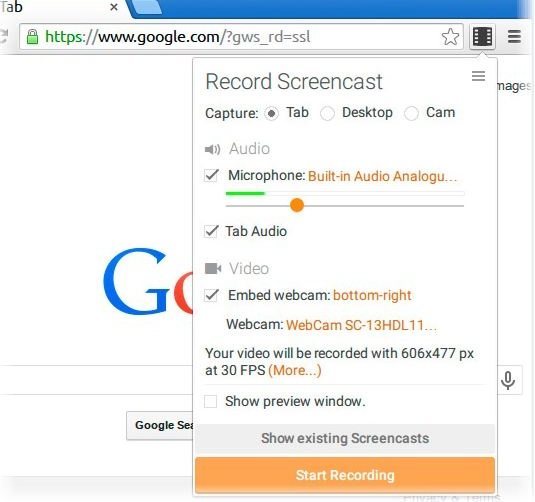
With Screencastify, you can also record and adjust the audio, a perfect combination if you want to explain what you are doing. You can also use some useful tools that will appear on the side that will allow you to highlight with colors and arrows whatever it is you want to emphasize. Apparently, this only seems to work if you are recording a tab.
Screencastify does have its limitations since it only allows you to record a ten-minute video, and you have to deal with the company’s watermark, but that can be eliminated by upgrading your account. If you want to see your recordings, you only need to click on the hamburger icon on the upper left-hand side of the menu, and if you wish to turn the audio recording feature off, you only need to unclick that option.
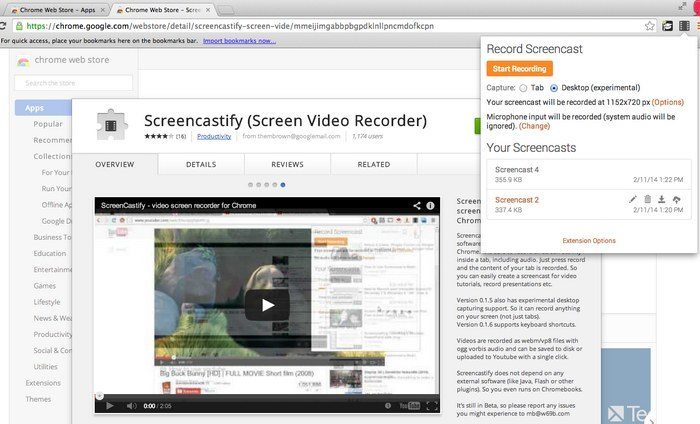
In Screencastify options, you can also decide where you want your recordings to be saved. You can either choose to have your videos saved onto Google Drive or locally. In options you can also set things up so you will receive notifications when recording a background tab, showing video editing progress, and showing Drive upload progress.
You can also set Screencastify up so it will open recorded videos automatically so you can either watch them or share them either on YouTube or Google Drive. You also share your video by copying the link and pasting it somewhere where the other person can copy it and go to the URL. Remember (when sharing) to set the privacy settings you want your video to have, whether you want it to be public, unlisted or private. If your video needs some trimming, you can count on that feature as well, but only if you upgrade your account.
Screencastify gives you the option of downloading your videos so you can watch them offline. Unfortunately, Screencastify does not allow you to records a particular part of our screen, but if that is a must-have feature for you, you can always try Screencast-O-Matic.
Your Chrome browser needs to be up to date for this extension to work, so you should have Chrome version 32 or higher. The video you make on Screencastify is exported in .webm format, so if this format is of no use to you, you will obviously need a video format converter.
Conclusion
Screencastify is an excellent tool for creating tutorials for students, family, and friends. With this free Chrome extension, not a single step will be missed or misunderstood. If you found this useful, don’t forget to give it a share and let me know your thoughts on the screen recorder in the comments.